Contents
Projects
MANAGED INFO open_in_new
- Pricing
-
Support
- The network connectivity card
- Quick start
- The device identifiers card
- Requirements for use
- Supported configurations
- Use cases
- Customise the experience
- Request a new feature
- Managed configuration JSON payload
- Troubleshooting issues
- Using admin override configuration in kiosk mode
- Kiosk vs launcher mode
- Deploy APK packages
- Deploy certificates
- Deploy device wallpapers
- Layout card builder
- App actions
- Release notes
MANAGED SETTINGS open_in_new
PACKAGE SEARCH open_in_new
MANAGED ARCHIVER open_in_new
KIOSK APP GENERATOR open_in_new
WEB APP GENERATOR open_in_new
CONTACTS APP GENERATOR open_in_new
Customise the MANAGED SETTINGS experience
Contents
To set customisation options, your organisation must be licensed. If you do not have a valid licence, please contact project-support@bayton.org to obtain one. Pricing is defined on the project page.
Available customisations
#MANAGED SETTINGS offers the following customisations:
- In-app title icon - Upcoming
- The option to customise the in-app title icon, defaulted to the MANAGED SETTINGS icon, but will use the generic icon if the respective configuration below is set.
- App title - 1.0.0.0
- The option to replace the default app title of Settings with another.
- Hide BAYTON branding - 1.0.0.0
- The option to hide the majority of BAYTON branding. A small co-branded icon will remain in the footer area of the application settings page. Contact me if you require full whitelabelling.
- Generic icon - 1.0.0.0
- The option to swap from the default MANAGED SETTINGS app icon to that of a generic settings app icon as shown on the home screen or app launcher. MANAGED SETTINGS will close if open when this configuration applies.
In future
#- Theme
- This will allow selection of a colour scheme to match an organisation's brand. It includes Background colour, Card colour, Text colour, and Accent colour.
If you'd like to see more customisation options, or general features, raise a feature request or discuss your requirements on the MANAGED SETTINGS Discord channel.
Enter your organisation ID
#In order to unlock customisations, input the licensed organisation ID of your Android Enterprise bind. You can find this in two ways:
- Head to Google Play admin settings and log in with the account you used for your bind
- Open the managed Google Play iFrame within your EMM, and click the settings icon in the top right of the iFrame
If you've set up your organisation with the new customer signup (BTE) flow, you may also locate your Android Enterprise bind organisation ID through Third-party Integrations in the Google Workspace/Cloud identity admin console.
Customise available settings
#With a valid organisation ID set, you may continue to configure all customisation options in addition to the standard, unlicensed & freely available settings intents.
Custom theme
#Custom theme is planned for an upcoming release.
For all theme-based customisations, you must specify a colour in HEX code format. Color Kit offers a decent tool for colour selection if you require guidance.
HEX code examples -
- #000000 - black
- #FFFFFF - white
- #FF4500 - orange-red
Submitting these colours via project-support@bayton.org along with your chosen theme name (non-identifiable preferred) will allow for a custom theme to be implemented in an app update, and the provided string can be entered into the theme input to apply. Options for dynamic theming are under review, rendering an app update unnecessary in future.
Customising the in-app title icon
#Title icon is expected in release 1.0.1.0.
The in-app title icon supports any PNG, JPG, or SVG file in the recommended dimensions of 128x128px.
The file must be reachable from the application, as it will fetch and cache it. A valid URL must be used to where the image is hosted, file uploads are not supported.
MANAGED SETTINGS will attempt to accommodate any file it is offered, however if using dimensions different to the recommended 128x128px in any aspect ratio other than 1:1 (square) the resulting image may not look particularly good. If using a file format other than specified, it won't work at all.
MANAGED SETTINGS will attempt to load and cache the requested image from a remote URL. If the file is unreachable the app will fall back to a generic settings icon.
Likewise, if the image file is considerable in size, it may delay loading or time out entirely, leading to a fall back to the generic icon.
Customising the app title
#The in-app title offers a standard alphanumeric input to allow organisations to use their own company name or custom title. Do consider the length of the title being input, as more than ~20 characters may cause a line break, and look unsightly.
Adding a custom intent
#MANAGED SETTINGS 1.0.3.0 and later support organisation actions for apps, broadcasts, services, and Android settings through managed configuration. These actions do not require a licensed organisation ID.
See Configure custom intents for the fields, supported extra types, examples, and device behaviour.
Customised example
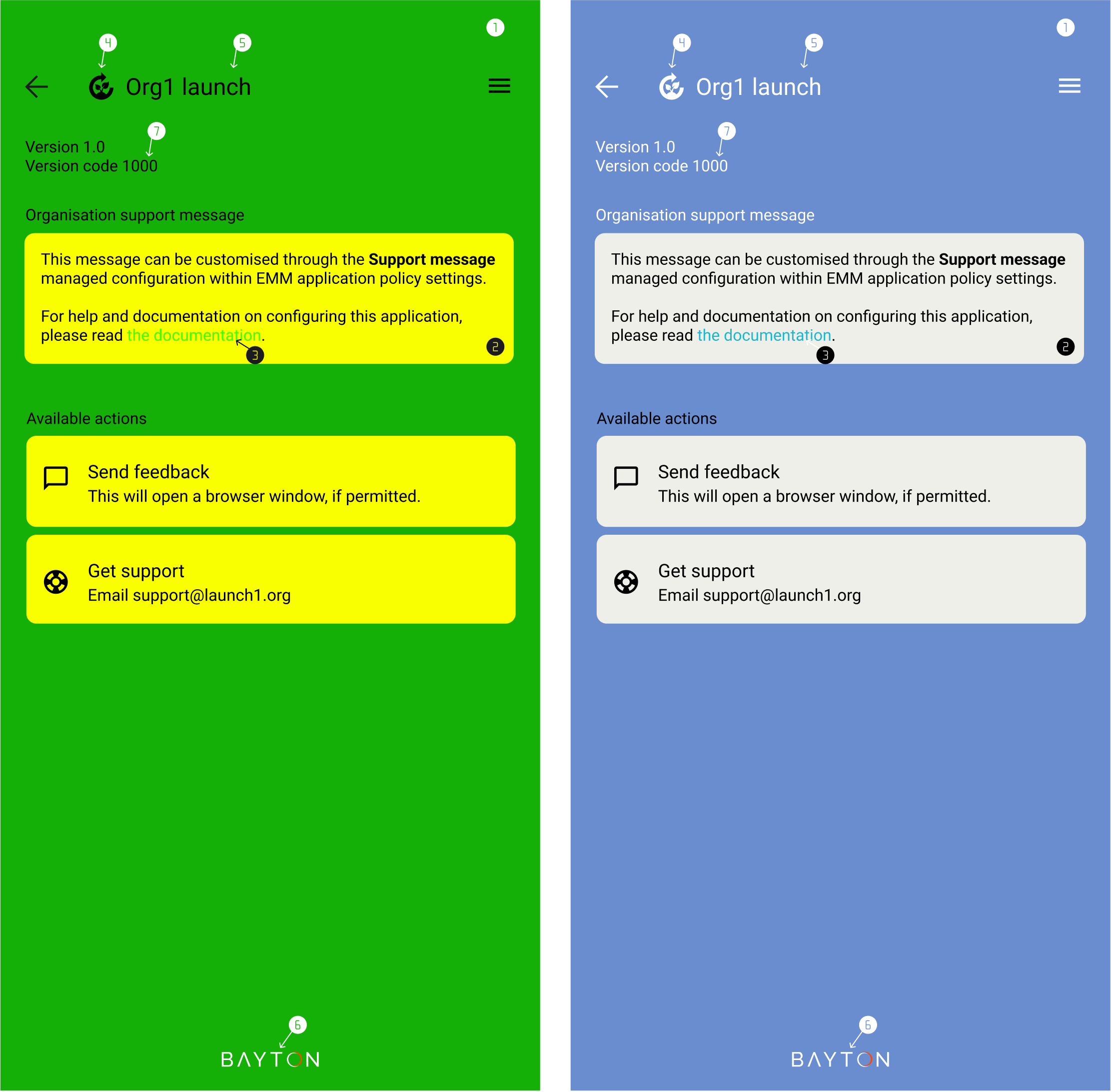
#The following are examples of a customised interface. I call these lemon & lime and sky - they're not available in the app, just examples.
Legend
- Background colour
- Card colour
- Accent colour
- Title icon
- Title
- BAYTON branding
- Text colour
Are you in need of further help, or would you like to raise a feature request? You can:
- Submit feedback
- Raise a feature request on GitHub
- Join the BAYTON Discord
- Tag me on LinkedIn
Projects
MANAGED INFO open_in_new
- Pricing
-
Support
- The network connectivity card
- Quick start
- The device identifiers card
- Requirements for use
- Supported configurations
- Use cases
- Customise the experience
- Request a new feature
- Managed configuration JSON payload
- Troubleshooting issues
- Using admin override configuration in kiosk mode
- Kiosk vs launcher mode
- Deploy APK packages
- Deploy certificates
- Deploy device wallpapers
- Layout card builder
- App actions
- Release notes