Contents
Articles
2026
2025
- Google Play Protect is now the custom DPC gatekeeper, and everyone is a threat by default
- 12 deliveries of AE-mas (What shipped in Android Enterprise in 2025)
- The 12 AE requests of Christmas (2025 Edition)
- RCS Archival and you: clearing up the misconceptions
- Device Trust from Android Enterprise: What it is and how it works (hands-on)
- Android developer verification: what this means for consumers and enterprise
- AMAPI finally supports direct APK installation, this is how it works
- The Android Management API doesn't support pulling managed properties (config) from app tracks. Here's how to work around it
- Hands-on with CVE-2025-22442, a work profile sideloading vulnerability affecting most Android devices today
- AAB support for private apps in the managed Google Play iFrame is coming, take a first look here
- What's new (so far) for enterprise in Android 16
2024
- Android 15: What's new for enterprise?
- How Goto's acquisition of Miradore is eroding a once-promising MDM solution
- Google Play Protect no longer sends sideloaded applications for scanning on enterprise-managed devices
- Mobile Pros is moving to Discord
- Avoid another CrowdStrike takedown: Two approaches to replacing Windows
- Introducing MANAGED SETTINGS
- I'm joining NinjaOne
- Samsung announces Knox SDK restrictions for Android 15
- What's new (so far) for enterprise in Android 15
- Google quietly introduces new quotas for unvalidated AMAPI use
- What is Play Auto Install (PAI) in Android and how does it work?
- AMAPI publicly adds support for DPC migration
- How do Android devices become certified?
2023
- Mute @channel & @here notifications in Slack
- A guide to raising better support requests
- Ask Jason: How should we manage security and/or OS updates for our devices?
- Pixel 8 series launches with 7 years of software support
- Android's work profile behaviour has been reverted in 14 beta 5.3
- Fairphone raises the bar with commitment to Android updates
- Product files: The DoorDash T8
- Android's work profile gets a major upgrade in 14
- Google's inactive account policy may not impact Android Enterprise customers
- Product files: Alternative form factors and power solutions
- What's new in Android 14 for enterprise
- Introducing Micro Mobility
- Android Enterprise: A refresher
2022
- What I'd like to see from Android Enterprise in 2023
- Thoughts on Android 12's password complexity changes
- Google Play target API requirements & impact on enterprise applications
- Sunsetting Discuss comment platform
- Google publishes differences between Android and Android Go
- Android Go & EMM support
- Relaunching bayton.org
- AER dropped the 3/5 year update mandate with Android 11, where are we now?
- I made a bet with Google (and lost)
2020
- Product files: Building Android devices
- Google announce big changes to zero-touch
- VMware announces end of support for Device Admin
- Google launch the Android Enterprise Help Community
- Watch: An Android Enterprise discussion with Hypergate
- Listen again: BM podcast #144 - Jason Bayton & Russ Mohr talk Android!
- Google's Android Management API will soon support COPE
- Android Enterprise in 11: Google reduces visibility and control with COPE to bolster privacy.
- The decade that redefined Android in the enterprise
2019
- Why Intune doesn't support Android Enterprise COPE
- VMware WS1 UEM 1908 supports Android Enterprise enrolments on closed networks and AOSP devices
- The Bayton 2019 Android Enterprise experience survey
- Android Enterprise Partner Summit 2019 highlights
- The Huawei ban and Enterprise: what now?
- Dabbling with Android Enterprise in Q beta 3
- Why I moved from Google WiFi to Netgear Orbi
- I'm joining Social Mobile as Director of Android Innovation
- Android Enterprise in Q/10: features and clarity on DA deprecation
- MWC 2019: Mid-range devices excel, 5G everything, form-factors galore and Android Enterprise
- UEM tools managing Android-powered cars
- Joining the Android Enterprise Experts community
- February was an interesting month for OEMConfig
- Google launch Android Enterprise Recommended for Managed Service Providers
- Migrating from Windows 10 Mobile? Here's why you should consider Android
- AER expands: Android Enterprise Recommended for EMMs
- What I'd like to see from Android Enterprise in 2019
2018
- My top Android apps in 2018
- Year in review: 2018
- MobileIron Cloud R58 supports Android Enterprise fully managed devices with work profiles
- Hands on with the Huawei Mate 20 Pro
- Workspace ONE UEM 1810 introduces support for Android Enterprise fully managed devices with work profiles
- G Suite no longer prevents Android data leakage by default
- Live: Huawei Mate series launch
- How to sideload the Digital Wellbeing beta on Pie
- How to manually update the Nokia 7 Plus to Android Pie
- Hands on with the BQ Aquaris X2 Pro
- Hands on with Sony OEMConfig
- The state of Android Enterprise in 2018
- BYOD & Privacy: Don’t settle for legacy Android management in 2018
- Connecting two Synologies via SSH using public and private key authentication
- How to update Rsync on Mac OS Mojave and High Sierra
- Intune gains support for Android Enterprise COSU deployments
- Android Enterprise Recommended: HMD Global launch the Nokia 3.1 and Nokia 5.1
- Android Enterprise Partner Summit 2018 highlights
- Live: MobileIron LIVE! 2018
- Android Enterprise first: AirWatch 9.4 lands with a new name and focus
- Live: Android Enterprise Partner Summit 2018
- Samsung, Oreo and an inconsistent Android Enterprise UX
- MobileIron launch Android Enterprise work profiles on fully managed devices
- Android P demonstrates Google's focus on the enterprise
- An introduction to managed Google Play
- MWC 2018: Android One, Oreo Go, Android Enterprise Recommended & Android Enterprise
- Enterprise ready: Google launch Android Enterprise Recommended
2017
- Year in review: 2017
- Google is deprecating device admin in favour of Android Enterprise
- Hands on with the Sony Xperia XZ1 Compact
- Moto C Plus giveaway
- The state of Android Enterprise in 2017
- Samsung launched a Note 8 for enterprise
- MobileIron officially supports Android Enterprise QR code provisioning
- Android zero-touch enrolment has landed
- MobileIron unofficially supports QR provisioning for Android Enterprise work-managed devices, this is how I found it
- Hands on with the Nokia 3
- Experimenting with clustering and data replication in Nextcloud with MariaDB Galera and SyncThing
- Introducing documentation on bayton.org
- Goodbye Alexa, Hey Google: Hands on with the Google Home
- Restricting access to Exchange ActiveSync
- What is Mobile Device Management?
- 8 tips for a successful EMM deployment
- Long-term update: the fitlet-RM, a fanless industrial mini PC by Compulab
- First look: the FreedomPop V7
- Vault7 and the CIA: This is why we need EMM
- What is Android Enterprise (Android for Work) and why is it used?
- Introducing night mode on bayton.org
- What is iOS Supervision and why is it used?
- Hands on with the Galaxy TabPro S
- Introducing Nextcloud demo servers
- Part 4 - Project Obsidian: Obsidian is dead, long live Obsidian
2016
- My top Android apps 2016
- Hands on with the Linx 12V64
- Wandera review 2016: 2 years on
- Deploying MobileIron 9.1+ on KVM
- Hands on with the Nextcloud Box
- How a promoted tweet landed me on Finnish national news
- Using RWG Mobile for simple, cross-device centralised voicemail
- Part 3 – Project Obsidian: A change, data migration day 1 and build day 2
- Hands on: fitlet-RM, a fanless industrial mini PC by Compulab
- Part 2 - Project Obsidian: Build day 1
- Part 1 - Project Obsidian: Objectives & parts list
- Part 0 - Project Obsidian: Low power NAS & container server
- 5 Android apps improving my Chromebook experience
- First look: Android apps on ChromeOS
- Competition: Win 3 months of free VPS/Container hosting - Closed!
- ElasticHosts review
- ElasticHosts: Cloud Storage vs Folders, what's the difference?
- Adding bash completion to LXD
- Android N: First look & hands-on
- Springs.io - Container hosting at container prices
- Apple vs the FBI: This is why we need MDM
- Miradore Online MDM: Expanding management with subscriptions
- Lenovo Yoga 300 (11IBY) hard drive upgrade
- I bought a Lenovo Yoga 300, this is why I'm sending it back
- Restricting access to Exchange ActiveSync
- Switching to HTTPS on WordPress
2015
2014
- Is CYOD the answer to the BYOD headache?
- BYOD Management: Yes, we can wipe your phone
- A fortnight with Android Wear: LG G Watch review
- First look: Miradore Online free MDM
- Hands on: A weekend with Google Glass
- A month with Wandera Mobile Gateway
- Final thoughts: Dell Venue Pro 11 (Atom)
- Thoughts on BYOD
- Will 2014 bring better battery life?
- My year in review: Bayton.org
- The best purchase I've ever made? A Moto G for my father
2013
2012
- My Top Android Apps 12/12
- The Nexus 7 saga: Resolved
- Recycling Caps Lock into something useful - Ubuntu (12.04)
- The Nexus 7 saga continues
- From Wows to Woes: Why I won't be recommending a Nexus7 any time soon.
- Nexus7: What you need to know
- Why I disabled dlvr.it links on Facebook
- HTC Sense: Changing the lockscreen icons from within ADW
2011
- Push your Google+ posts to Twitter and Facebook
- Using multiple accounts with Google.
- The "Wn-R48" (Windows on the Cr-48)
- Want a Google+ invite?
- Publishing to external sources from Google+
- Dell Streak review. The Phone/Tablet Hybrid
- BlueInput: The Bluetooth HID driver Google forgot to include
- Pushing Buzz to Twitter with dlvr.it
- Managing your social outreach with dlvr.it
- When Awe met Some. The Cr-48 and Gnome3.
- Living with Google's Cr-48 and the cloud.
- Downtime 23-25/04/2011
- Are you practising "safe surfing"?
- The Virtualbox bug: "Cannot access the kernel driver" in Windows
- Putting tech into perspective
2010
- Have a Google Buzz Christmas
- Root a G1 running Android 1.6 without recovery!
- Windows 7 display issues on old Dell desktops
- Google added the Apps flexibility we've been waiting for!
- Part I: My 3 step program for moving to Google Apps
- Downloading torrents
- Completing the Buzz experience for Google Maps Mobile
- Quicktip: Trial Google Apps
- Quicktip: Save internet images fast
- Turn your desktop 3D!
- Part III - Device not compatible - Skype on 3
- Swype not compatible? ShapeWriter!
- Don't wait, get Swype now!
- HideIP VPN. Finally!
- Google enables Wave for Apps domains
- Aspire One touch screen
- Streamline XP into Ubuntu
- Edit a PDF with Zamzar
- Google offering Gmail addresses in the UK
- Google Wave: Revolutionising blogs!
- Hexxeh's Google Chrome OS builds
- Update: Buzz on Windows Mobile
- Alternatives to Internet Explorer
- Wordress 3.0 is coming!
- Skype for WM alternatives
- Browsing on a (data) budget? Opera!
- Buzz on unsupported mobiles
- Buzz on your desktop
- What's all the Buzz?
- Part II: Device not compatible - Skype on 3
- Part I - Device not compatible - Skype on 3
- Dreamscene on Windows 7
- Free Skype with 3? There's a catch..
Change log
RCS Archival and you: clearing up the misconceptions
Contents
Recent headlines have sparked concern and confusion about a new Android feature that supposedly "lets your boss read all your text messages". Sensational claims like “Google starts sharing all your text messages with your employer” have understandably raised privacy concerns. In reality, Android RCS Archival is a tightly scoped enterprise feature designed for regulatory compliance - not a free-for-all licence for employers to snoop on any phone. This post will clarify what RCS Archival actually is, how it works, and debunk the common misconceptions.
What Android RCS Archival actually is
#RCS Archival is a feature introduced by Google to help organisations meet regulatory requirements (for example: financial, legal, and government sectors).
Modern messaging creates a compliance challenge. SMS could historically be archived via carriers, but RCS (the upgraded texting standard used by Google Messages amongst others) is end-to-end encrypted, which means organisations cannot simply rely on carrier logs or network-level capture.
From Google’s official announcement:
“This new capability, available on Google Pixel and other compatible Android Enterprise devices gives your employees all the benefits of RCS — like typing indicators, read receipts, and end-to-end encryption between Android devices — while ensuring your organization meets its regulatory requirements”
— Google Android Enterprise Blog
How it works:
- A partner archiving app (Smarsh, CellTrust, BAYTON) integrates with Google Messages.
- When enabled, messages sent, received, edited, or deleted are captured on the device itself, not intercepted in transit.
- Encryption remains intact; the capture happens after decryption on the device, similar to how work email archiving has always functioned.
This is not a backdoor. It is an endpoint-level compliance mechanism, and it only works under tightly controlled enterprise management environments.
Fully managed, company-owned devices only
#This cannot be stressed enough:
RCS Archival does not work on personal devices.
It does not work on BYOD devices.
It does not work on Work Profile setups (both BYOD and work profiles on company-owned devices (COPE)).
It only applies to devices that are:
- Company-owned
- Provisioned as fully-managed
- Under complete MDM/EMM control
Google’s documentation makes this explicit:
“This feature works for Google Messages on fully-managed Android devices.”
— Google Support
Even if an organisation wants to archive messages, they cannot do it on your personal device. It is simply not possible for this feature to function anywhere except on fully managed devices.
Not enabled by default
#Android's RCS Archival is opt-in for an organisation, not automatic.
To activate it, an IT administrator must:
- Deploy a supported archiving application.
- Configure
messages_archivalvia managed configuration in their EMM. - Explicitly assign the policy to targeted devices.
If they do not do all three, archival does not occur.
From Google:
“IT administrators can enable RCS Archival through a simple configuration. You have full control to decide which devices have the feature turned on and which archival application you deploy for your organization.”
— Google Android Enterprise Blog
There is no “silent switch” Google can flip globally. There is no mass rollout to all users. There is no automatic activation for all Pixels (or other Android Enterprise devices as support rolls out).
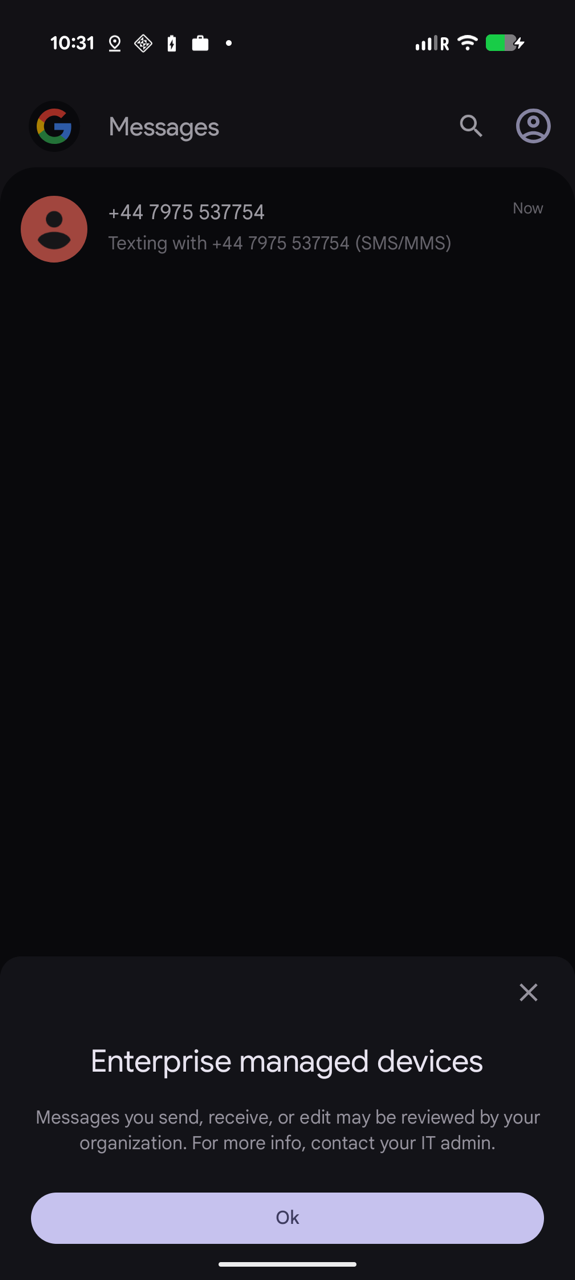
Transparent to employees
#A crucial part of this design is user visibility.
“Employees will see a clear notification on their device whenever the archival feature is active.” — Google Android Enterprise Blog
Meaning:
- You cannot be silently monitored.
- If the feature is active, you will see a prompt in Google Messages.
- Once you see that warning, you know every message in Google Messages is being archived.
This ensures the feature cannot be used clandestinely. It's intentionally transparent.
Encryption remains intact
#One of the more misleading claims circulating is that RCS Archival “breaks” end-to-end encryption.
It doesn’t.
RCS encryption protects messages in transit. Archiving happens on the device after the message is decrypted for display.
This is exactly the same model used by:
- Email archiving on corporate laptops
- Instant message archiving in regulated industries
- Call recording on corporate phone systems
Encryption remains intact. The device itself is configured to retain business communications.
Only Google Messages is affected
#RCS Archival applies exclusively to Google Messages.
It does not affect:
- Telegram
- Signal
- Slack
- Teams
- Facebook Messenger
- Any other third-party messaging app
Those apps retain their own security models, separate from Android’s enterprise capabilities. Will similar archival solutions become possible with these applications (or any others) in future? Possibly.. but today's RCS Archival offered by Google is app-level and limited only to Google Messages.
Myths vs facts
#| Myth | Fact |
|---|---|
| “Google lets employers read messages on your personal phone.” | False. Only company-owned fully-managed devices can be archived. |
| “It’s enabled on all Android phones by default.” | False. IT admins must explicitly enable it via EMM configuration. |
| “Your boss can secretly monitor your RCS chats.” | False. A clear notification appears on the device when archival is active. |
| “This breaks end-to-end encryption.” | False. Encryption in transit remains. Archiving happens only on the managed device, after decryption. |
| “Employers can now read your WhatsApp messages.” | Completely false. Only Google Messages (SMS/RCS) is supported. |
What this means for employees
#If you’re using a company-issued phone:
- Treat it as a work device.
- Expect work communications to be recorded.
- Watch for the archival notification in Google Messages.
If you’re using your personal phone:
- Nothing changes.
- Your employer cannot access your messages.
- The feature doesn’t function on personal devices.
This entire capability is irrelevant to personal Android users.
What this means for IT leaders & CIOs
#For regulated industries:
- This finally closes the compliance gap around RCS.
- It restores parity with SMS and email archiving.
- It maintains security and device-side encryption.
You choose:
- Whether to enable it
- When to deploy it
- Which archival solution to use
And your users are transparently informed when it’s active.
Conclusion
#Despite dramatic headlines, Android’s RCS Archival feature is not a privacy invasion, not automatically enabled, and not applicable to personal phones. It aligns with what should be typically expected of a company device - actions may be monitored, data may be recorded.
If your organisation issues fully managed Android devices, you can now archive RCS/SMS securely and compliantly. If you’re an employee using your own phone, relax. This does not affect you, and your boss cannot read your messages.
Google summarises its purpose best:
“[RCS Archival] helps your organization meet strict compliance needs while using the advanced security of Google Messages.”
— Google Android Enterprise Blog
Still unconvinced?
#Get in touch, and I'll provide a demo with my own archival app, MANAGED ARCHIVER. You'll be able to see not only what happens on-device, but on the server-side, also.
Articles
2026
2025
- Google Play Protect is now the custom DPC gatekeeper, and everyone is a threat by default
- 12 deliveries of AE-mas (What shipped in Android Enterprise in 2025)
- The 12 AE requests of Christmas (2025 Edition)
- RCS Archival and you: clearing up the misconceptions
- Device Trust from Android Enterprise: What it is and how it works (hands-on)
- Android developer verification: what this means for consumers and enterprise
- AMAPI finally supports direct APK installation, this is how it works
- The Android Management API doesn't support pulling managed properties (config) from app tracks. Here's how to work around it
- Hands-on with CVE-2025-22442, a work profile sideloading vulnerability affecting most Android devices today
- AAB support for private apps in the managed Google Play iFrame is coming, take a first look here
- What's new (so far) for enterprise in Android 16
2024
- Android 15: What's new for enterprise?
- How Goto's acquisition of Miradore is eroding a once-promising MDM solution
- Google Play Protect no longer sends sideloaded applications for scanning on enterprise-managed devices
- Mobile Pros is moving to Discord
- Avoid another CrowdStrike takedown: Two approaches to replacing Windows
- Introducing MANAGED SETTINGS
- I'm joining NinjaOne
- Samsung announces Knox SDK restrictions for Android 15
- What's new (so far) for enterprise in Android 15
- Google quietly introduces new quotas for unvalidated AMAPI use
- What is Play Auto Install (PAI) in Android and how does it work?
- AMAPI publicly adds support for DPC migration
- How do Android devices become certified?
2023
- Mute @channel & @here notifications in Slack
- A guide to raising better support requests
- Ask Jason: How should we manage security and/or OS updates for our devices?
- Pixel 8 series launches with 7 years of software support
- Android's work profile behaviour has been reverted in 14 beta 5.3
- Fairphone raises the bar with commitment to Android updates
- Product files: The DoorDash T8
- Android's work profile gets a major upgrade in 14
- Google's inactive account policy may not impact Android Enterprise customers
- Product files: Alternative form factors and power solutions
- What's new in Android 14 for enterprise
- Introducing Micro Mobility
- Android Enterprise: A refresher
2022
- What I'd like to see from Android Enterprise in 2023
- Thoughts on Android 12's password complexity changes
- Google Play target API requirements & impact on enterprise applications
- Sunsetting Discuss comment platform
- Google publishes differences between Android and Android Go
- Android Go & EMM support
- Relaunching bayton.org
- AER dropped the 3/5 year update mandate with Android 11, where are we now?
- I made a bet with Google (and lost)
2020
- Product files: Building Android devices
- Google announce big changes to zero-touch
- VMware announces end of support for Device Admin
- Google launch the Android Enterprise Help Community
- Watch: An Android Enterprise discussion with Hypergate
- Listen again: BM podcast #144 - Jason Bayton & Russ Mohr talk Android!
- Google's Android Management API will soon support COPE
- Android Enterprise in 11: Google reduces visibility and control with COPE to bolster privacy.
- The decade that redefined Android in the enterprise
2019
- Why Intune doesn't support Android Enterprise COPE
- VMware WS1 UEM 1908 supports Android Enterprise enrolments on closed networks and AOSP devices
- The Bayton 2019 Android Enterprise experience survey
- Android Enterprise Partner Summit 2019 highlights
- The Huawei ban and Enterprise: what now?
- Dabbling with Android Enterprise in Q beta 3
- Why I moved from Google WiFi to Netgear Orbi
- I'm joining Social Mobile as Director of Android Innovation
- Android Enterprise in Q/10: features and clarity on DA deprecation
- MWC 2019: Mid-range devices excel, 5G everything, form-factors galore and Android Enterprise
- UEM tools managing Android-powered cars
- Joining the Android Enterprise Experts community
- February was an interesting month for OEMConfig
- Google launch Android Enterprise Recommended for Managed Service Providers
- Migrating from Windows 10 Mobile? Here's why you should consider Android
- AER expands: Android Enterprise Recommended for EMMs
- What I'd like to see from Android Enterprise in 2019
2018
- My top Android apps in 2018
- Year in review: 2018
- MobileIron Cloud R58 supports Android Enterprise fully managed devices with work profiles
- Hands on with the Huawei Mate 20 Pro
- Workspace ONE UEM 1810 introduces support for Android Enterprise fully managed devices with work profiles
- G Suite no longer prevents Android data leakage by default
- Live: Huawei Mate series launch
- How to sideload the Digital Wellbeing beta on Pie
- How to manually update the Nokia 7 Plus to Android Pie
- Hands on with the BQ Aquaris X2 Pro
- Hands on with Sony OEMConfig
- The state of Android Enterprise in 2018
- BYOD & Privacy: Don’t settle for legacy Android management in 2018
- Connecting two Synologies via SSH using public and private key authentication
- How to update Rsync on Mac OS Mojave and High Sierra
- Intune gains support for Android Enterprise COSU deployments
- Android Enterprise Recommended: HMD Global launch the Nokia 3.1 and Nokia 5.1
- Android Enterprise Partner Summit 2018 highlights
- Live: MobileIron LIVE! 2018
- Android Enterprise first: AirWatch 9.4 lands with a new name and focus
- Live: Android Enterprise Partner Summit 2018
- Samsung, Oreo and an inconsistent Android Enterprise UX
- MobileIron launch Android Enterprise work profiles on fully managed devices
- Android P demonstrates Google's focus on the enterprise
- An introduction to managed Google Play
- MWC 2018: Android One, Oreo Go, Android Enterprise Recommended & Android Enterprise
- Enterprise ready: Google launch Android Enterprise Recommended
2017
- Year in review: 2017
- Google is deprecating device admin in favour of Android Enterprise
- Hands on with the Sony Xperia XZ1 Compact
- Moto C Plus giveaway
- The state of Android Enterprise in 2017
- Samsung launched a Note 8 for enterprise
- MobileIron officially supports Android Enterprise QR code provisioning
- Android zero-touch enrolment has landed
- MobileIron unofficially supports QR provisioning for Android Enterprise work-managed devices, this is how I found it
- Hands on with the Nokia 3
- Experimenting with clustering and data replication in Nextcloud with MariaDB Galera and SyncThing
- Introducing documentation on bayton.org
- Goodbye Alexa, Hey Google: Hands on with the Google Home
- Restricting access to Exchange ActiveSync
- What is Mobile Device Management?
- 8 tips for a successful EMM deployment
- Long-term update: the fitlet-RM, a fanless industrial mini PC by Compulab
- First look: the FreedomPop V7
- Vault7 and the CIA: This is why we need EMM
- What is Android Enterprise (Android for Work) and why is it used?
- Introducing night mode on bayton.org
- What is iOS Supervision and why is it used?
- Hands on with the Galaxy TabPro S
- Introducing Nextcloud demo servers
- Part 4 - Project Obsidian: Obsidian is dead, long live Obsidian
2016
- My top Android apps 2016
- Hands on with the Linx 12V64
- Wandera review 2016: 2 years on
- Deploying MobileIron 9.1+ on KVM
- Hands on with the Nextcloud Box
- How a promoted tweet landed me on Finnish national news
- Using RWG Mobile for simple, cross-device centralised voicemail
- Part 3 – Project Obsidian: A change, data migration day 1 and build day 2
- Hands on: fitlet-RM, a fanless industrial mini PC by Compulab
- Part 2 - Project Obsidian: Build day 1
- Part 1 - Project Obsidian: Objectives & parts list
- Part 0 - Project Obsidian: Low power NAS & container server
- 5 Android apps improving my Chromebook experience
- First look: Android apps on ChromeOS
- Competition: Win 3 months of free VPS/Container hosting - Closed!
- ElasticHosts review
- ElasticHosts: Cloud Storage vs Folders, what's the difference?
- Adding bash completion to LXD
- Android N: First look & hands-on
- Springs.io - Container hosting at container prices
- Apple vs the FBI: This is why we need MDM
- Miradore Online MDM: Expanding management with subscriptions
- Lenovo Yoga 300 (11IBY) hard drive upgrade
- I bought a Lenovo Yoga 300, this is why I'm sending it back
- Restricting access to Exchange ActiveSync
- Switching to HTTPS on WordPress
2015
2014
- Is CYOD the answer to the BYOD headache?
- BYOD Management: Yes, we can wipe your phone
- A fortnight with Android Wear: LG G Watch review
- First look: Miradore Online free MDM
- Hands on: A weekend with Google Glass
- A month with Wandera Mobile Gateway
- Final thoughts: Dell Venue Pro 11 (Atom)
- Thoughts on BYOD
- Will 2014 bring better battery life?
- My year in review: Bayton.org
- The best purchase I've ever made? A Moto G for my father
2013
2012
- My Top Android Apps 12/12
- The Nexus 7 saga: Resolved
- Recycling Caps Lock into something useful - Ubuntu (12.04)
- The Nexus 7 saga continues
- From Wows to Woes: Why I won't be recommending a Nexus7 any time soon.
- Nexus7: What you need to know
- Why I disabled dlvr.it links on Facebook
- HTC Sense: Changing the lockscreen icons from within ADW
2011
- Push your Google+ posts to Twitter and Facebook
- Using multiple accounts with Google.
- The "Wn-R48" (Windows on the Cr-48)
- Want a Google+ invite?
- Publishing to external sources from Google+
- Dell Streak review. The Phone/Tablet Hybrid
- BlueInput: The Bluetooth HID driver Google forgot to include
- Pushing Buzz to Twitter with dlvr.it
- Managing your social outreach with dlvr.it
- When Awe met Some. The Cr-48 and Gnome3.
- Living with Google's Cr-48 and the cloud.
- Downtime 23-25/04/2011
- Are you practising "safe surfing"?
- The Virtualbox bug: "Cannot access the kernel driver" in Windows
- Putting tech into perspective
2010
- Have a Google Buzz Christmas
- Root a G1 running Android 1.6 without recovery!
- Windows 7 display issues on old Dell desktops
- Google added the Apps flexibility we've been waiting for!
- Part I: My 3 step program for moving to Google Apps
- Downloading torrents
- Completing the Buzz experience for Google Maps Mobile
- Quicktip: Trial Google Apps
- Quicktip: Save internet images fast
- Turn your desktop 3D!
- Part III - Device not compatible - Skype on 3
- Swype not compatible? ShapeWriter!
- Don't wait, get Swype now!
- HideIP VPN. Finally!
- Google enables Wave for Apps domains
- Aspire One touch screen
- Streamline XP into Ubuntu
- Edit a PDF with Zamzar
- Google offering Gmail addresses in the UK
- Google Wave: Revolutionising blogs!
- Hexxeh's Google Chrome OS builds
- Update: Buzz on Windows Mobile
- Alternatives to Internet Explorer
- Wordress 3.0 is coming!
- Skype for WM alternatives
- Browsing on a (data) budget? Opera!
- Buzz on unsupported mobiles
- Buzz on your desktop
- What's all the Buzz?
- Part II: Device not compatible - Skype on 3
- Part I - Device not compatible - Skype on 3
- Dreamscene on Windows 7
- Free Skype with 3? There's a catch..