Contents
Docs
General
- Introduction
- Android Enterprise build tracker
- What is Android Enterprise?
- Android versions matrix
- Android Enterprise feature requests
- Considerations when migrating from device administrator to Android Enterprise
- Upgrading your Android Enterprise binding to a managed Google domain
- What is Android Enterprise Recommended?
- Android Enterprise FAQ
- How to migrate Android devices from one EMM to another
- Android Enterprise device testing
- New in Android 16 for enterprise
- New in Android 17 for enterprise
- What is Private Space in Android 15, and how can organisations manage it?
- Why don't all Android devices come with GMS?
- What is Android One?
- What are managed configurations?
- Android Enterprise vs Device Admin: Why DA is no longer suitable
- Considerations for choosing Android in the Enterprise
- Feature spotlight: Android Smartlock
- Android glossary
- Android version evolution graphics
- Infobyte: Device Admin deprecation
- How to submit a device for Android Enterprise Recommended validation
- How to view software version information
- How to capture a bug report and device logs
- Gartner comparison of security controls for mobile devices 2019
Provisioning
- How to become a zero-touch enrolment reseller
- Android Enterprise provisioning methods
- What is Android zero-touch enrolment?
- Android Enterprise zero-touch console administration guide
- Android Enterprise DPC identifier collection
- Android Enterprise provisioning guides
- Android Enterprise zero-touch DPC extras collection
- Infobyte: Android Enterprise deployment scenarios
- Infobyte: Android Enterprise fully managed provisioning methods
- Manual Android Enterprise work-managed QR code generation for MobileIron
Work profile
Fully managed
App management
- Set up Hypergate's Kerberos Authentication on MobileIron Core for Android Enterprise
- Managed Google Play, allowlist or blocklist?
- Considerations when deploying MTD with Android Enterprise
- Why you shouldn't install apps from unknown sources
- What is OEMConfig?
- Create and manage private apps for Android Enterprise
- Create and manage web apps for Android Enterprise
- Using Google Play application tracks with EMM
- How to locate a private Android app assigned to an organisation ID
- How to host enterprise apps outside of Google Play
- The Google Play iFrame app approval flow is deprecated
- Android 13 adds notifications access as a runtime permission
- Android 13 & up restricts permissions when apps are sideloaded
- Android 14 blocks apps targeting old Android versions
- Android minimum target SDK matrix
- Android system app database
- How to resolve common Android app install failures, by error message
FAQ
- Is Android Enterprise supported on uncertified (non-GMS) devices?
- Can apps be sideloaded into the Private Space?
- Is Private Space supported on fully managed devices?
- Why don't Private Space apps go through VPN?
- How can apps be managed in the Private Space?
- Are Private Space apps visible to enterprise admins?
- Are Private Space applications truly hidden?
- Does Samsung support Android Enterprise?
- Is it possible to manage personal applications on a work profile device?
- Why has USB data access been disabled suddenly?
- What versions of Android support Android Enterprise?
- How to check if an Android device is GMS/Play Protect certified?
- Is it possible to manage eSIM?
- Can I manage APNs through AMAPI?
- Why is my organisation name showing on managed devices?
- Can I route specific apps through 5G network slicing?
- To use Android Enterprise do I need to buy Google Workspace (G Suite) and register my domain?
- What is a managed Google domain, and should I upgrade?
- Is Android Enterprise supported on XR headsets?
- What devices should I buy for my organisation?
- What is the difference between GMS and EDLA certification for enterprise?
- How do Samsung Knox and Android Enterprise policies interact?
- If Android Enterprise is supported from Lollipop, why is Marshmallow often mentioned instead?
- What’s the difference between Device Admin and Android Enterprise?
- What is the Android Enterprise bind?
- Can I change the account I used to bind Android Enterprise?
- Is it possible to bind Android Enterprise with multiple EMMs using one account?
- How do I remove the Android Enterprise bind from my current EMM?
- How do I choose an EMM for Android Enterprise?
- What network requirements does Android Enterprise have?
- What is Android Enterprise Recommended?
- My AER device doesn’t work properly with Android Enterprise, what should I do?
- What is Advanced Protection, and can it be managed?
- Is Android One better than AER? (Or the other way around?)
- How do I configure Google Workspace domains for provisioning?
- What’s the best provisioning method?
- What’s the difference between allow adding accounts vs allow configure credentials?
- Is it possible to utilise multiple VPN connections within a profile?
- Is it possible to utilise a single VPN connection across the entire device?
- Does Android support Kerberos natively?
- What’s the difference between device based accounts and user based accounts?
- How do I manage the new notifications runtime permission in Android 13?
- Can organisations see applications outside of the work profile?
- What can my employer see on my personal device with a work profile?
- What happens to my data when the work profile is removed?
- What is the difference between MAM and work profiles for BYOD?
- Can organisations deploy applications to the parent profile in a work profile deployment?
- Why does the work profile drain my battery?
- Why are my work profile notifications delayed or missing?
- Is it possible to migrate from DA to AE work profile without a re-enrol?
- Can I turn off my work profile?
- What is a work challenge?
- Enrolment failed but the work profile was created. How do I remove it?
- Why can’t I install or uninstall apps on my managed device?
- How can I provision a fully managed device?
- Is it possible to “retire” (or enterprise wipe) a fully managed device?
- What is RCS archival, and which devices support it?
- Devices factory reset as soon as they’re enrolled, why?
- Is Factory Reset Protection enabled on fully managed devices?
- What is the difference between FRP and Enterprise FRP?
- Is it possible to migrate fully managed devices between EMM solutions?
- How has COPE changed in Android 11?
- Does Intune support COPE?
- Can organisations see applications outside of the work profile on a COPE device?
- Does Android Enterprise support Wear OS?
- Can organisations deploy applications to the parent profile in a COPE deployment?
- Is it possible to migrate from fully managed to COPE without a factory reset?
- How should system applications be handled on a COPE device?
- What OEMs currently support zero-touch?
- Where are zero-touch resellers located?
- Does zero-touch cost anything?
- Does Android Auto work on fully managed devices?
- Is an EMM still required with zero-touch?
- What is the content protection policy in AMAPI?
- What happens if a fully set up device is added to the zero-touch console?
- What happens if a user starts setting up a device before the zero-touch config is applied?
- What happens if a zero-touch config is removed from an enrolled device?
- My AMAPI project returns a usage limit error, why?
- Can I add/remove users on a fully managed device?
- What happens if a new config for a different EMM or server is applied to an enrolled device?
- How can I access a Wi-Fi captive portal when devices are in Kiosk?
- What happens if a zero-touch assigned device is reset?
- What is Device Trust from Android Enterprise?
- Why does zero-touch or KME not trigger after a factory reset on Android 15+?
- What happens if a device is unregistered from the zero-touch console?
- What enterprise features are new in Android 16?
- What is Identity Check on Android?
- Can a device be OTA managed from the zero-touch console?
- What happens when a managed device receives a major Android update?
- Can I migrate devices from a custom DPC to AMAPI?
- What enterprise features are new in Android 17?
- Avoiding configuration issues in Google Workspace with GEM & 3rd party EMM
- What is the difference between AMAPI and a custom DPC?
- Can I pin a specific OS or app version on managed devices?
- Does enrolling via zero-touch slow down or cause any delay to the setup process while it’s retrieving the zero-touch config?
- What happens if my Android Enterprise bind account is disabled or deleted?
- What is the AMAPI MCP server?
- How do I manage runtime permissions on managed Android devices?
- How do I restrict screenshots and screen recording on managed Android devices?
- Can I manage Private DNS settings through AMAPI?
- What deployment scenario will a zero-touch device enrol under?
- Why does zero-touch require so much touching?
- Can I set Device Owner without a factory reset?
- Can anyone add a device to the zero-touch console?
- Is it possible for an organisation to add previously-purchased devices to zero-touch?
- Can a MADA device be converted to EDLA?
- Can anyone remove a device from the zero-touch console?
- Does Samsung support zero-touch?
- Is it possible to set a zero-touch default configuration?
- Is it possible to bulk update zero-touch devices?
- Is it possible to change zero-touch resellers?
- Are all zero-touch devices Android Enterprise Recommended?
- What are DPC extras?
- What should I put in DPC extras?
- How do I set up zero-touch enrollment when my device reseller is not a zero-touch partner?
- What happens if a device is uploaded to zero-touch with the wrong manufacturer?
- The device registered with zero-touch, but doesn’t launch during setup, why?
- Does Android Go support zero-touch?
- Why are my zero-touch devices randomly factory resetting?
- Are employee-owned devices eligible for zero-touch?
- How do I turn off Google Play app collections?
- What’s the recommended way of managing private (in-house) applications?
- Is it possible to deploy app shortcuts to the homescreen of an Android Enterprise device?
- What are AMAPI application roles?
- Is it possible to backup & restore device data on a fully managed device?
- What is Lost Mode on Android Enterprise?
- The Google Play iFrame is missing a feature in my UEM. How do I enable it?
- How do I configure allowlist/blocklist domains for Google Chrome?
- Does Picture-in-Picture work in kiosk (lock task) mode?
- How to configure Chrome managed bookmarks
- Why does Samsung Smart Switch not work on fully managed devices?
- Play Protect blocked my DPC, why?
- Can Google Play Protect remove apps from managed devices without admin approval?
- What is enhanced fraud protection, and can it block enterprise apps?
- Has Play Protect changed how it handles sideloaded apps on managed devices?
- What is Google Play developer verification, and how does it affect enterprise?
- What do Google Play's target API level requirements mean for enterprise?
- Does AMAPI support direct APK installation?
- Why can't I find apps in managed Google Play after approving them?
- Are Google Play System Updates managed by Android Enterprise system update policies?
- What enterprise features are new in Android 15?
- Can I purchase paid apps through managed Google Play?
- Can I control default applications through AMAPI?
- Why is my kiosk app UI broken after updating to Android 15?
- Why are managed Google Play apps stuck on pending?
- Why is work profile enrolment failing?
- How do app updates work in managed Google Play?
- Why don't managed configurations work with app tracks?
- How do I prevent users from escaping kiosk (lock task) mode?
- How do I manage credential providers and passkeys on managed devices?
- How does conditional access work with Android Enterprise?
- How does cross-profile data sharing work in a work profile?
- What are the AMAPI device quota limits?
- What is the key attestation root certificate change in 2026?
- Can I rename my managed Google Play organisation?
- How do I manage generative AI apps and features on managed devices?
- What is Strong Integrity, and why are my Android 13+ devices failing compliance?
Create and manage private apps for Android Enterprise
Contents
In December 2018, Google quietly introduced support for private app upload within the Google Play iFrame, allowing for simple, straightforward upload of in-house applications without the hassle associated with uploading to the Google Play console directly.
Context
#With a switch to Android Enterprise, the recommended means for distributing corporate, in-house applications is through managed Google Play. UEMs can support silently pushing uploaded APKs directly to devices from the UEM platform, either UEM-hosted (with appropriate OEM support with AMAPI) or through other EMM-provided deployment paths, but this isn’t consistent across UEMs in the way uploading an app directly to Play has been, and so the general recommendation has remained largely unchanged.
Note: Google has since announced that externally hosted apps are deprecated and no longer supported. Treat externally hosted private app guidance as historical; for current deployments, use managed Google Play private apps, Play Console private apps, or direct APK deployment through an EMM where supported.
Uploading apps to the Google Play Store, however, is not straightforward:
- You need to pay a $25 fee before being able to upload apps
- The publishing process is long-winded and arduous
- Mistakes can easily be made by inexperienced admins, leading to public availability of the in-house application.
..and more. The process has left a lot to be desired for a long time.
The proposed solution
#In this case, rather than incrementally improve the process, Google seems to have taken the previously announced feature for Google Workspace and applied it to the Google Play iFrame. With only a little information, organisations can quickly and easily upload their private applications with very little effort:
- App name
- APK file
Once submitted, the app will be uploaded to managed Google Play against the Android Enterprise organisation ID in which the UEM is bound (has a bind). Apps uploaded in this way cannot be made public, and therefore are only useful for internal, non-public applications.
Note on package names
#When uploading an app to Google Play, the package name must be unique. If your organisation is considering an initial internal release to then make available publicly at a later date (or even if not, but this is still a consideration) it must be noted that the package name com.package.name must be unique for each upload.
A simple recommendation would be to append .internal to the package name when uploaded to the Managed Google Play iFrame, to make com.myapp.internal, which can be omitted for future public release - com.myapp.
It’ll take a little while for the app to upload and become available for use (though comparatively extremely quickly compared to a fully public Google Play rollout - minutes vs days), but once complete, the app can be imported into the UEM as with any other public or previously Google Play-uploaded private application.
How it works
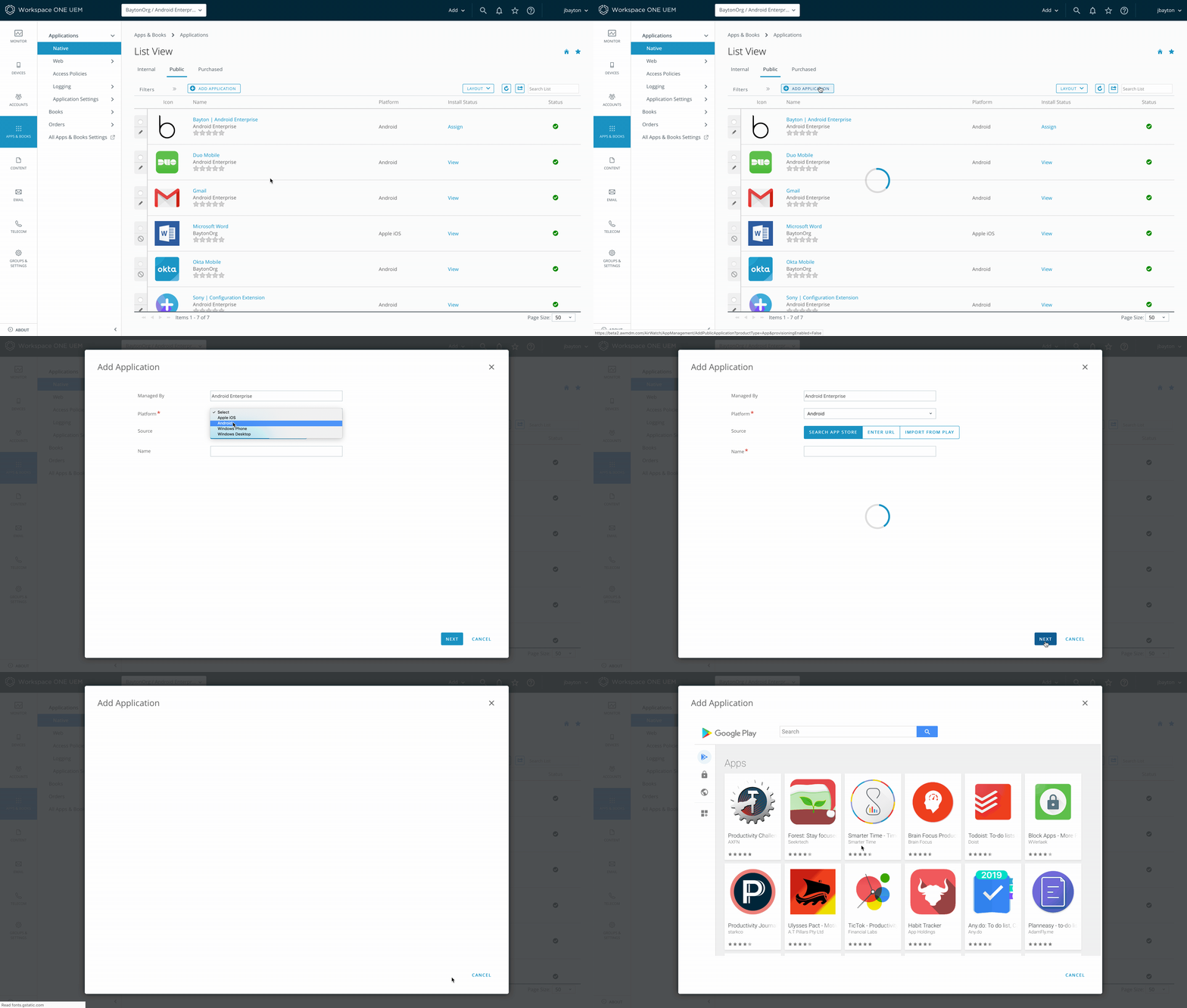
#The following is demonstrated in VMware Workspace One UEM, but the process is identical in all UEMs supporting the iFrame (those that don’t cannot use this functionality).
Within Apps & Books > Apps > Public, add a new app. No name is required, despite it showing the asterisk*:
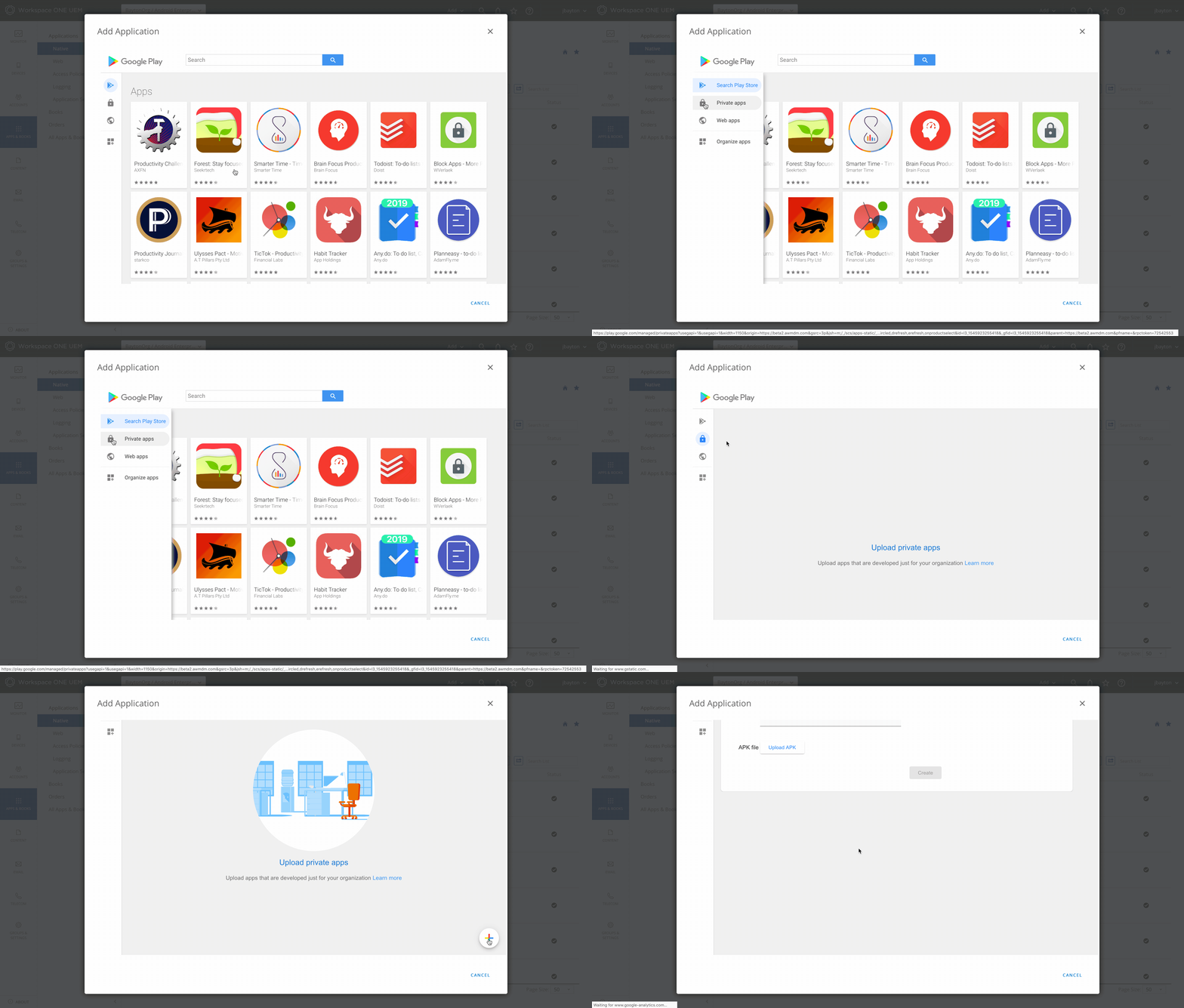
Once the iFrame opens, hover the mouse on the left-hand side to display the sidebar menu, and click Private apps. You may need to scroll down in the empty private apps page to locate the new icon, but once located click it:
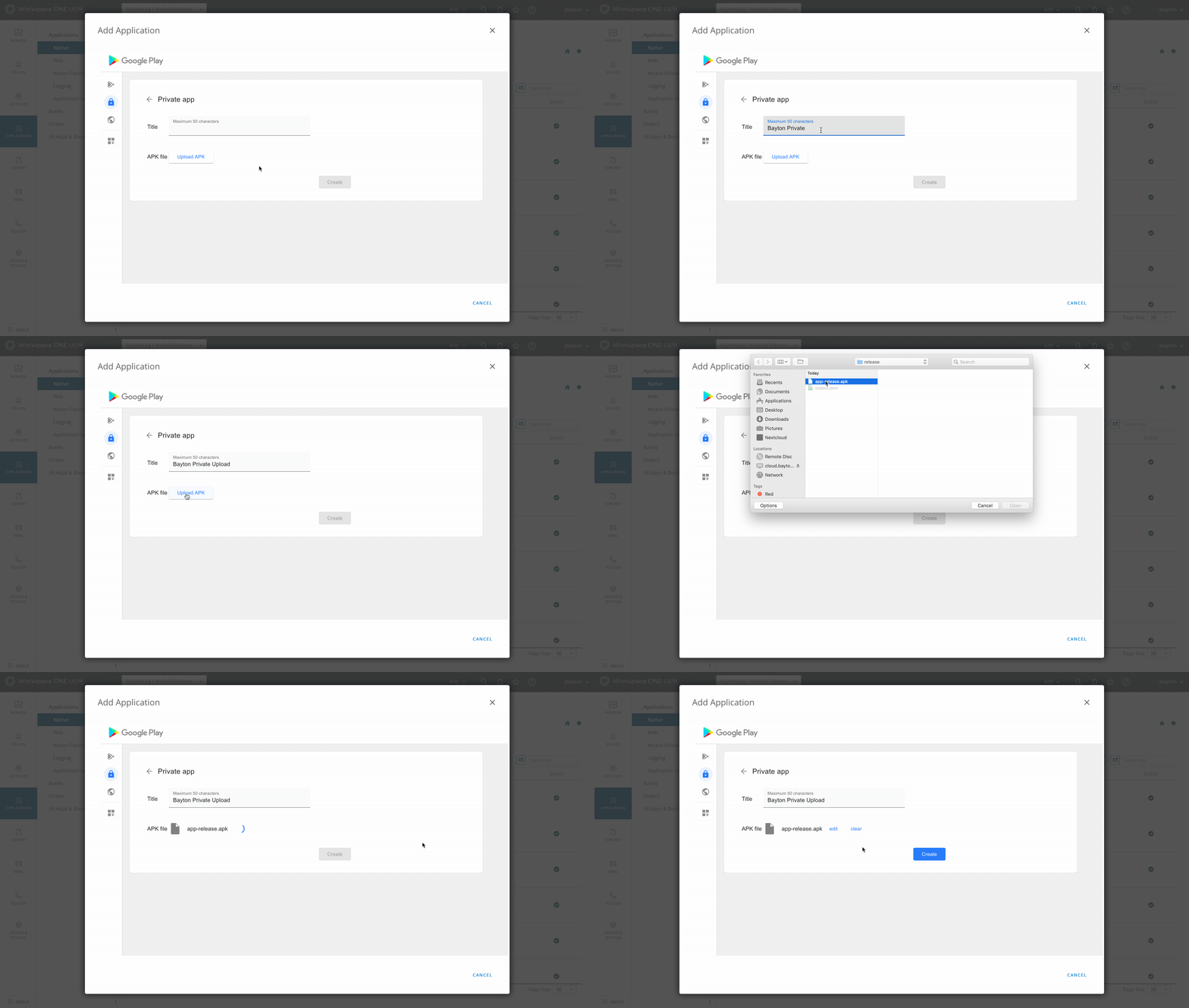
You’re now creating a new private app. Add a name and upload the APK (or AAB - see below):
Once complete, click Create:
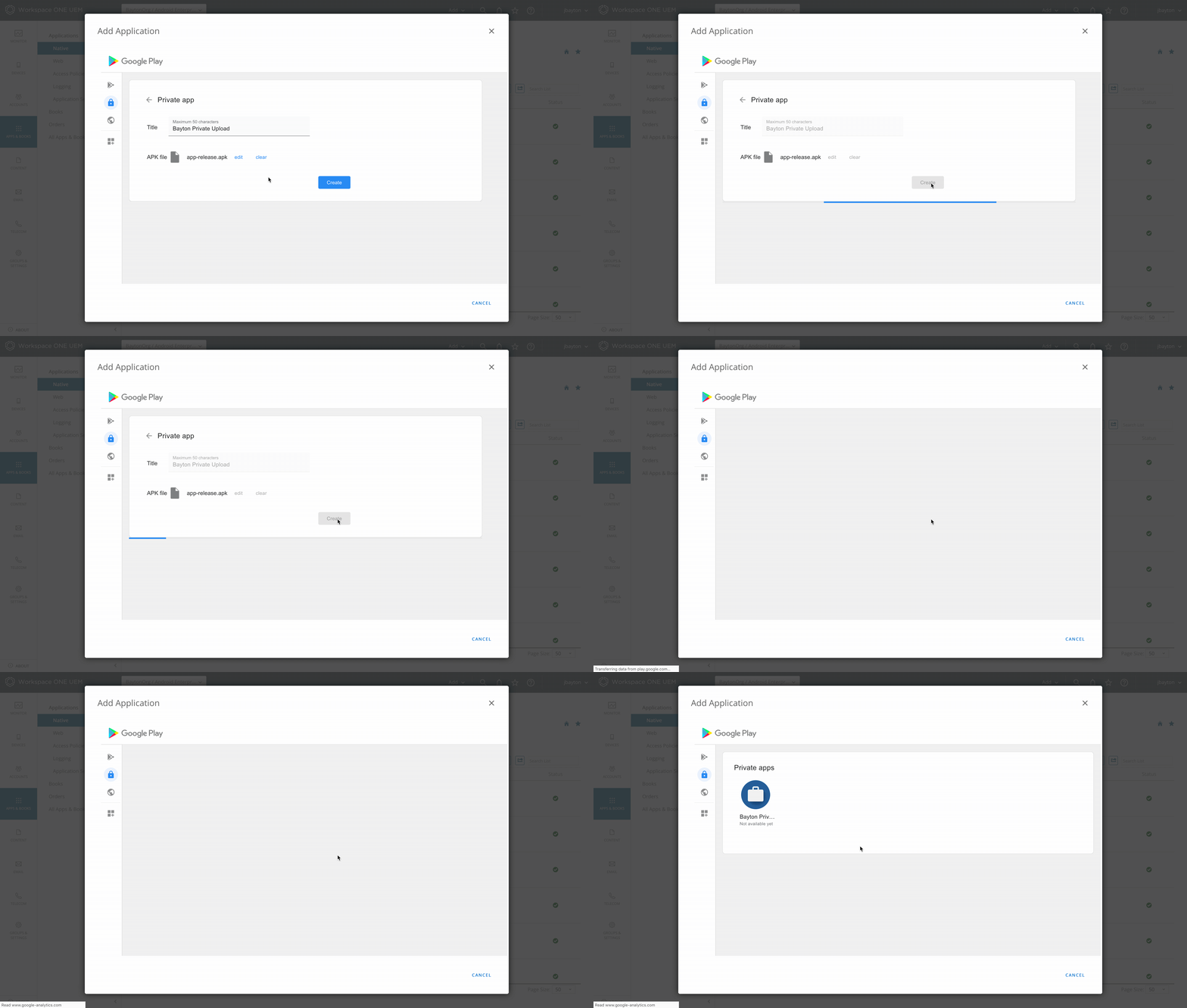
The private app will be available normally within a few minutes (note the Not available yet message under the app after creating it, this will vanish when it’s ready).
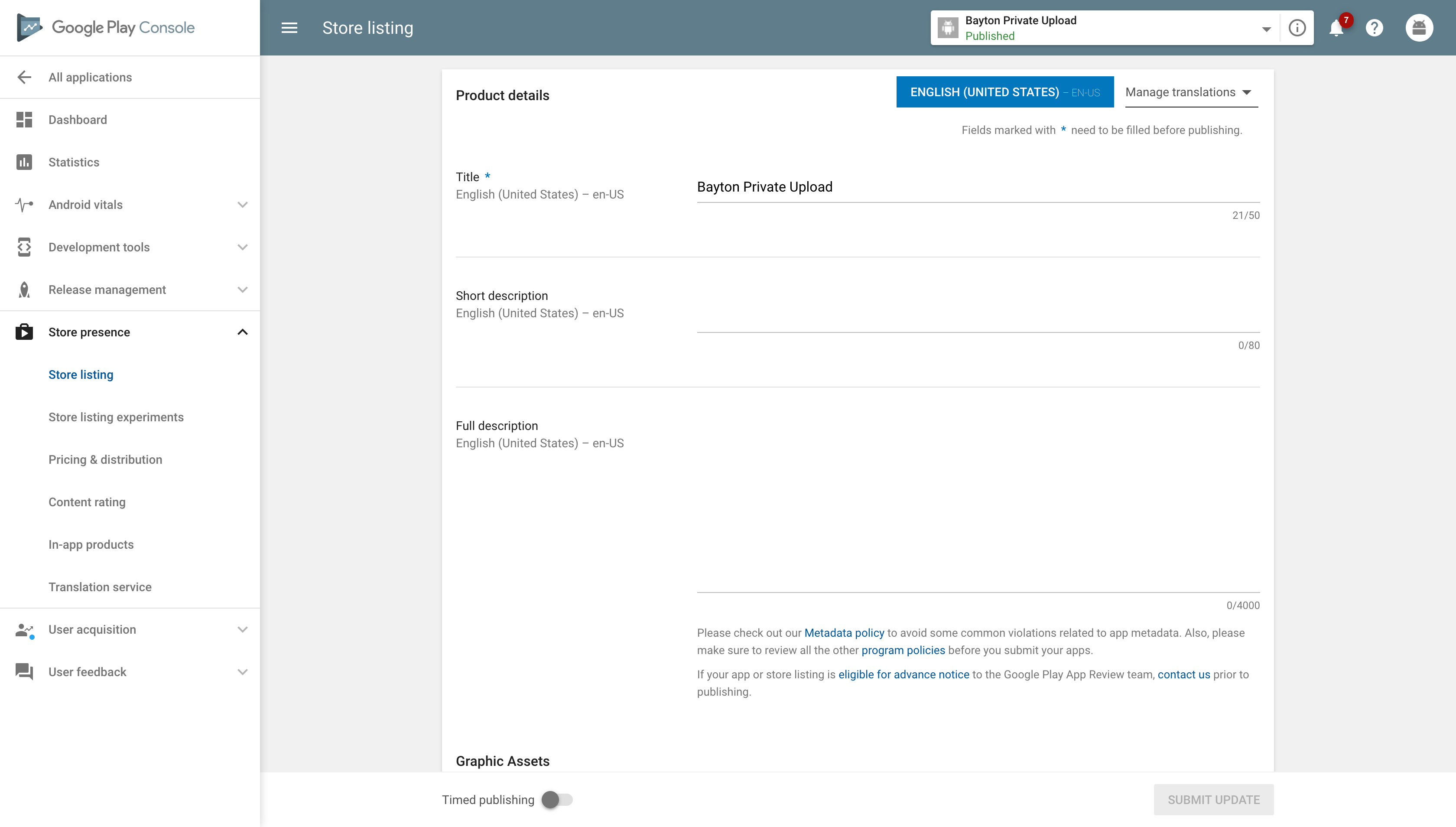
If you click the app, you’ll be taken into the details view for it, where you’ll be able to edit the name, upload new versions, and also see a link to Google Play to add more information:
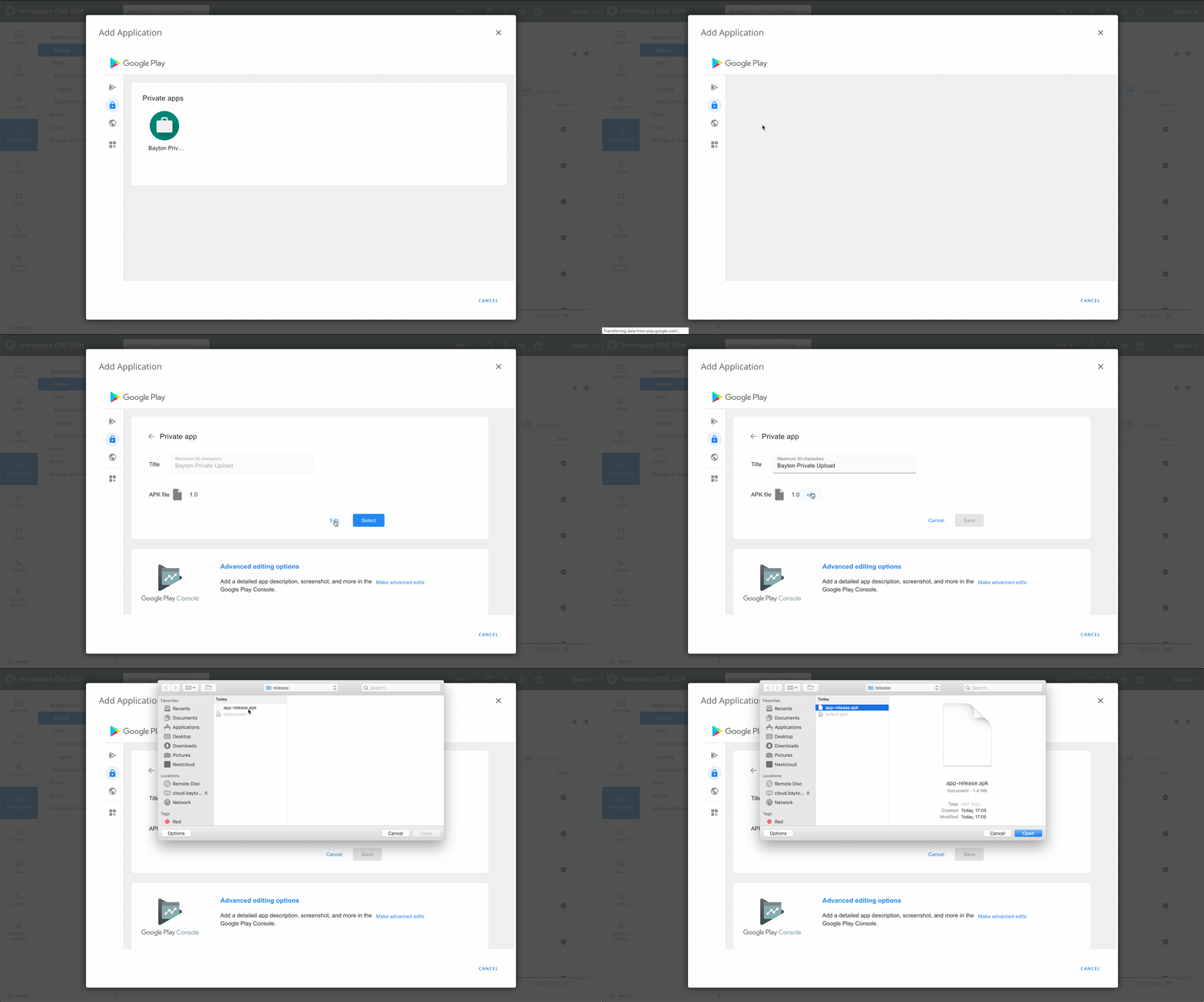
Some UEMs will import private apps automatically. Others will not. For the latter, simply add an app as you normally would, switch to the private apps tab in the iFrame, click the app in question and click Select. Alternatively if the UEM supports it, run an import from Play to get it.
AAB support
#Since March 2025, the managed Google Play iFrame supports Android App Bundle (AAB) uploads for private apps in addition to APKs. AABs offer optimised delivery and smaller download sizes per device, and are the format Google recommends for all Play distribution.
Note: Direct uploads to the Play Console must use Android App Bundle (.aab) format. APK uploads remain supported when creating or updating private apps through the managed Google Play iFrame.
When uploading an AAB through the iFrame, a Google-generated signing key is used automatically. If you need to use your own signing key, upload via the Google Play Console instead (see below). Existing APK-based private apps can be migrated to AAB by uploading the signing key through the Play Console.
For more detail on AAB support in managed Google Play, see AAB support for private apps in the managed Google Play iFrame.
The Google Play Console may make more sense
#There's a significant drawback with leveraging the iFrame: Applications are bound to your enterprise and may become inaccessible if the bind is deleted. There are options for migration, but this is cumbersome.
If your organisation already uses the Google Play Console for application distribution, applications can be made private under Setup > Advanced Settings > Managed Google Play, or via the Publishing API. This allows organisations to centrally manage all public and private applications under one account, and providing access to one or one hundred enterprises (organisation IDs) from the Play Console is a piece of cake.
Here's an overview of the alternative approaches and when to leverage them:
Google Play Console (private)
#Publishing through the Google Play Console with the app set to private distribution offers considerably more control. You'll need a Google developer account ($25 one-off fee), but in return the app is managed centrally and independently of any specific EMM bind.
Play Console uploads should be prepared as Android App Bundles (.aab). If you need to upload an APK, use the managed Google Play iFrame where supported, or use direct APK deployment through your EMM where Play distribution is not suitable.
Private apps in the Play Console can be shared with multiple organisation IDs the same way as iFrame-uploaded apps. This is particularly useful for:
- Cross-EMM deployment: If you manage devices across more than one EMM solution, the same private app can be made available to all of them without re-uploading.
- ISVs and developers: If you're distributing an app to multiple customers privately - say, a bespoke line-of-business application or an agent your customers deploy to their fleets - Play Console private distribution lets you do this without tying the app to any one customer's MDM.
- Future-proofing: Because the app lives in your developer account rather than an enterprise bind, it survives MDM migrations entirely. Switch EMMs, re-bind your organisation, and the app is still there waiting to be assigned.
You also get the full Play Console feature set: release management, staged rollouts, pre-launch reports, Android vitals, and flexible track management.
Google Play Console (public)
#Standard public distribution through Google Play. The app goes through the full review process and is discoverable by anyone on the Play Store.
This is the right approach when the app genuinely needs broad reach - whether that's a customer-facing application, a utility you want available to any organisation, or an open-source tool. Public apps can still be assigned and managed through managed Google Play just like private ones; the difference is simply visibility.
Direct APK installation
#One option lesser-covered that still holds relevance today: pushing APK files directly to devices without going through managed Google Play at all.
This is particularly useful in scenarios where Play-based distribution isn't practical:
- Air-gapped environments: Devices without reliable internet access or those operating in restricted networks where managed Google Play can't be reached.
- Apps that can't be published to Play: Whether due to compliance constraints, technical limitations, or policies that prevent uploading to Google's infrastructure.
- Development and testing: Rapid iteration where the overhead of publishing to Play - even as a private app - slows things down unnecessarily.
The trade-off is that you lose the benefits of Play's distribution infrastructure. There are no delta updates, no Play Protect scanning at the distribution layer, and no staged rollouts (unless the EMM supports a similar approach). Your EMM handles the heavy lifting instead, which means the experience depends entirely on how well your EMM implements it.
For more detail, see AMAPI finally supports direct APK installation, this is how it works and the FAQ on direct APK installation. Custom DPCs have had this functionality for years, find your vendor documentation for details on that.
Considerations when changing MDMs
#One of the most common gotchas with private app distribution is what happens when you migrate between EMM platforms.
iFrame apps don't automatically travel
#If your private apps were uploaded through the iFrame, they're bound to the enterprise ID that was active at the time. When you set up a new EMM and create a new managed Google Play bind, those apps won't carry over by default. You'll need to either re-upload them through the new EMM's iFrame, and they'll get new package names on the backend - effectively becoming different apps as far as managed Google Play is concerned - or apply to transfer them to a new developer account, a process that is often slow and without guarantees.
Play Console apps are portable
#Apps published through the Google Play Console - whether private or public - aren't affected by EMM migrations at all. They live in your developer account. When you set up a new EMM, you simply add the new organisation ID to the app's distribution settings and it's available immediately. No re-uploading, no disruption to devices already running the app.
Planning ahead
#If there's any chance you'll change EMM platforms in the future - and most organisations do eventually - it's worth publishing through the Play Console from the start, even if the iFrame feels easier today. The $25 developer fee is a one-off cost, and the portability it provides can save significant effort down the line.
For apps already deployed via the iFrame, consider republishing them through the Play Console before initiating any migration, or initiating a proactive transfer of ownership. This gives you a clean transition path and ensures devices continue to receive updates throughout the process.
Conclusion
#An improvement to the process of uploading private apps to Google Play has been long-overdue, but definitely worth the wait for them to get it right.
Uploading private apps is now a 2 step process, free to use and ensures no mistakes can be made when compared to the old, convoluted process. That said, for organisations happy to use the Google Play Console for app management, the options to do so are still there and can be leveraged, so it’s a win-win with this implementation.
As it’s via the iFrame, the obvious prerequisite is your UEM must support this (and if they don’t, be sure to make your request heard), however beyond that the feature is ready to be used!
For more information on this feature with your particular UEM platform, please reach out to your UEM vendor directly.
Docs
General
- Introduction
- Android Enterprise build tracker
- What is Android Enterprise?
- Android versions matrix
- Android Enterprise feature requests
- Considerations when migrating from device administrator to Android Enterprise
- Upgrading your Android Enterprise binding to a managed Google domain
- What is Android Enterprise Recommended?
- Android Enterprise FAQ
- How to migrate Android devices from one EMM to another
- Android Enterprise device testing
- New in Android 16 for enterprise
- New in Android 17 for enterprise
- What is Private Space in Android 15, and how can organisations manage it?
- Why don't all Android devices come with GMS?
- What is Android One?
- What are managed configurations?
- Android Enterprise vs Device Admin: Why DA is no longer suitable
- Considerations for choosing Android in the Enterprise
- Feature spotlight: Android Smartlock
- Android glossary
- Android version evolution graphics
- Infobyte: Device Admin deprecation
- How to submit a device for Android Enterprise Recommended validation
- How to view software version information
- How to capture a bug report and device logs
- Gartner comparison of security controls for mobile devices 2019
Provisioning
- How to become a zero-touch enrolment reseller
- Android Enterprise provisioning methods
- What is Android zero-touch enrolment?
- Android Enterprise zero-touch console administration guide
- Android Enterprise DPC identifier collection
- Android Enterprise provisioning guides
- Android Enterprise zero-touch DPC extras collection
- Infobyte: Android Enterprise deployment scenarios
- Infobyte: Android Enterprise fully managed provisioning methods
- Manual Android Enterprise work-managed QR code generation for MobileIron
Work profile
Fully managed
App management
- Set up Hypergate's Kerberos Authentication on MobileIron Core for Android Enterprise
- Managed Google Play, allowlist or blocklist?
- Considerations when deploying MTD with Android Enterprise
- Why you shouldn't install apps from unknown sources
- What is OEMConfig?
- Create and manage private apps for Android Enterprise
- Create and manage web apps for Android Enterprise
- Using Google Play application tracks with EMM
- How to locate a private Android app assigned to an organisation ID
- How to host enterprise apps outside of Google Play
- The Google Play iFrame app approval flow is deprecated
- Android 13 adds notifications access as a runtime permission
- Android 13 & up restricts permissions when apps are sideloaded
- Android 14 blocks apps targeting old Android versions
- Android minimum target SDK matrix
- Android system app database
- How to resolve common Android app install failures, by error message
FAQ
- Is Android Enterprise supported on uncertified (non-GMS) devices?
- Can apps be sideloaded into the Private Space?
- Is Private Space supported on fully managed devices?
- Why don't Private Space apps go through VPN?
- How can apps be managed in the Private Space?
- Are Private Space apps visible to enterprise admins?
- Are Private Space applications truly hidden?
- Does Samsung support Android Enterprise?
- Is it possible to manage personal applications on a work profile device?
- Why has USB data access been disabled suddenly?
- What versions of Android support Android Enterprise?
- How to check if an Android device is GMS/Play Protect certified?
- Is it possible to manage eSIM?
- Can I manage APNs through AMAPI?
- Why is my organisation name showing on managed devices?
- Can I route specific apps through 5G network slicing?
- To use Android Enterprise do I need to buy Google Workspace (G Suite) and register my domain?
- What is a managed Google domain, and should I upgrade?
- Is Android Enterprise supported on XR headsets?
- What devices should I buy for my organisation?
- What is the difference between GMS and EDLA certification for enterprise?
- How do Samsung Knox and Android Enterprise policies interact?
- If Android Enterprise is supported from Lollipop, why is Marshmallow often mentioned instead?
- What’s the difference between Device Admin and Android Enterprise?
- What is the Android Enterprise bind?
- Can I change the account I used to bind Android Enterprise?
- Is it possible to bind Android Enterprise with multiple EMMs using one account?
- How do I remove the Android Enterprise bind from my current EMM?
- How do I choose an EMM for Android Enterprise?
- What network requirements does Android Enterprise have?
- What is Android Enterprise Recommended?
- My AER device doesn’t work properly with Android Enterprise, what should I do?
- What is Advanced Protection, and can it be managed?
- Is Android One better than AER? (Or the other way around?)
- How do I configure Google Workspace domains for provisioning?
- What’s the best provisioning method?
- What’s the difference between allow adding accounts vs allow configure credentials?
- Is it possible to utilise multiple VPN connections within a profile?
- Is it possible to utilise a single VPN connection across the entire device?
- Does Android support Kerberos natively?
- What’s the difference between device based accounts and user based accounts?
- How do I manage the new notifications runtime permission in Android 13?
- Can organisations see applications outside of the work profile?
- What can my employer see on my personal device with a work profile?
- What happens to my data when the work profile is removed?
- What is the difference between MAM and work profiles for BYOD?
- Can organisations deploy applications to the parent profile in a work profile deployment?
- Why does the work profile drain my battery?
- Why are my work profile notifications delayed or missing?
- Is it possible to migrate from DA to AE work profile without a re-enrol?
- Can I turn off my work profile?
- What is a work challenge?
- Enrolment failed but the work profile was created. How do I remove it?
- Why can’t I install or uninstall apps on my managed device?
- How can I provision a fully managed device?
- Is it possible to “retire” (or enterprise wipe) a fully managed device?
- What is RCS archival, and which devices support it?
- Devices factory reset as soon as they’re enrolled, why?
- Is Factory Reset Protection enabled on fully managed devices?
- What is the difference between FRP and Enterprise FRP?
- Is it possible to migrate fully managed devices between EMM solutions?
- How has COPE changed in Android 11?
- Does Intune support COPE?
- Can organisations see applications outside of the work profile on a COPE device?
- Does Android Enterprise support Wear OS?
- Can organisations deploy applications to the parent profile in a COPE deployment?
- Is it possible to migrate from fully managed to COPE without a factory reset?
- How should system applications be handled on a COPE device?
- What OEMs currently support zero-touch?
- Where are zero-touch resellers located?
- Does zero-touch cost anything?
- Does Android Auto work on fully managed devices?
- Is an EMM still required with zero-touch?
- What is the content protection policy in AMAPI?
- What happens if a fully set up device is added to the zero-touch console?
- What happens if a user starts setting up a device before the zero-touch config is applied?
- What happens if a zero-touch config is removed from an enrolled device?
- My AMAPI project returns a usage limit error, why?
- Can I add/remove users on a fully managed device?
- What happens if a new config for a different EMM or server is applied to an enrolled device?
- How can I access a Wi-Fi captive portal when devices are in Kiosk?
- What happens if a zero-touch assigned device is reset?
- What is Device Trust from Android Enterprise?
- Why does zero-touch or KME not trigger after a factory reset on Android 15+?
- What happens if a device is unregistered from the zero-touch console?
- What enterprise features are new in Android 16?
- What is Identity Check on Android?
- Can a device be OTA managed from the zero-touch console?
- What happens when a managed device receives a major Android update?
- Can I migrate devices from a custom DPC to AMAPI?
- What enterprise features are new in Android 17?
- Avoiding configuration issues in Google Workspace with GEM & 3rd party EMM
- What is the difference between AMAPI and a custom DPC?
- Can I pin a specific OS or app version on managed devices?
- Does enrolling via zero-touch slow down or cause any delay to the setup process while it’s retrieving the zero-touch config?
- What happens if my Android Enterprise bind account is disabled or deleted?
- What is the AMAPI MCP server?
- How do I manage runtime permissions on managed Android devices?
- How do I restrict screenshots and screen recording on managed Android devices?
- Can I manage Private DNS settings through AMAPI?
- What deployment scenario will a zero-touch device enrol under?
- Why does zero-touch require so much touching?
- Can I set Device Owner without a factory reset?
- Can anyone add a device to the zero-touch console?
- Is it possible for an organisation to add previously-purchased devices to zero-touch?
- Can a MADA device be converted to EDLA?
- Can anyone remove a device from the zero-touch console?
- Does Samsung support zero-touch?
- Is it possible to set a zero-touch default configuration?
- Is it possible to bulk update zero-touch devices?
- Is it possible to change zero-touch resellers?
- Are all zero-touch devices Android Enterprise Recommended?
- What are DPC extras?
- What should I put in DPC extras?
- How do I set up zero-touch enrollment when my device reseller is not a zero-touch partner?
- What happens if a device is uploaded to zero-touch with the wrong manufacturer?
- The device registered with zero-touch, but doesn’t launch during setup, why?
- Does Android Go support zero-touch?
- Why are my zero-touch devices randomly factory resetting?
- Are employee-owned devices eligible for zero-touch?
- How do I turn off Google Play app collections?
- What’s the recommended way of managing private (in-house) applications?
- Is it possible to deploy app shortcuts to the homescreen of an Android Enterprise device?
- What are AMAPI application roles?
- Is it possible to backup & restore device data on a fully managed device?
- What is Lost Mode on Android Enterprise?
- The Google Play iFrame is missing a feature in my UEM. How do I enable it?
- How do I configure allowlist/blocklist domains for Google Chrome?
- Does Picture-in-Picture work in kiosk (lock task) mode?
- How to configure Chrome managed bookmarks
- Why does Samsung Smart Switch not work on fully managed devices?
- Play Protect blocked my DPC, why?
- Can Google Play Protect remove apps from managed devices without admin approval?
- What is enhanced fraud protection, and can it block enterprise apps?
- Has Play Protect changed how it handles sideloaded apps on managed devices?
- What is Google Play developer verification, and how does it affect enterprise?
- What do Google Play's target API level requirements mean for enterprise?
- Does AMAPI support direct APK installation?
- Why can't I find apps in managed Google Play after approving them?
- Are Google Play System Updates managed by Android Enterprise system update policies?
- What enterprise features are new in Android 15?
- Can I purchase paid apps through managed Google Play?
- Can I control default applications through AMAPI?
- Why is my kiosk app UI broken after updating to Android 15?
- Why are managed Google Play apps stuck on pending?
- Why is work profile enrolment failing?
- How do app updates work in managed Google Play?
- Why don't managed configurations work with app tracks?
- How do I prevent users from escaping kiosk (lock task) mode?
- How do I manage credential providers and passkeys on managed devices?
- How does conditional access work with Android Enterprise?
- How does cross-profile data sharing work in a work profile?
- What are the AMAPI device quota limits?
- What is the key attestation root certificate change in 2026?
- Can I rename my managed Google Play organisation?
- How do I manage generative AI apps and features on managed devices?
- What is Strong Integrity, and why are my Android 13+ devices failing compliance?