Contents
Articles
2026
2025
- Google Play Protect is now the custom DPC gatekeeper, and everyone is a threat by default
- 12 deliveries of AE-mas (What shipped in Android Enterprise in 2025)
- The 12 AE requests of Christmas (2025 Edition)
- RCS Archival and you: clearing up the misconceptions
- Device Trust from Android Enterprise: What it is and how it works (hands-on)
- Android developer verification: what this means for consumers and enterprise
- AMAPI finally supports direct APK installation, this is how it works
- The Android Management API doesn't support pulling managed properties (config) from app tracks. Here's how to work around it
- Hands-on with CVE-2025-22442, a work profile sideloading vulnerability affecting most Android devices today
- AAB support for private apps in the managed Google Play iFrame is coming, take a first look here
- What's new (so far) for enterprise in Android 16
2024
- Android 15: What's new for enterprise?
- How Goto's acquisition of Miradore is eroding a once-promising MDM solution
- Google Play Protect no longer sends sideloaded applications for scanning on enterprise-managed devices
- Mobile Pros is moving to Discord
- Avoid another CrowdStrike takedown: Two approaches to replacing Windows
- Introducing MANAGED SETTINGS
- I'm joining NinjaOne
- Samsung announces Knox SDK restrictions for Android 15
- What's new (so far) for enterprise in Android 15
- Google quietly introduces new quotas for unvalidated AMAPI use
- What is Play Auto Install (PAI) in Android and how does it work?
- AMAPI publicly adds support for DPC migration
- How do Android devices become certified?
2023
- Mute @channel & @here notifications in Slack
- A guide to raising better support requests
- Ask Jason: How should we manage security and/or OS updates for our devices?
- Pixel 8 series launches with 7 years of software support
- Android's work profile behaviour has been reverted in 14 beta 5.3
- Fairphone raises the bar with commitment to Android updates
- Product files: The DoorDash T8
- Android's work profile gets a major upgrade in 14
- Google's inactive account policy may not impact Android Enterprise customers
- Product files: Alternative form factors and power solutions
- What's new in Android 14 for enterprise
- Introducing Micro Mobility
- Android Enterprise: A refresher
2022
- What I'd like to see from Android Enterprise in 2023
- Thoughts on Android 12's password complexity changes
- Google Play target API requirements & impact on enterprise applications
- Sunsetting Discuss comment platform
- Google publishes differences between Android and Android Go
- Android Go & EMM support
- Relaunching bayton.org
- AER dropped the 3/5 year update mandate with Android 11, where are we now?
- I made a bet with Google (and lost)
2020
- Product files: Building Android devices
- Google announce big changes to zero-touch
- VMware announces end of support for Device Admin
- Google launch the Android Enterprise Help Community
- Watch: An Android Enterprise discussion with Hypergate
- Listen again: BM podcast #144 - Jason Bayton & Russ Mohr talk Android!
- Google's Android Management API will soon support COPE
- Android Enterprise in 11: Google reduces visibility and control with COPE to bolster privacy.
- The decade that redefined Android in the enterprise
2019
- Why Intune doesn't support Android Enterprise COPE
- VMware WS1 UEM 1908 supports Android Enterprise enrolments on closed networks and AOSP devices
- The Bayton 2019 Android Enterprise experience survey
- Android Enterprise Partner Summit 2019 highlights
- The Huawei ban and Enterprise: what now?
- Dabbling with Android Enterprise in Q beta 3
- Why I moved from Google WiFi to Netgear Orbi
- I'm joining Social Mobile as Director of Android Innovation
- Android Enterprise in Q/10: features and clarity on DA deprecation
- MWC 2019: Mid-range devices excel, 5G everything, form-factors galore and Android Enterprise
- UEM tools managing Android-powered cars
- Joining the Android Enterprise Experts community
- February was an interesting month for OEMConfig
- Google launch Android Enterprise Recommended for Managed Service Providers
- Migrating from Windows 10 Mobile? Here's why you should consider Android
- AER expands: Android Enterprise Recommended for EMMs
- What I'd like to see from Android Enterprise in 2019
2018
- My top Android apps in 2018
- Year in review: 2018
- MobileIron Cloud R58 supports Android Enterprise fully managed devices with work profiles
- Hands on with the Huawei Mate 20 Pro
- Workspace ONE UEM 1810 introduces support for Android Enterprise fully managed devices with work profiles
- G Suite no longer prevents Android data leakage by default
- Live: Huawei Mate series launch
- How to sideload the Digital Wellbeing beta on Pie
- How to manually update the Nokia 7 Plus to Android Pie
- Hands on with the BQ Aquaris X2 Pro
- Hands on with Sony OEMConfig
- The state of Android Enterprise in 2018
- BYOD & Privacy: Don’t settle for legacy Android management in 2018
- Connecting two Synologies via SSH using public and private key authentication
- How to update Rsync on Mac OS Mojave and High Sierra
- Intune gains support for Android Enterprise COSU deployments
- Android Enterprise Recommended: HMD Global launch the Nokia 3.1 and Nokia 5.1
- Android Enterprise Partner Summit 2018 highlights
- Live: MobileIron LIVE! 2018
- Android Enterprise first: AirWatch 9.4 lands with a new name and focus
- Live: Android Enterprise Partner Summit 2018
- Samsung, Oreo and an inconsistent Android Enterprise UX
- MobileIron launch Android Enterprise work profiles on fully managed devices
- Android P demonstrates Google's focus on the enterprise
- An introduction to managed Google Play
- MWC 2018: Android One, Oreo Go, Android Enterprise Recommended & Android Enterprise
- Enterprise ready: Google launch Android Enterprise Recommended
2017
- Year in review: 2017
- Google is deprecating device admin in favour of Android Enterprise
- Hands on with the Sony Xperia XZ1 Compact
- Moto C Plus giveaway
- The state of Android Enterprise in 2017
- Samsung launched a Note 8 for enterprise
- MobileIron officially supports Android Enterprise QR code provisioning
- Android zero-touch enrolment has landed
- MobileIron unofficially supports QR provisioning for Android Enterprise work-managed devices, this is how I found it
- Hands on with the Nokia 3
- Experimenting with clustering and data replication in Nextcloud with MariaDB Galera and SyncThing
- Introducing documentation on bayton.org
- Goodbye Alexa, Hey Google: Hands on with the Google Home
- Restricting access to Exchange ActiveSync
- What is Mobile Device Management?
- 8 tips for a successful EMM deployment
- Long-term update: the fitlet-RM, a fanless industrial mini PC by Compulab
- First look: the FreedomPop V7
- Vault7 and the CIA: This is why we need EMM
- What is Android Enterprise (Android for Work) and why is it used?
- Introducing night mode on bayton.org
- What is iOS Supervision and why is it used?
- Hands on with the Galaxy TabPro S
- Introducing Nextcloud demo servers
- Part 4 - Project Obsidian: Obsidian is dead, long live Obsidian
2016
- My top Android apps 2016
- Hands on with the Linx 12V64
- Wandera review 2016: 2 years on
- Deploying MobileIron 9.1+ on KVM
- Hands on with the Nextcloud Box
- How a promoted tweet landed me on Finnish national news
- Using RWG Mobile for simple, cross-device centralised voicemail
- Part 3 – Project Obsidian: A change, data migration day 1 and build day 2
- Hands on: fitlet-RM, a fanless industrial mini PC by Compulab
- Part 2 - Project Obsidian: Build day 1
- Part 1 - Project Obsidian: Objectives & parts list
- Part 0 - Project Obsidian: Low power NAS & container server
- 5 Android apps improving my Chromebook experience
- First look: Android apps on ChromeOS
- Competition: Win 3 months of free VPS/Container hosting - Closed!
- ElasticHosts review
- ElasticHosts: Cloud Storage vs Folders, what's the difference?
- Adding bash completion to LXD
- Android N: First look & hands-on
- Springs.io - Container hosting at container prices
- Apple vs the FBI: This is why we need MDM
- Miradore Online MDM: Expanding management with subscriptions
- Lenovo Yoga 300 (11IBY) hard drive upgrade
- I bought a Lenovo Yoga 300, this is why I'm sending it back
- Restricting access to Exchange ActiveSync
- Switching to HTTPS on WordPress
2015
2014
- Is CYOD the answer to the BYOD headache?
- BYOD Management: Yes, we can wipe your phone
- A fortnight with Android Wear: LG G Watch review
- First look: Miradore Online free MDM
- Hands on: A weekend with Google Glass
- A month with Wandera Mobile Gateway
- Final thoughts: Dell Venue Pro 11 (Atom)
- Thoughts on BYOD
- Will 2014 bring better battery life?
- My year in review: Bayton.org
- The best purchase I've ever made? A Moto G for my father
2013
2012
- My Top Android Apps 12/12
- The Nexus 7 saga: Resolved
- Recycling Caps Lock into something useful - Ubuntu (12.04)
- The Nexus 7 saga continues
- From Wows to Woes: Why I won't be recommending a Nexus7 any time soon.
- Nexus7: What you need to know
- Why I disabled dlvr.it links on Facebook
- HTC Sense: Changing the lockscreen icons from within ADW
2011
- Push your Google+ posts to Twitter and Facebook
- Using multiple accounts with Google.
- The "Wn-R48" (Windows on the Cr-48)
- Want a Google+ invite?
- Publishing to external sources from Google+
- Dell Streak review. The Phone/Tablet Hybrid
- BlueInput: The Bluetooth HID driver Google forgot to include
- Pushing Buzz to Twitter with dlvr.it
- Managing your social outreach with dlvr.it
- When Awe met Some. The Cr-48 and Gnome3.
- Living with Google's Cr-48 and the cloud.
- Downtime 23-25/04/2011
- Are you practising "safe surfing"?
- The Virtualbox bug: "Cannot access the kernel driver" in Windows
- Putting tech into perspective
2010
- Have a Google Buzz Christmas
- Root a G1 running Android 1.6 without recovery!
- Windows 7 display issues on old Dell desktops
- Google added the Apps flexibility we've been waiting for!
- Part I: My 3 step program for moving to Google Apps
- Downloading torrents
- Completing the Buzz experience for Google Maps Mobile
- Quicktip: Trial Google Apps
- Quicktip: Save internet images fast
- Turn your desktop 3D!
- Part III - Device not compatible - Skype on 3
- Swype not compatible? ShapeWriter!
- Don't wait, get Swype now!
- HideIP VPN. Finally!
- Google enables Wave for Apps domains
- Aspire One touch screen
- Streamline XP into Ubuntu
- Edit a PDF with Zamzar
- Google offering Gmail addresses in the UK
- Google Wave: Revolutionising blogs!
- Hexxeh's Google Chrome OS builds
- Update: Buzz on Windows Mobile
- Alternatives to Internet Explorer
- Wordress 3.0 is coming!
- Skype for WM alternatives
- Browsing on a (data) budget? Opera!
- Buzz on unsupported mobiles
- Buzz on your desktop
- What's all the Buzz?
- Part II: Device not compatible - Skype on 3
- Part I - Device not compatible - Skype on 3
- Dreamscene on Windows 7
- Free Skype with 3? There's a catch..
Change log
TCL Note A1 NXTPAPER hands-on
Contents
I've been spending some time with TCL's Note A1 NXTPAPER lately after backing their kickstarter a few months ago. It's a tablet-notepad hybrid positioned to rival the likes of the Kindle Scribe and ReMarkable in the notes-first space. It's not an E-Ink tablet despite the marketing leaning into that category, but the matte, paper-like display does genuinely feel different to a typical glossy tablet.
On paper the fundamentals are decent enough for a low-cost tablet proposition, so I was keen to see how it held up in practice.
I have been eyeing up the ReMarkable for quite a while, but I wanted something powered by Android. I think that's good framing for my following thoughts.
Hardware
#The Note A1 is a Wi-Fi only tablet with a 1440x2200 display that leans into the paper-like aesthetic TCL have been pushing with the NXTPAPER branding. I'm no stranger to NXTPAPER, I've got multiple TCL phones and tablets with the E-Ink-like display tech and I enjoy it. I fancied getting hands-on with the A1 to see how they'd apply this to the notes space.
The matte finish is genuinely pleasant to look at and write on, and the pen's additional pressure sensitivity over their typical Android tablets is a nice boost.
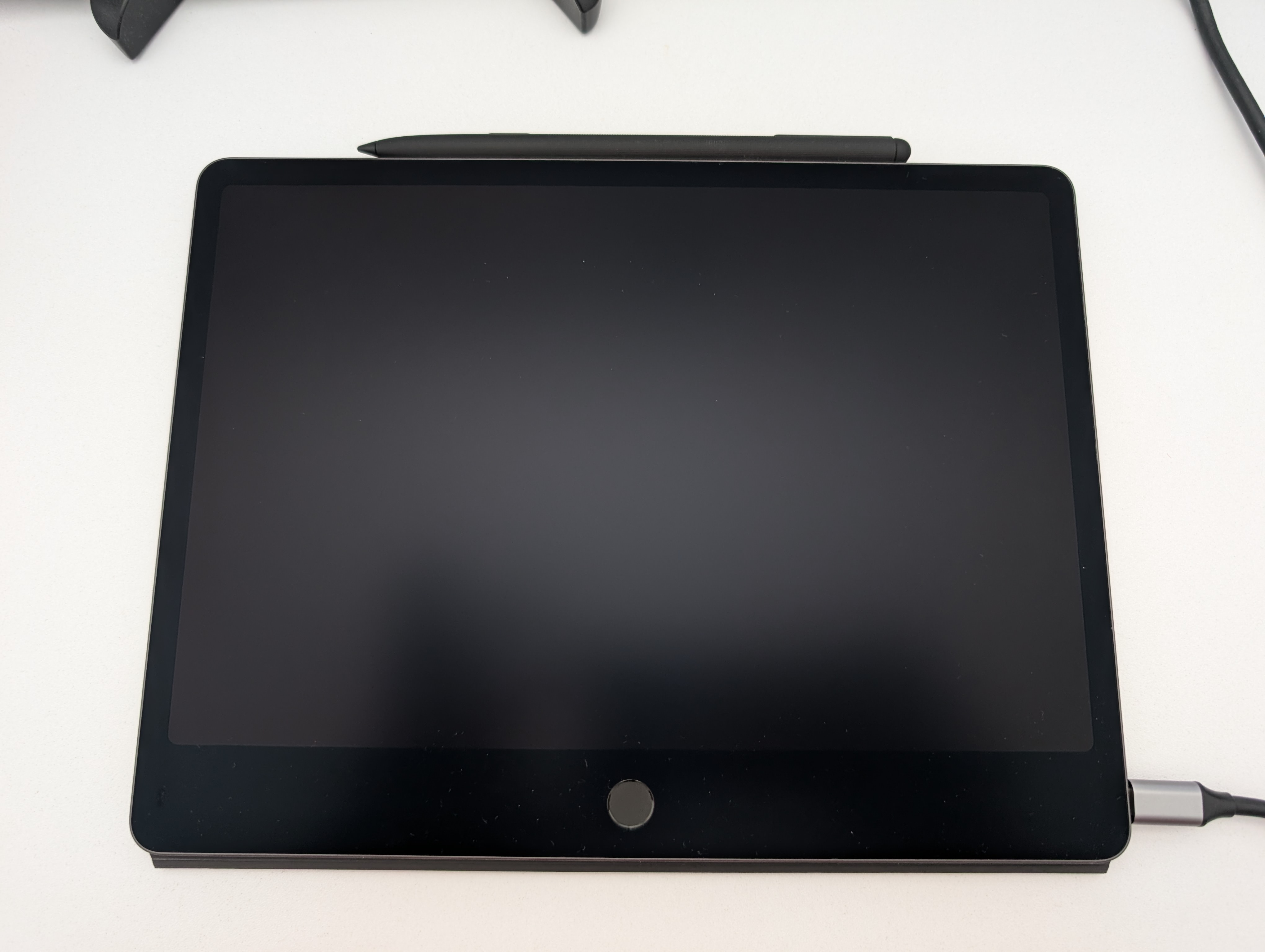
Build quality is reasonable for the price; it's not going to compete with premium tablets on materials, but it feels solid enough in the hand. That said, the device overall feels heavier than I'd prefer - it's noticeably heavier than the notepads I'd otherwise use for writing, so the fatigue is real during longer sessions.
There is one design flaw that becomes a constant annoyance because I'm left-handed. The ambient light sensor sits on the top-left edge in the orientation the tablet seems to want to be used, which means it's very easy to cover with a thumb or palm.
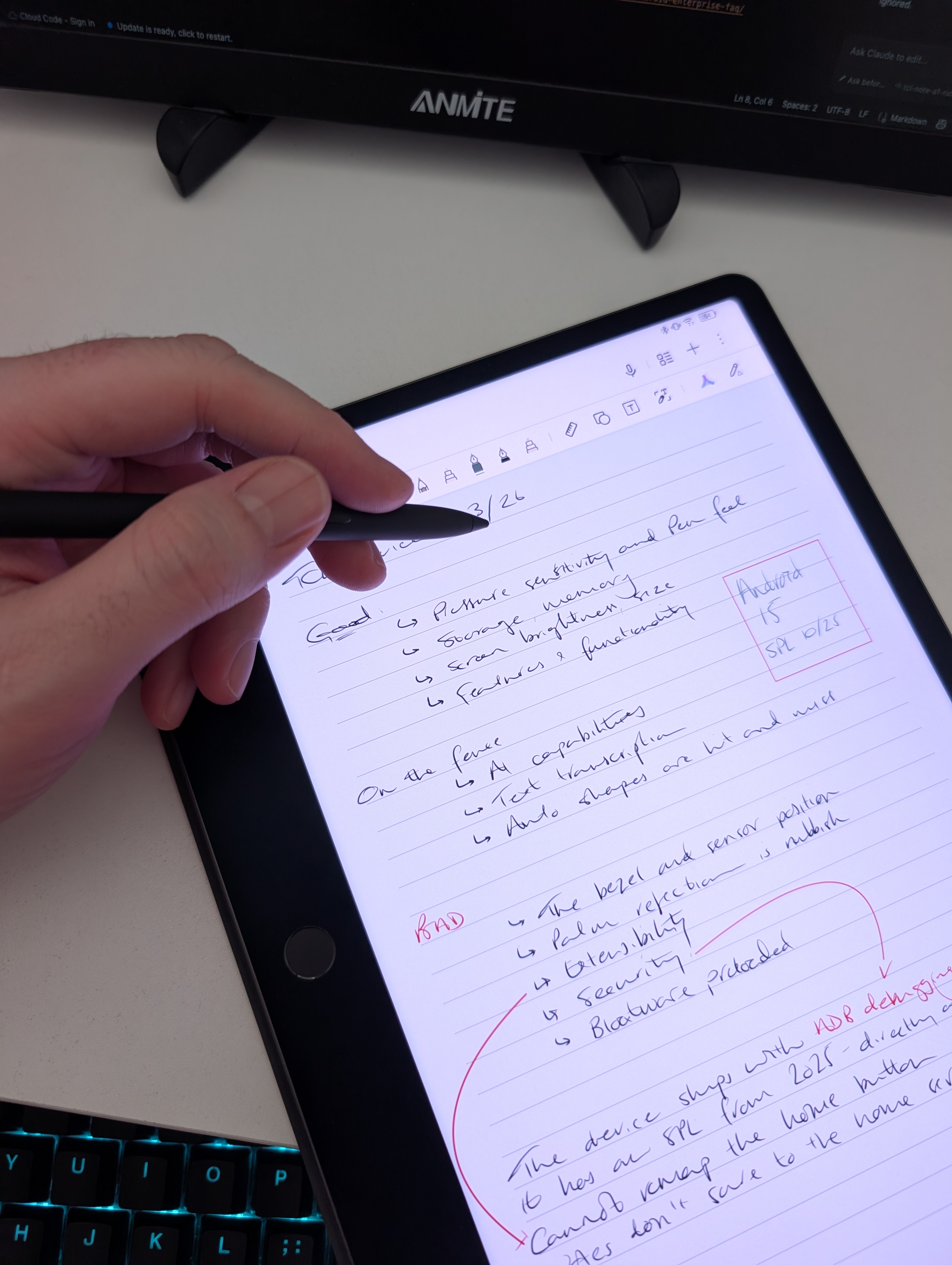
Do that and the display starts dimming because the sensor thinks the room has gone dark. Flip the tablet around and the sensor problem goes away, but so does the little bit of bezel that makes it comfortable to hold - resting a palm anywhere near the edge then leads to accidental touches. They could have put the sensor on the opposite side to where the button is and avoided the issue entirely. I eventually gave up and turned auto brightness off; I'm happy enough to adapt it manually whenever I pick it up, but I shouldn't have to.
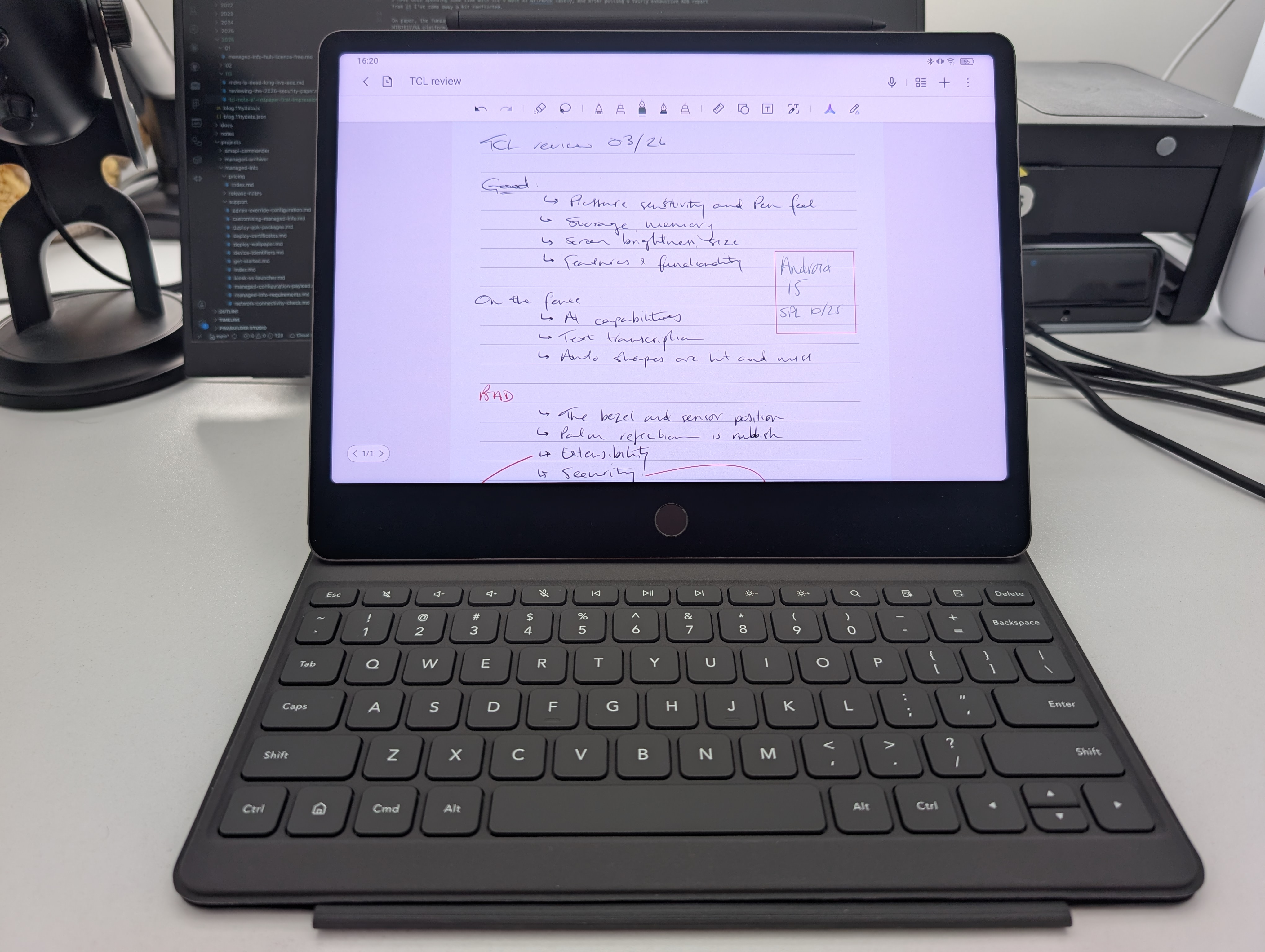
Speaking of setting the brightness, battery life is fine - the 8,000mAh cell is sizeable for a tablet this weight. It doesn't charge very quickly at all despite supporting 33W, though. I use my Anker dock (pictured just to the right of the picture below) and it doesn't seem to want to pull more than 17W, frequently dropping to as low as 2-3W.
In terms of the bundled accessories I received with the Kickstarter, the keyboard case requires fundamental knowledge of origami to get set up, but once it's in place it works well and is nice to type on. The book case keeps everything well protected, including a space for the pen within the clasp, which is a nice touch.
Spec
#- Platform: MediaTek MT8781V/NA (Helio G100)
- RAM: 8GB
- Storage: 256GB
- Display: 11.5", 1440x2200, 120Hz, matte NXTPAPER finish
- Battery: 8,000mAh, 33W charging
- Pen: T-Pen Pro, 8,192 levels of pressure sensitivity, dual tips, built-in eraser, <5ms latency
- Dimensions: 260.1 x 196.6 x 5.5mm, 500g
- Connectivity: Wi-Fi
- Android 15
The notes experience
#This is what the device is built around, so it deserves its own section.
The writing tool configuration (the toolbar shown above a note when opened) is genuinely great. Each of the five tool slots can be individually configured - different pen types, colours, thicknesses - which means switching between presets is quick and not fiddly at all. I could set all five to the same pen tool with different colours if I wanted to, which depending on the complexity of the note may even be something I'll do.
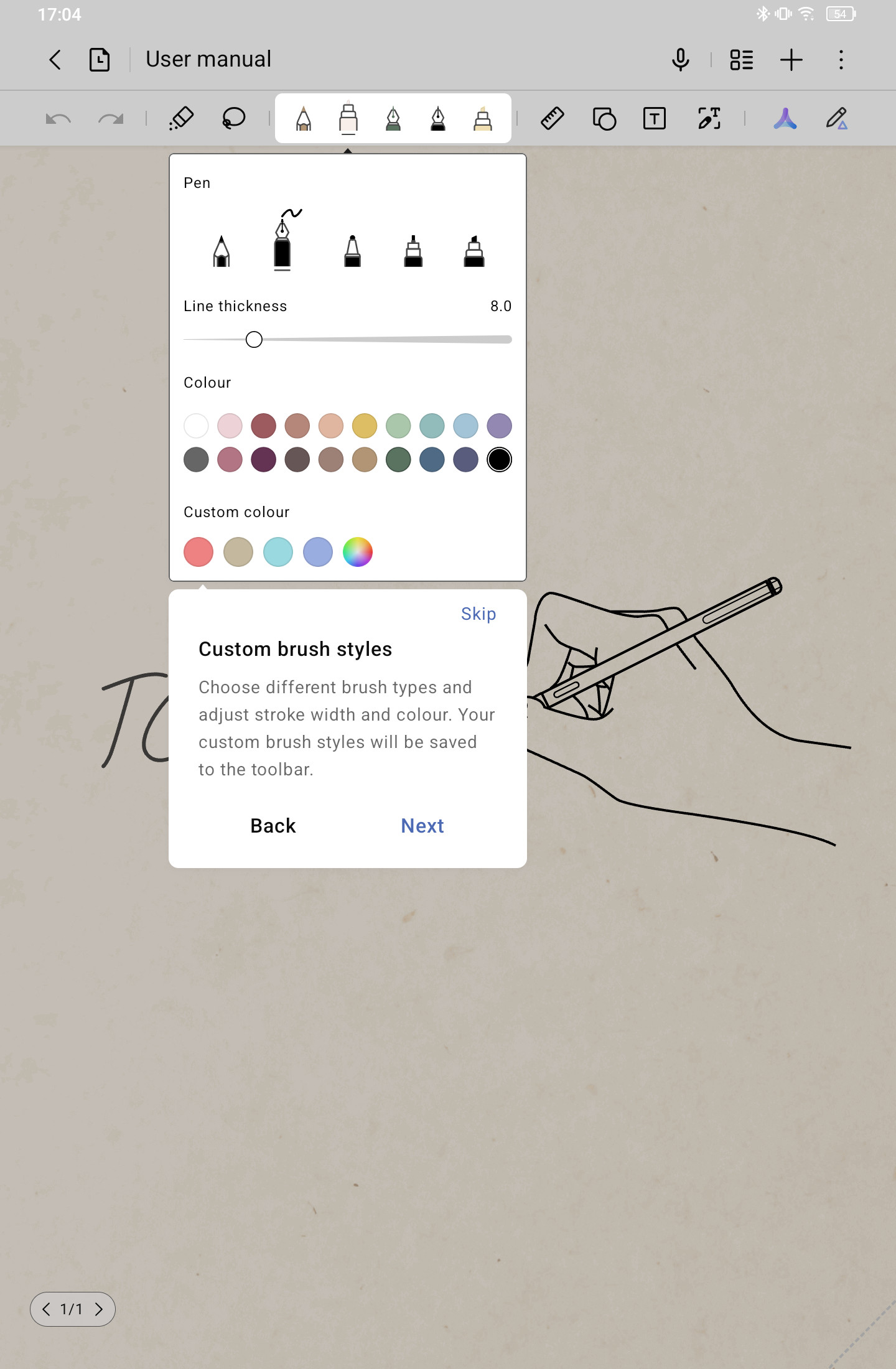
The ruler is useful too, particularly for layouts that don't come as standard templates. It can be rotated to any angle, which is helpful.
One-stroke shape detection works pretty well for larger shapes, though smaller shapes aren't always detected.
Transcription, on the other hand, takes a long time and I found it not to be very accurate. There's also no option to transcribe a full page or full document of notes, which is frustrating - though I can partially get around it by asking the device to translate the full page to English, which it does, albeit very poorly.
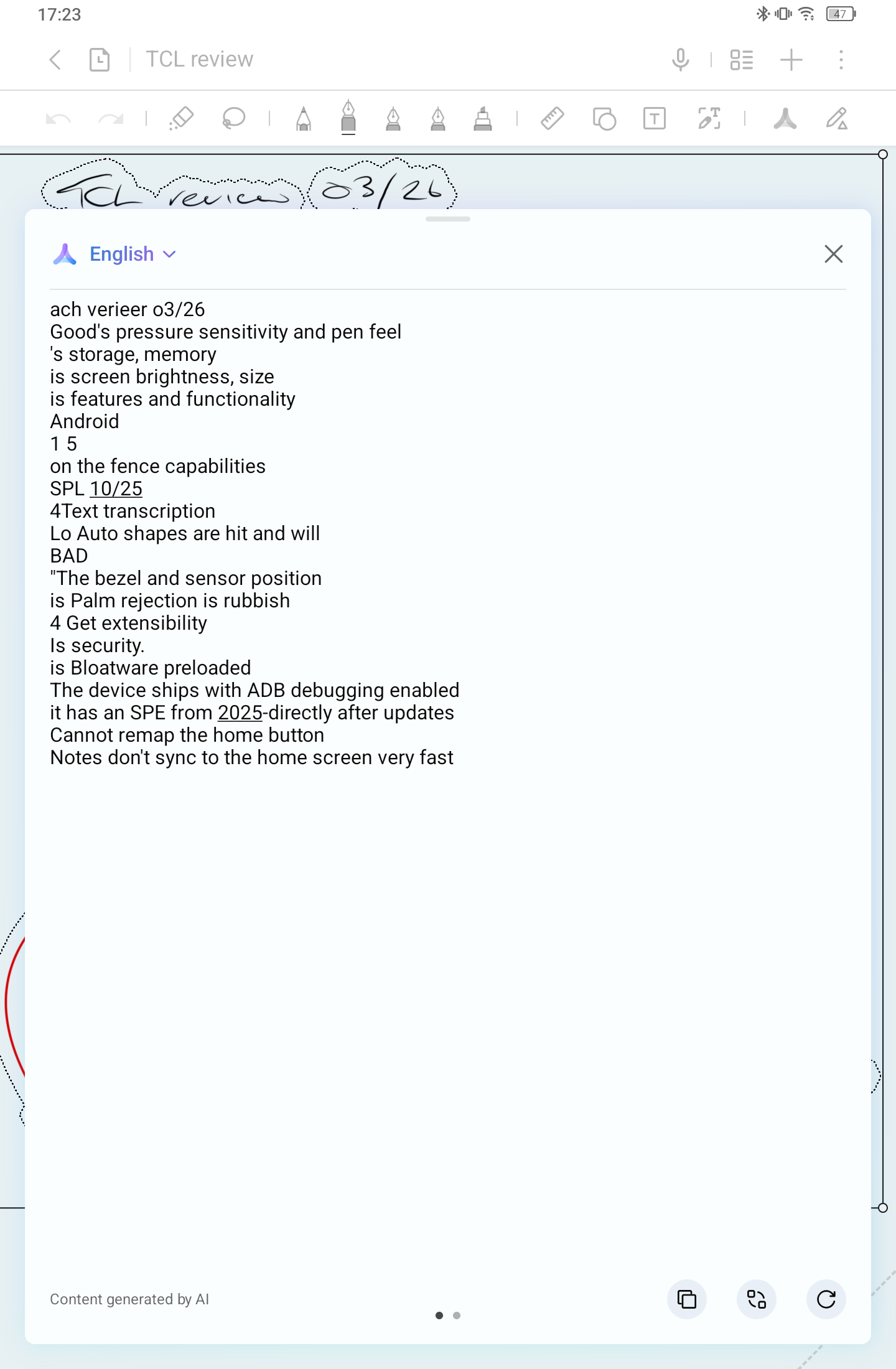
I tried the Inspiration Space, which is triggered by holding down the pen button and circling something on screen. It takes a screenshot and puts it into the notes. The problem is it doesn't work outside of the notes app, so I have no use for it - I don't normally need to take inspiration from my own notes, but news articles, images, Google searches... that would actually help.
Note management itself is fine: add, delete, rename, tap and drag, folders. All par for the course and nothing noteworthy to comment on.
One annoyance worth mentioning: when exiting a note - particularly accidentally, which happens easily when using the thin bezel edge and palming the screen - it can take quite a long time for the note I was working on to show back up in the list. The first few times this happened I was searching for it, convinced it had disappeared, before I realised I just had to wait for it to catch up.
Software
#From a platform-security standpoint, the basics are all where you'd want them: it's a production user build with a locked bootloader, green verified boot, SELinux enforcing, and file-based encryption enabled. There are no active management agents or obvious abuse of the device policy APIs I could see. That's a solid starting point.
But that's where it drops off a bit.
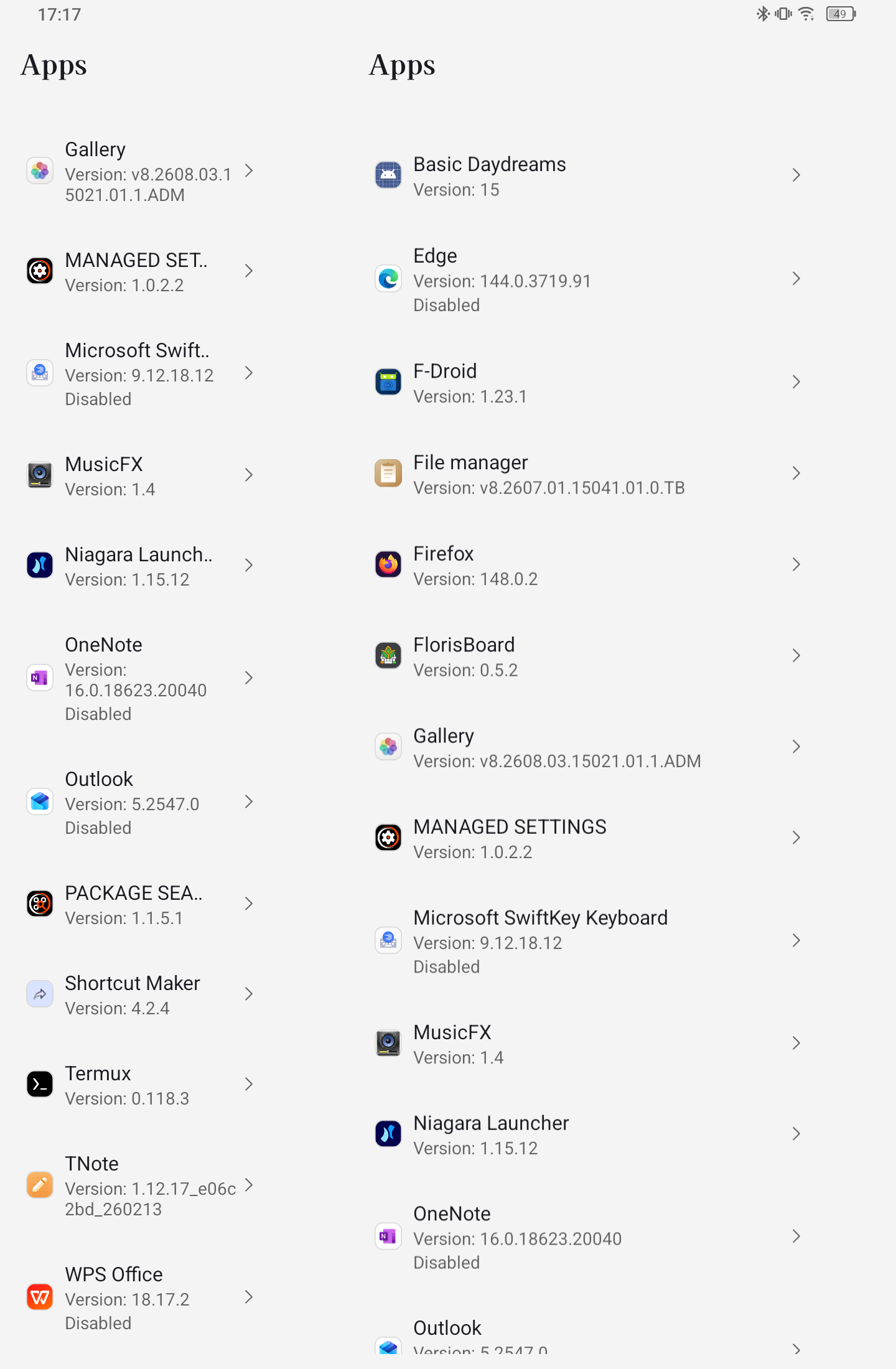
For a start, it shipped with a pile of Microsoft preload apps and other bloat - Edge, Outlook, OneNote, SwiftKey, and WPS Office among them - all living under /preload/priv-app, which is irremovable. I've since sideloaded replacements and disabled those bundled. As with every device that ships with perma-crap preloaded, doing so in the user space (/data) would be so much nicer than having to disable irremovable apps baked into the ROM.
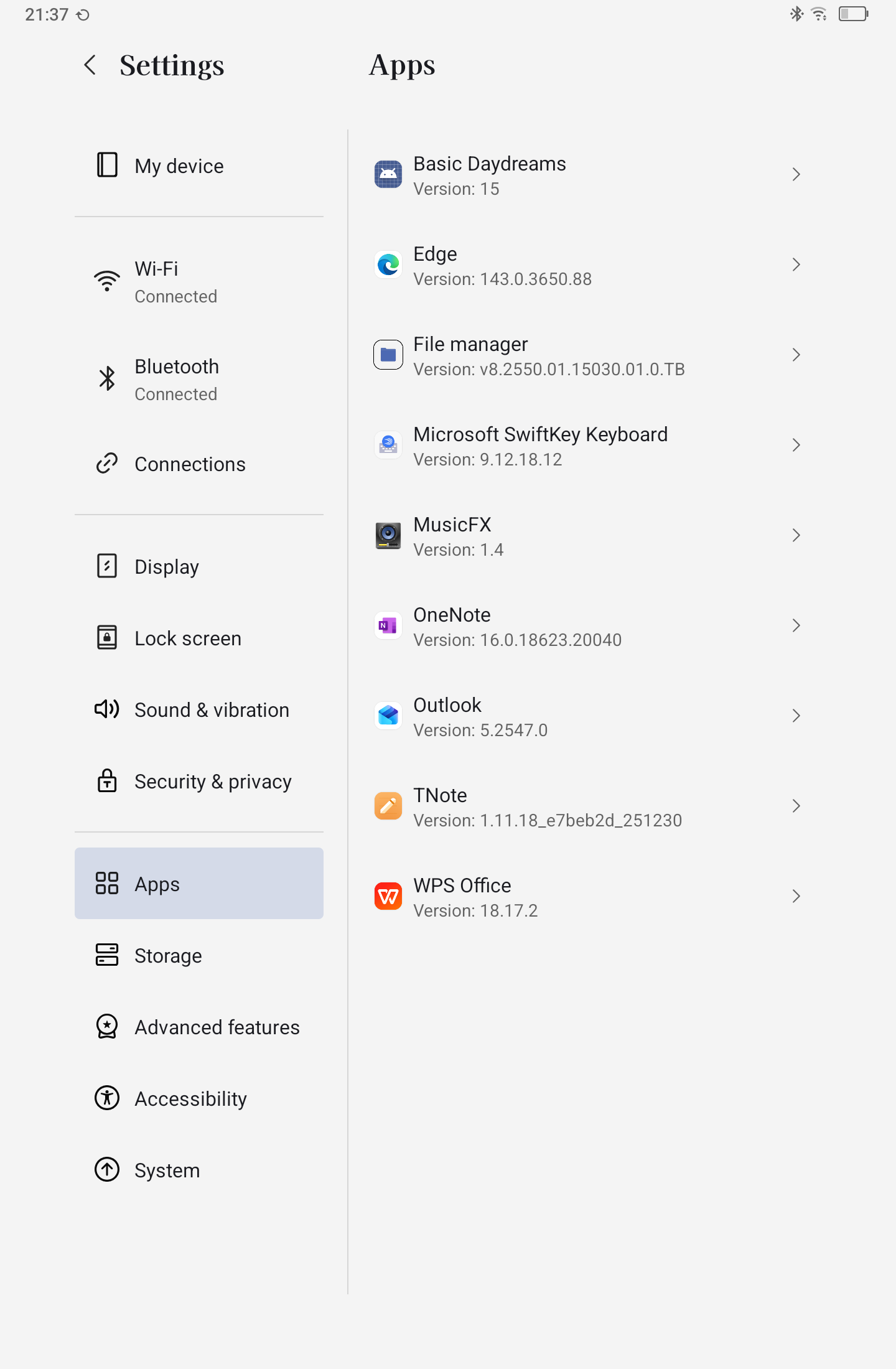
There are also a number of TCL packages with broad privileges, which feel more noteworthy from a posture standpoint than the consumer bloat itself. Obviously par for the course with OEM packages, but the lack of GMS means these system apps have no guards to prevent them doing anything and everything they want.
The security patch level was also older than I'd like for a device delivered in March of 2026: 2025-10-05. Not catastrophic, but old enough to notice immediately on a brand new tablet.
The settings experience is unusual. TCL have removed a bunch of typically accessible settings from Android for no obvious reason other than someone's assumption they won't be needed. I can't search in settings. I can't view system apps under settings > apps. I can't turn on developer options. I can't set a different home app.
I'll also point out the changes made to settings may have introduced other issues, like the split-settings view landing in a situation where the left-hand panel, used for navigating the settings pages, would be replaced with a settings screen. Not ideal.
I can't remap the "iPad home button" - that's legitimately how it looks and feels. I set Niagara as the HOME role holder and confirmed the normal Android HOME intent would resolve to it, but pressing the home button on the device still kept dragging me back into TCL's own Notes launcher. ADB made the split very obvious: Android thought Niagara was Home, TCL's UI behaviour thought otherwise, and since the native Android gestures had been maimed, I couldn't fall back to just ignoring the button in favour of a gesture.
That's the kind of thing that makes a device feel much more customised than it first appears. You can change the default launcher, but not really. TCL's layer still gets the final say - and this notes-first approach isn't just marketing, it's baked into the software decisions and shell behaviour.
Enterprise
#It's AOSP, so standard DPC device-owner management should work in theory, but AMAPI, device trust, and the typical GMS-dependent provisioning flows are out of the question. I haven't tested what I can and can't do as I don't much see the point - this is more of a consumer device that might find its way into a BYO scenario rather than something you'd deploy at scale.
What I will say is the posture around developer access is bizarre. My device shipped with ADB enabled, but the build number field - normally used to tap-to-enable developer options - has been repurposed as a link/button for updating the tablet. It's both less secure out of the box and equally difficult to lock down.
I used adb shell settings put global development_settings_enabled 1 to get access to developer settings, which also revealed desktop mode - though I couldn't get it to display on any external monitor, which is a shame. Setting dev options back to 0 temporarily turned off ADB, but it turned itself back on later. Make of that what you will.
TCL should really bring back standard Android behaviour - ship with ADB disabled, allow developer settings, and leave the decision to the end user on how this device should behave. As it stands now I wouldn't want these littering my corporate network.
Conclusion
#I end up in a strange place with the Note A1.
The base Android build is more solid than I expected. The notes experience has some genuinely nice touches - the writing tool presets and the ruler in particular - but is let down by poor transcription and some sluggish behaviour. The out-of-box software load is worse than it needs to be, and TCL's decision to strip out several standard Android settings while simultaneously shipping with ADB enabled is a strange combination.
Maybe that's the fairest summary: the security and platform basics are questionable, the core notes functionality is decent, and the product decisions around software, preload content, and UX details get in the way of the hardware more than they should.
But it takes notes. They're decent. I can export them. So it does what it says on the tin.. I just wish it did Android a little better.
For anyone interested in the notes-first reviews, do also check out existing coverage from CNET, ZDNET, and PCMag for broader hands-on perspectives.
Articles
2026
2025
- Google Play Protect is now the custom DPC gatekeeper, and everyone is a threat by default
- 12 deliveries of AE-mas (What shipped in Android Enterprise in 2025)
- The 12 AE requests of Christmas (2025 Edition)
- RCS Archival and you: clearing up the misconceptions
- Device Trust from Android Enterprise: What it is and how it works (hands-on)
- Android developer verification: what this means for consumers and enterprise
- AMAPI finally supports direct APK installation, this is how it works
- The Android Management API doesn't support pulling managed properties (config) from app tracks. Here's how to work around it
- Hands-on with CVE-2025-22442, a work profile sideloading vulnerability affecting most Android devices today
- AAB support for private apps in the managed Google Play iFrame is coming, take a first look here
- What's new (so far) for enterprise in Android 16
2024
- Android 15: What's new for enterprise?
- How Goto's acquisition of Miradore is eroding a once-promising MDM solution
- Google Play Protect no longer sends sideloaded applications for scanning on enterprise-managed devices
- Mobile Pros is moving to Discord
- Avoid another CrowdStrike takedown: Two approaches to replacing Windows
- Introducing MANAGED SETTINGS
- I'm joining NinjaOne
- Samsung announces Knox SDK restrictions for Android 15
- What's new (so far) for enterprise in Android 15
- Google quietly introduces new quotas for unvalidated AMAPI use
- What is Play Auto Install (PAI) in Android and how does it work?
- AMAPI publicly adds support for DPC migration
- How do Android devices become certified?
2023
- Mute @channel & @here notifications in Slack
- A guide to raising better support requests
- Ask Jason: How should we manage security and/or OS updates for our devices?
- Pixel 8 series launches with 7 years of software support
- Android's work profile behaviour has been reverted in 14 beta 5.3
- Fairphone raises the bar with commitment to Android updates
- Product files: The DoorDash T8
- Android's work profile gets a major upgrade in 14
- Google's inactive account policy may not impact Android Enterprise customers
- Product files: Alternative form factors and power solutions
- What's new in Android 14 for enterprise
- Introducing Micro Mobility
- Android Enterprise: A refresher
2022
- What I'd like to see from Android Enterprise in 2023
- Thoughts on Android 12's password complexity changes
- Google Play target API requirements & impact on enterprise applications
- Sunsetting Discuss comment platform
- Google publishes differences between Android and Android Go
- Android Go & EMM support
- Relaunching bayton.org
- AER dropped the 3/5 year update mandate with Android 11, where are we now?
- I made a bet with Google (and lost)
2020
- Product files: Building Android devices
- Google announce big changes to zero-touch
- VMware announces end of support for Device Admin
- Google launch the Android Enterprise Help Community
- Watch: An Android Enterprise discussion with Hypergate
- Listen again: BM podcast #144 - Jason Bayton & Russ Mohr talk Android!
- Google's Android Management API will soon support COPE
- Android Enterprise in 11: Google reduces visibility and control with COPE to bolster privacy.
- The decade that redefined Android in the enterprise
2019
- Why Intune doesn't support Android Enterprise COPE
- VMware WS1 UEM 1908 supports Android Enterprise enrolments on closed networks and AOSP devices
- The Bayton 2019 Android Enterprise experience survey
- Android Enterprise Partner Summit 2019 highlights
- The Huawei ban and Enterprise: what now?
- Dabbling with Android Enterprise in Q beta 3
- Why I moved from Google WiFi to Netgear Orbi
- I'm joining Social Mobile as Director of Android Innovation
- Android Enterprise in Q/10: features and clarity on DA deprecation
- MWC 2019: Mid-range devices excel, 5G everything, form-factors galore and Android Enterprise
- UEM tools managing Android-powered cars
- Joining the Android Enterprise Experts community
- February was an interesting month for OEMConfig
- Google launch Android Enterprise Recommended for Managed Service Providers
- Migrating from Windows 10 Mobile? Here's why you should consider Android
- AER expands: Android Enterprise Recommended for EMMs
- What I'd like to see from Android Enterprise in 2019
2018
- My top Android apps in 2018
- Year in review: 2018
- MobileIron Cloud R58 supports Android Enterprise fully managed devices with work profiles
- Hands on with the Huawei Mate 20 Pro
- Workspace ONE UEM 1810 introduces support for Android Enterprise fully managed devices with work profiles
- G Suite no longer prevents Android data leakage by default
- Live: Huawei Mate series launch
- How to sideload the Digital Wellbeing beta on Pie
- How to manually update the Nokia 7 Plus to Android Pie
- Hands on with the BQ Aquaris X2 Pro
- Hands on with Sony OEMConfig
- The state of Android Enterprise in 2018
- BYOD & Privacy: Don’t settle for legacy Android management in 2018
- Connecting two Synologies via SSH using public and private key authentication
- How to update Rsync on Mac OS Mojave and High Sierra
- Intune gains support for Android Enterprise COSU deployments
- Android Enterprise Recommended: HMD Global launch the Nokia 3.1 and Nokia 5.1
- Android Enterprise Partner Summit 2018 highlights
- Live: MobileIron LIVE! 2018
- Android Enterprise first: AirWatch 9.4 lands with a new name and focus
- Live: Android Enterprise Partner Summit 2018
- Samsung, Oreo and an inconsistent Android Enterprise UX
- MobileIron launch Android Enterprise work profiles on fully managed devices
- Android P demonstrates Google's focus on the enterprise
- An introduction to managed Google Play
- MWC 2018: Android One, Oreo Go, Android Enterprise Recommended & Android Enterprise
- Enterprise ready: Google launch Android Enterprise Recommended
2017
- Year in review: 2017
- Google is deprecating device admin in favour of Android Enterprise
- Hands on with the Sony Xperia XZ1 Compact
- Moto C Plus giveaway
- The state of Android Enterprise in 2017
- Samsung launched a Note 8 for enterprise
- MobileIron officially supports Android Enterprise QR code provisioning
- Android zero-touch enrolment has landed
- MobileIron unofficially supports QR provisioning for Android Enterprise work-managed devices, this is how I found it
- Hands on with the Nokia 3
- Experimenting with clustering and data replication in Nextcloud with MariaDB Galera and SyncThing
- Introducing documentation on bayton.org
- Goodbye Alexa, Hey Google: Hands on with the Google Home
- Restricting access to Exchange ActiveSync
- What is Mobile Device Management?
- 8 tips for a successful EMM deployment
- Long-term update: the fitlet-RM, a fanless industrial mini PC by Compulab
- First look: the FreedomPop V7
- Vault7 and the CIA: This is why we need EMM
- What is Android Enterprise (Android for Work) and why is it used?
- Introducing night mode on bayton.org
- What is iOS Supervision and why is it used?
- Hands on with the Galaxy TabPro S
- Introducing Nextcloud demo servers
- Part 4 - Project Obsidian: Obsidian is dead, long live Obsidian
2016
- My top Android apps 2016
- Hands on with the Linx 12V64
- Wandera review 2016: 2 years on
- Deploying MobileIron 9.1+ on KVM
- Hands on with the Nextcloud Box
- How a promoted tweet landed me on Finnish national news
- Using RWG Mobile for simple, cross-device centralised voicemail
- Part 3 – Project Obsidian: A change, data migration day 1 and build day 2
- Hands on: fitlet-RM, a fanless industrial mini PC by Compulab
- Part 2 - Project Obsidian: Build day 1
- Part 1 - Project Obsidian: Objectives & parts list
- Part 0 - Project Obsidian: Low power NAS & container server
- 5 Android apps improving my Chromebook experience
- First look: Android apps on ChromeOS
- Competition: Win 3 months of free VPS/Container hosting - Closed!
- ElasticHosts review
- ElasticHosts: Cloud Storage vs Folders, what's the difference?
- Adding bash completion to LXD
- Android N: First look & hands-on
- Springs.io - Container hosting at container prices
- Apple vs the FBI: This is why we need MDM
- Miradore Online MDM: Expanding management with subscriptions
- Lenovo Yoga 300 (11IBY) hard drive upgrade
- I bought a Lenovo Yoga 300, this is why I'm sending it back
- Restricting access to Exchange ActiveSync
- Switching to HTTPS on WordPress
2015
2014
- Is CYOD the answer to the BYOD headache?
- BYOD Management: Yes, we can wipe your phone
- A fortnight with Android Wear: LG G Watch review
- First look: Miradore Online free MDM
- Hands on: A weekend with Google Glass
- A month with Wandera Mobile Gateway
- Final thoughts: Dell Venue Pro 11 (Atom)
- Thoughts on BYOD
- Will 2014 bring better battery life?
- My year in review: Bayton.org
- The best purchase I've ever made? A Moto G for my father
2013
2012
- My Top Android Apps 12/12
- The Nexus 7 saga: Resolved
- Recycling Caps Lock into something useful - Ubuntu (12.04)
- The Nexus 7 saga continues
- From Wows to Woes: Why I won't be recommending a Nexus7 any time soon.
- Nexus7: What you need to know
- Why I disabled dlvr.it links on Facebook
- HTC Sense: Changing the lockscreen icons from within ADW
2011
- Push your Google+ posts to Twitter and Facebook
- Using multiple accounts with Google.
- The "Wn-R48" (Windows on the Cr-48)
- Want a Google+ invite?
- Publishing to external sources from Google+
- Dell Streak review. The Phone/Tablet Hybrid
- BlueInput: The Bluetooth HID driver Google forgot to include
- Pushing Buzz to Twitter with dlvr.it
- Managing your social outreach with dlvr.it
- When Awe met Some. The Cr-48 and Gnome3.
- Living with Google's Cr-48 and the cloud.
- Downtime 23-25/04/2011
- Are you practising "safe surfing"?
- The Virtualbox bug: "Cannot access the kernel driver" in Windows
- Putting tech into perspective
2010
- Have a Google Buzz Christmas
- Root a G1 running Android 1.6 without recovery!
- Windows 7 display issues on old Dell desktops
- Google added the Apps flexibility we've been waiting for!
- Part I: My 3 step program for moving to Google Apps
- Downloading torrents
- Completing the Buzz experience for Google Maps Mobile
- Quicktip: Trial Google Apps
- Quicktip: Save internet images fast
- Turn your desktop 3D!
- Part III - Device not compatible - Skype on 3
- Swype not compatible? ShapeWriter!
- Don't wait, get Swype now!
- HideIP VPN. Finally!
- Google enables Wave for Apps domains
- Aspire One touch screen
- Streamline XP into Ubuntu
- Edit a PDF with Zamzar
- Google offering Gmail addresses in the UK
- Google Wave: Revolutionising blogs!
- Hexxeh's Google Chrome OS builds
- Update: Buzz on Windows Mobile
- Alternatives to Internet Explorer
- Wordress 3.0 is coming!
- Skype for WM alternatives
- Browsing on a (data) budget? Opera!
- Buzz on unsupported mobiles
- Buzz on your desktop
- What's all the Buzz?
- Part II: Device not compatible - Skype on 3
- Part I - Device not compatible - Skype on 3
- Dreamscene on Windows 7
- Free Skype with 3? There's a catch..