Contents
Articles
2026
- Upcoming work profile support for Googlebook first look
- A week with Googlebook
- Googlebook in enterprise? Here's my wishlist
- Googlebooks meet enterprise, eventually
- Zero-touch initiation comes to the app generators
- I built an app for my son's music lessons, then reported its API out of existence
- What the last decade of Android Enterprise DPC migration could have been
- Introducing DeltaWatch: web change detection
- Android Enterprise lands on Android XR
- How MIKA works: building an AI assistant for bayton.org
- Bayton.org goes AI-first: meet MIKA
- TCL Note A1 NXTPAPER hands-on
- What's new in the 2026 Android Security Paper?
- MDM is dead. Long live ACE?
- Introducing AMAPI Commander: converse with your Android estate
- MANAGED INFO is going licence-free
2025
- Google Play Protect is now the custom DPC gatekeeper, and everyone is a threat by default
- 12 deliveries of AE-mas (What shipped in Android Enterprise in 2025)
- The 12 AE requests of Christmas (2025 Edition)
- RCS Archival and you: clearing up the misconceptions
- Device Trust from Android Enterprise: What it is and how it works (hands-on)
- Android developer verification: what this means for consumers and enterprise
- AMAPI finally supports direct APK installation, this is how it works
- The Android Management API doesn't support pulling managed properties (config) from app tracks. Here's how to work around it
- Hands-on with CVE-2025-22442, a work profile sideloading vulnerability affecting most Android devices today
- AAB support for private apps in the managed Google Play iFrame is coming, take a first look here
- What's new (so far) for enterprise in Android 16
2024
- Android 15: What's new for enterprise?
- How Goto's acquisition of Miradore is eroding a once-promising MDM solution
- Google Play Protect no longer sends sideloaded applications for scanning on enterprise-managed devices
- Mobile Pros is moving to Discord
- Avoid another CrowdStrike takedown: Two approaches to replacing Windows
- Introducing MANAGED SETTINGS
- I'm joining NinjaOne
- Samsung announces Knox SDK restrictions for Android 15
- What's new (so far) for enterprise in Android 15
- Google quietly introduces new quotas for unvalidated AMAPI use
- What is Play Auto Install (PAI) in Android and how does it work?
- AMAPI publicly adds support for DPC migration
- How do Android devices become certified?
2023
- Mute @channel & @here notifications in Slack
- A guide to raising better support requests
- Ask Jason: How should we manage security and/or OS updates for our devices?
- Pixel 8 series launches with 7 years of software support
- Android's work profile behaviour has been reverted in 14 beta 5.3
- Fairphone raises the bar with commitment to Android updates
- Product files: The DoorDash T8
- Android's work profile gets a major upgrade in 14
- Google's inactive account policy may not impact Android Enterprise customers
- Product files: Alternative form factors and power solutions
- What's new in Android 14 for enterprise
- Introducing Micro Mobility
- Android Enterprise: A refresher
2022
- What I'd like to see from Android Enterprise in 2023
- Thoughts on Android 12's password complexity changes
- Google Play target API requirements & impact on enterprise applications
- Sunsetting Discuss comment platform
- Google publishes differences between Android and Android Go
- Android Go & EMM support
- Relaunching bayton.org
- AER dropped the 3/5 year update mandate with Android 11, where are we now?
- I made a bet with Google (and lost)
2020
- Product files: Building Android devices
- Google announce big changes to zero-touch
- VMware announces end of support for Device Admin
- Google launch the Android Enterprise Help Community
- Watch: An Android Enterprise discussion with Hypergate
- Listen again: BM podcast #144 - Jason Bayton & Russ Mohr talk Android!
- Google's Android Management API will soon support COPE
- Android Enterprise in 11: Google reduces visibility and control with COPE to bolster privacy.
- The decade that redefined Android in the enterprise
2019
- Why Intune doesn't support Android Enterprise COPE
- VMware WS1 UEM 1908 supports Android Enterprise enrolments on closed networks and AOSP devices
- The Bayton 2019 Android Enterprise experience survey
- Android Enterprise Partner Summit 2019 highlights
- The Huawei ban and Enterprise: what now?
- Dabbling with Android Enterprise in Q beta 3
- Why I moved from Google WiFi to Netgear Orbi
- I'm joining Social Mobile as Director of Android Innovation
- Android Enterprise in Q/10: features and clarity on DA deprecation
- MWC 2019: Mid-range devices excel, 5G everything, form-factors galore and Android Enterprise
- UEM tools managing Android-powered cars
- Joining the Android Enterprise Experts community
- February was an interesting month for OEMConfig
- Google launch Android Enterprise Recommended for Managed Service Providers
- Migrating from Windows 10 Mobile? Here's why you should consider Android
- AER expands: Android Enterprise Recommended for EMMs
- What I'd like to see from Android Enterprise in 2019
2018
- My top Android apps in 2018
- Year in review: 2018
- MobileIron Cloud R58 supports Android Enterprise fully managed devices with work profiles
- Hands on with the Huawei Mate 20 Pro
- Workspace ONE UEM 1810 introduces support for Android Enterprise fully managed devices with work profiles
- G Suite no longer prevents Android data leakage by default
- Live: Huawei Mate series launch
- How to sideload the Digital Wellbeing beta on Pie
- How to manually update the Nokia 7 Plus to Android Pie
- Hands on with the BQ Aquaris X2 Pro
- Hands on with Sony OEMConfig
- The state of Android Enterprise in 2018
- BYOD & Privacy: Don’t settle for legacy Android management in 2018
- Connecting two Synologies via SSH using public and private key authentication
- How to update Rsync on Mac OS Mojave and High Sierra
- Intune gains support for Android Enterprise COSU deployments
- Android Enterprise Recommended: HMD Global launch the Nokia 3.1 and Nokia 5.1
- Android Enterprise Partner Summit 2018 highlights
- Live: MobileIron LIVE! 2018
- Android Enterprise first: AirWatch 9.4 lands with a new name and focus
- Live: Android Enterprise Partner Summit 2018
- Samsung, Oreo and an inconsistent Android Enterprise UX
- MobileIron launch Android Enterprise work profiles on fully managed devices
- Android P demonstrates Google's focus on the enterprise
- An introduction to managed Google Play
- MWC 2018: Android One, Oreo Go, Android Enterprise Recommended & Android Enterprise
- Enterprise ready: Google launch Android Enterprise Recommended
2017
- Year in review: 2017
- Google is deprecating device admin in favour of Android Enterprise
- Hands on with the Sony Xperia XZ1 Compact
- Moto C Plus giveaway
- The state of Android Enterprise in 2017
- Samsung launched a Note 8 for enterprise
- MobileIron officially supports Android Enterprise QR code provisioning
- Android zero-touch enrolment has landed
- MobileIron unofficially supports QR provisioning for Android Enterprise work-managed devices, this is how I found it
- Hands on with the Nokia 3
- Experimenting with clustering and data replication in Nextcloud with MariaDB Galera and SyncThing
- Introducing documentation on bayton.org
- Goodbye Alexa, Hey Google: Hands on with the Google Home
- Restricting access to Exchange ActiveSync
- What is Mobile Device Management?
- 8 tips for a successful EMM deployment
- Long-term update: the fitlet-RM, a fanless industrial mini PC by Compulab
- First look: the FreedomPop V7
- Vault7 and the CIA: This is why we need EMM
- What is Android Enterprise (Android for Work) and why is it used?
- Introducing night mode on bayton.org
- What is iOS Supervision and why is it used?
- Hands on with the Galaxy TabPro S
- Introducing Nextcloud demo servers
- Part 4 - Project Obsidian: Obsidian is dead, long live Obsidian
2016
- My top Android apps 2016
- Hands on with the Linx 12V64
- Wandera review 2016: 2 years on
- Deploying MobileIron 9.1+ on KVM
- Hands on with the Nextcloud Box
- How a promoted tweet landed me on Finnish national news
- Using RWG Mobile for simple, cross-device centralised voicemail
- Part 3 – Project Obsidian: A change, data migration day 1 and build day 2
- Hands on: fitlet-RM, a fanless industrial mini PC by Compulab
- Part 2 - Project Obsidian: Build day 1
- Part 1 - Project Obsidian: Objectives & parts list
- Part 0 - Project Obsidian: Low power NAS & container server
- 5 Android apps improving my Chromebook experience
- First look: Android apps on ChromeOS
- Competition: Win 3 months of free VPS/Container hosting - Closed!
- ElasticHosts review
- ElasticHosts: Cloud Storage vs Folders, what's the difference?
- Adding bash completion to LXD
- Android N: First look & hands-on
- Springs.io - Container hosting at container prices
- Apple vs the FBI: This is why we need MDM
- Miradore Online MDM: Expanding management with subscriptions
- Lenovo Yoga 300 (11IBY) hard drive upgrade
- I bought a Lenovo Yoga 300, this is why I'm sending it back
- Restricting access to Exchange ActiveSync
- Switching to HTTPS on WordPress
2015
2014
- Is CYOD the answer to the BYOD headache?
- BYOD Management: Yes, we can wipe your phone
- A fortnight with Android Wear: LG G Watch review
- First look: Miradore Online free MDM
- Hands on: A weekend with Google Glass
- A month with Wandera Mobile Gateway
- Final thoughts: Dell Venue Pro 11 (Atom)
- Thoughts on BYOD
- Will 2014 bring better battery life?
- My year in review: Bayton.org
- The best purchase I've ever made? A Moto G for my father
2013
2012
- My Top Android Apps 12/12
- The Nexus 7 saga: Resolved
- Recycling Caps Lock into something useful - Ubuntu (12.04)
- The Nexus 7 saga continues
- From Wows to Woes: Why I won't be recommending a Nexus7 any time soon.
- Nexus7: What you need to know
- Why I disabled dlvr.it links on Facebook
- HTC Sense: Changing the lockscreen icons from within ADW
2011
- Push your Google+ posts to Twitter and Facebook
- Using multiple accounts with Google.
- The "Wn-R48" (Windows on the Cr-48)
- Want a Google+ invite?
- Publishing to external sources from Google+
- Dell Streak review. The Phone/Tablet Hybrid
- BlueInput: The Bluetooth HID driver Google forgot to include
- Pushing Buzz to Twitter with dlvr.it
- Managing your social outreach with dlvr.it
- When Awe met Some. The Cr-48 and Gnome3.
- Living with Google's Cr-48 and the cloud.
- Downtime 23-25/04/2011
- Are you practising "safe surfing"?
- The Virtualbox bug: "Cannot access the kernel driver" in Windows
- Putting tech into perspective
2010
- Have a Google Buzz Christmas
- Root a G1 running Android 1.6 without recovery!
- Windows 7 display issues on old Dell desktops
- Google added the Apps flexibility we've been waiting for!
- Part I: My 3 step program for moving to Google Apps
- Downloading torrents
- Completing the Buzz experience for Google Maps Mobile
- Quicktip: Trial Google Apps
- Quicktip: Save internet images fast
- Turn your desktop 3D!
- Part III - Device not compatible - Skype on 3
- Swype not compatible? ShapeWriter!
- Don't wait, get Swype now!
- HideIP VPN. Finally!
- Google enables Wave for Apps domains
- Aspire One touch screen
- Streamline XP into Ubuntu
- Edit a PDF with Zamzar
- Google offering Gmail addresses in the UK
- Google Wave: Revolutionising blogs!
- Hexxeh's Google Chrome OS builds
- Update: Buzz on Windows Mobile
- Alternatives to Internet Explorer
- Wordress 3.0 is coming!
- Skype for WM alternatives
- Browsing on a (data) budget? Opera!
- Buzz on unsupported mobiles
- Buzz on your desktop
- What's all the Buzz?
- Part II: Device not compatible - Skype on 3
- Part I - Device not compatible - Skype on 3
- Dreamscene on Windows 7
- Free Skype with 3? There's a catch..
A week with Googlebook
Contents
I said in my first Googlebook post I'd come back to it once I had hardware, and having picked up an HP Googlebook 14 earlier this week after pre-ordering it at Google's Enterprise Summit in London, I'm about ready to pop some thoughts together on how I've been getting on with it for daily work since.
For those who missed the launch, Googlebook is Google's new Android laptop platform, with Android and web applications, a Linux environment, and Gemini deeply integrated throughout. Googlebook OS (Aluminium) is built on Android, while the Chromebooks (those Googlebooks will eventually replace) run ChromeOS - it's a brand new operating system.
I came into this with a perception, based on the marketing and hype leading up to release. Buying one doesn't, however, get you everything you may already be using on a Chromebook, as I've been finding out.
When I put together my enterprise wishlist, I'd assumed more of the existing ChromeOS experience would come across. Google had already been clear about the wait for enterprise support, but I hadn't expected to miss browser profile switching or find Linux GUI applications quite so awkward to use alongside everything else. Those omissions have made it harder to replace both my Chromebook or my other daily drivers, even before getting into limitations around Android Enterprise.
Since much of my work is app or web based, getting started was fairly straightforward. I've kept going back to my usual machine for Android Studio, but the Googlebook has picked up a substantial amount of everything else, so it's earning its keep for now.
The HP Googlebook 14
#I've liked working on the HP. The keyboard was comfortable, with decent travel and a decent backlight, and the trackpad was a good size and responsive. The screen was clear and bright, and battery life was excellent in my use too. I don't have a measured runtime to offer, but I had very little to complain about there since it'd last a full day without any fuss.
Initially, automatic brightness kept the display rather dim. An update seemed to improve that; looking through the OTA archive, it did appear that a brightness configuration patch was included. I haven't checked the rest of that build's changes in depth, but it didn't seem to fix much more visibly than that.
Performance was amongst the best I've seen from an Android device, which made the random ANRs I keep getting all the more frustrating (more below). The rest of the experience is fast enough that it doesn't feel like a machine struggling with the work I'm giving it. Whatever is happening will hopefully be patched out in due course.
That said, the hardware itself left a lot to be desired, with quality issues leading to me taking it back for a replacement.
Apps, and their web replacements
#I've been less impressed with how Googlebook chooses the applications I'll use. Some are familiar Android apps, others open a web experience, and it isn't always obvious which I'm going to get. I can both quite happily most of the time, but I'd prefer to make that choice myself.
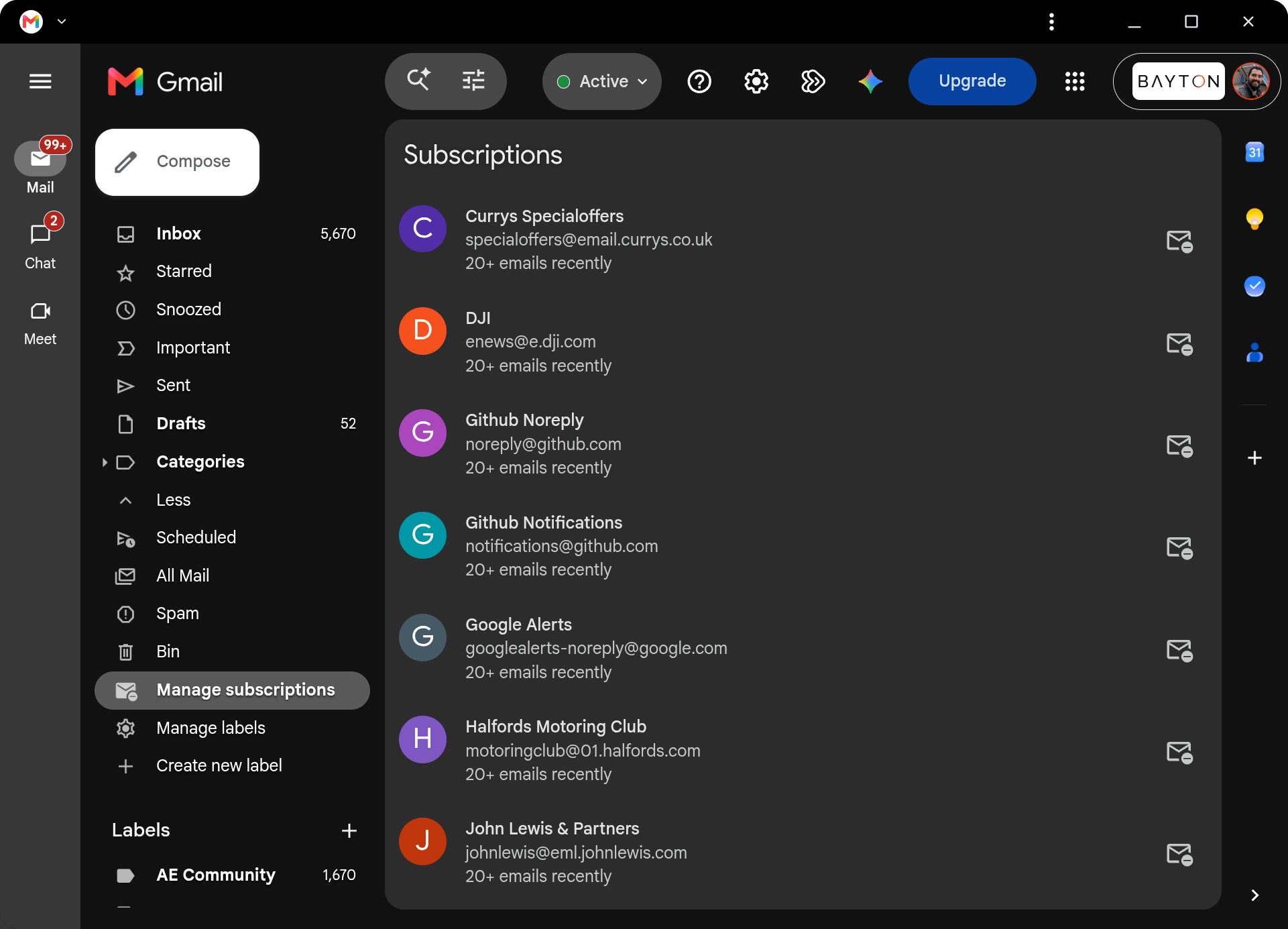
Gmail opens into the web interface. I'd much rather have the Android tablet experience there, which is what I expected when opening Gmail on an Android laptop. I can get at my mail, of course, but it's not the experience I want. I haven't yet looked into replacing the installed version with the one I'd prefer.
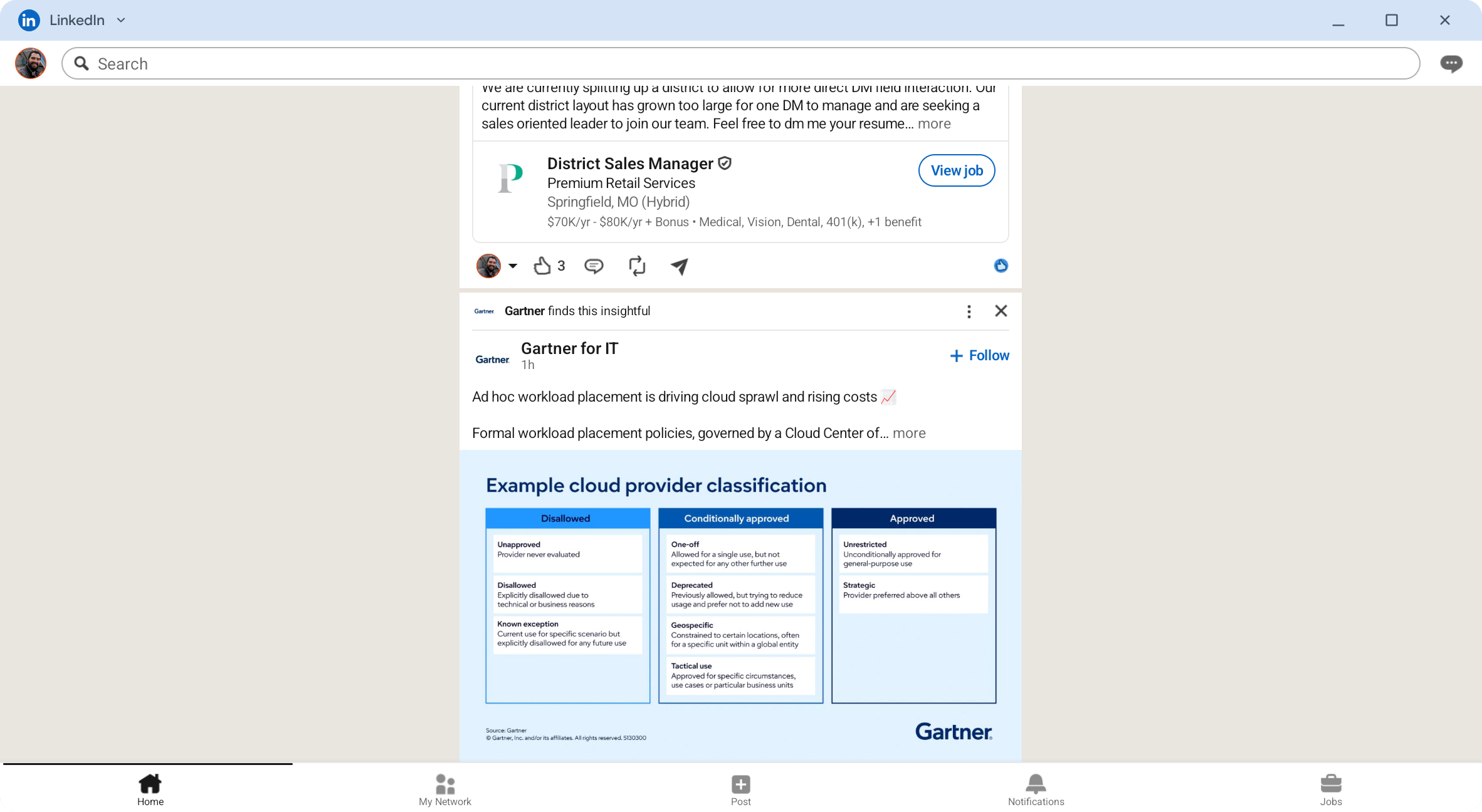
LinkedIn is the opposite. Its Android application does a terrible job of using the larger display, and I'd choose the website for that. Google can't fix every developer's layout, but those applications are part of what people will judge the Googlebook on, and some of them aren't doing it any favours.
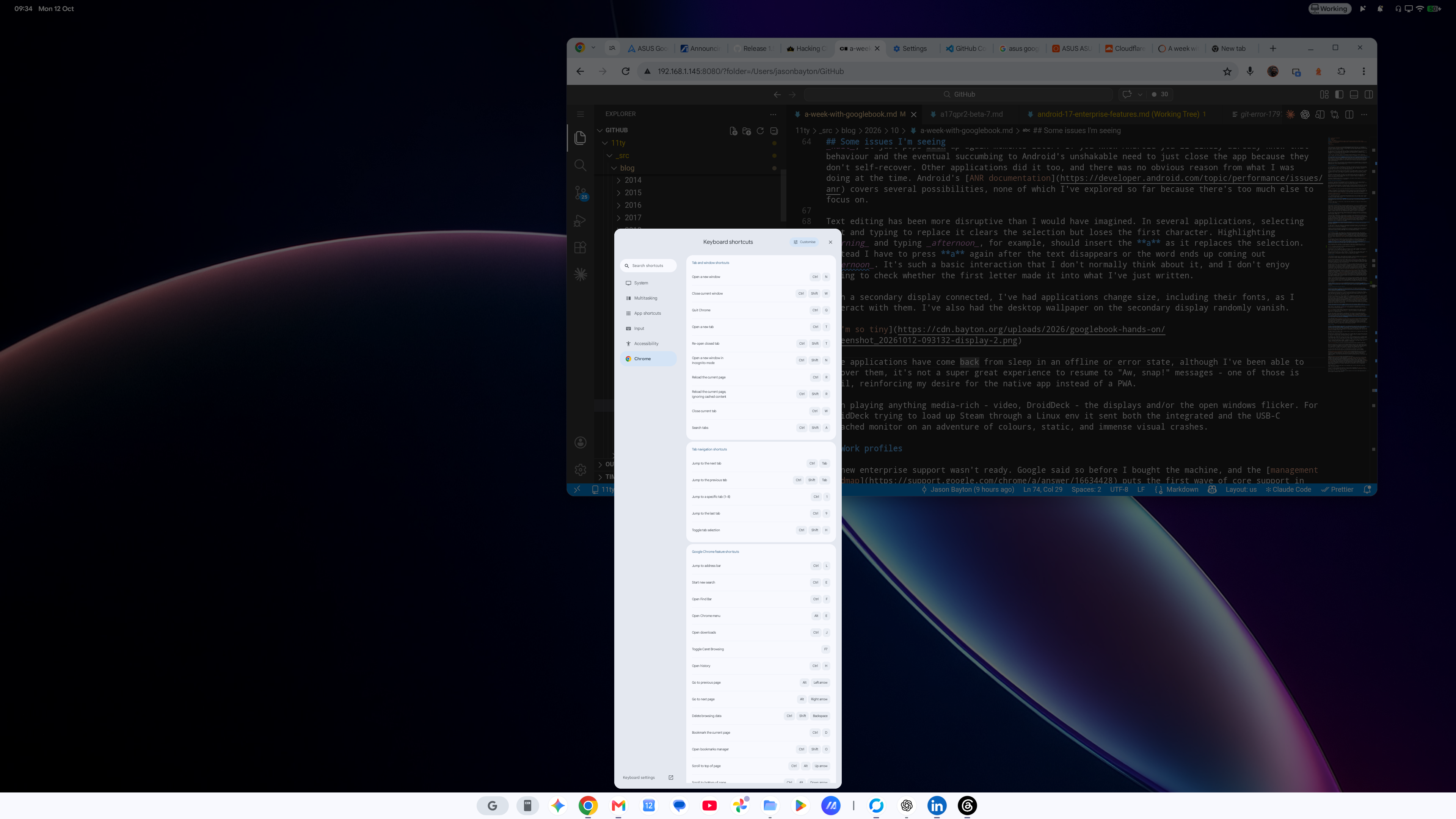
I do appreciate having more of the desktop Chrome experience than I get on my phone. There's plenty I'd use in the browser anyway. I'd just like to choose which version to use for each service, rather than having to accept the one offered.
A semi-related read if interested: Ben Schoon's look at the app situation goes into the desktop labels in Play and and the ambiguity associated.
That hasn't been much of a concern here, I would like more indication of if apps will launch natively or spin up a PWA though, including on the launcher itself, not dissimilar to how work apps are badged perhaps.
A few features I'm missing
#Chrome profile switching has been a particularly awkward omission. I use it on my Chromebook and every other machine I have to keep account contexts separate while leaving everything available on the same desktop. Here I've been using different Chrome release channels instead, presently beta alongside stable, to get separate browser installations. That gets me some separation, but adding a Google account still takes me through Android's system account manager (something of a blessing and a curse for the years I've been dealing with Android). The account I wanted confined to a work browser then appears in account choices across the Googlebook. I don't particularly want to be checking which identity I'm being offered every time I open something elsewhere.. but that's a minor quibble.
Proper browser profiles are on the way, according to Mishaal. There's no date yet, so I'm keeping multiple Chrome channels installed for now, though I wouldn't suggest it as a satisfactory replacement for the profile switching Chrome elsewhere already has.. it also may not solve the multiple system Google accounts integrated, but we'll see what comes of it.
Linux is another disappointment, mainly because I'd assumed it would behave much as it does on my Chromebook. There, I can launch a graphical Linux application and use its window alongside everything else. On Googlebook, my GUI applications opened in the graphics view inside Terminal, which wasn't at all what I was trying to achieve. Google's Terminal documentation describes a Debian virtual machine with that graphics screen for GUI applications. There's file integration and folder sharing with the host, so the environment isn't cut off from the rest of the machine. I'd like launcher entries and individual windows for those applications, much as I already have on ChromeOS.
The Verge's roundtable describes similar frustration with the launcher and taskbar behaviour.
I'd been trying to bring over graphical work applications (and Android Studio!), and stopped doing that for the moment. I already have a Chromebook that handles those better, which makes this a difficult feature to give up in the switch to Googlebook.
Google's Linux roadmap, published on 12 October, includes GUI applications integrated into the launcher, VM persistence independent of the Terminal window, and USB passthrough with ADB support. I'd be pleased to have those, particularly when trying to bring Android development onto the machine, but there's no delivery date yet.
Elsewhere, swiping between desktops is ingrained from using a Mac. Googlebook doesn't have the gesture I keep trying to use, and Gemini's suggestion that a four-finger swipe would do it was incorrect. I found myself accidentally sending myself back in the current application instead.
Some issues I'm seeing
#I'll be browsing in Chrome, then randomly get an application-not-responding prompt. When choosing Wait, it just pops back up again moments later. If you know Android you'll likely already know that behaviour and the eventual succumbing to Android's unshakable need to just close the app because they don't reliably self-recover. Other applications did it too, and there was no obvious reason from what I was doing at the time. Android's ANR documentation covers several possibilities, none of which I've explored so far because there's too much else to focus on.
Text editing has been more disruptive than I would have imagined. In several applications, selecting text and typing to replace it clears the selection but loses the first character. Highlighting morning and typing afternoon, for example, should insert the a as it replaces the selection. Instead I have to press a again after the text disappears or the word ends up coming out fternoon. It's such a basic interaction that I don't normally think about it, and I don't enjoy having to check whether the first letter made it into what I've just written.
With a secondary display connected, I've had applications change size, including their fonts, as I interact with them. I've also had the desktop wallpaper on the secondary display randomly vanish.
Some applications have come back from sleep in an offline or error state, although I've been able to recover them, it's not a super great experience to resume to "Aw, snap!" messages - one of those is Gmail, reinforcing my desire for the native app instead of a PWA.
When playing anything media-rich - video, DroidDeck - the displays and/or the open windows flicker. For DroidDeck trying to load up Steam through a Linux env it sent both the integrated and the USB-C attached monitor on an adventure of colours, static, and immense visual crashes.
Work profiles
#I knew enterprise support wasn't ready. Google said so before I bought the machine, and the management roadmap puts the first wave of core support in the second half of 2027, followed by a phased rollout over multiple years.
I'm still going to advocate for work profile support on this personally owned Android laptop. I'm using it for work and personal tasks, just as I do my phone, and the absence is already limiting which applications I'll put on it. On some initial testing the required system supported feature flags have been declared unsupported, but that could hopefully just be a flag to disable it intentionally, rather than support being impossible sooner than H2 next year.
An extra Chrome flavour can't give me a managed work copy of an Android application. Where I use an app personally and for work, both currently have to live in the same profile - assuming they support multiple accounts - but without the separation or management I'd normally have. I've been leaving some work applications off the machine all together to maintain DLP on both sides of the divide. Adding another account inside an app doesn't give an administrator managed Google Play deployment, managed configuration or the work-profile security policies they would otherwise apply, but it may allow work apps to query other apps, gain insight into the personal environment, and so forth. No thanks.
Googlebook supports separate device users, as the account guidance explains. Switching the whole desktop session whenever I need to answer a work message or do something personal is far too cumbersome for me (ignoring the fact that notifications and such wouldn't be possible). I need both available while I'm working, without continually leaving one session to enter another. An Android work profile already provides that. It is a managed profile associated with the parent user, with separate application data and a defined management scope, while both personal and work applications remain available within the same signed-in desktop session. The EMM can deploy and configure its work applications without those being mixed into the personal copies.
Google's current guidance explicitly rules out work profiles and device management, blocks sign-in for accounts requiring third-party EMM management, and says managed Google Play is unavailable. Some Chrome browser policies can apply, but they don't provide management of the Android applications I need for work. I'd like to be able to enrol a work profile through my chosen EMM. That would let me use more of my work applications on the laptop I've already bought, with the management and separation I'd normally have on my phone (or tablets, which reasonably match a desktop experience on multiple OEMs to what Googlebook is today, in my opinion).
I've put together a work-profile tracker with guidance on submitting feedback if you're running into the same limitation. There's more in the enterprise wishlist, but this is the one I'm missing every day.. and I do love a good tracker to gently remind Google I'm waiting for something :)
Phone integration and the other additions
#Cross-device services on my Galaxy Z Fold 8 started working over the weekend. My Pixel had worked earlier, but the Samsung is the phone I currently actively carry, so I can finally get app streaming without swapping phones. Mishaal posted about the setup and Samsung rollout.
I've switched off notification sync in cross-device services because it was becoming noise. Samsung system notifications were coming over as well as ordinary app notifications, including alerts when the Fold's edge panel did something. I'm signed into the same services on both devices too, so I was getting a lot of duplicate notifications on top of that.
Thanks to u/d1863's tip for pointing me towards Settings > Notifications > Notification read, reply and control > Cross-Device Services > See all apps on the Googlebook. There are per-app controls there, but configuring them is cumbersome. I'm not prepared to sift through 300+ apps to find the ones to turn off, so notification sync is staying off for now.
Some apps won't stream at all as they're marked secure - Authenticator, banking apps, so on. For those that work, some UI elements don't render properly in the streamed applications, and copying a link in one hasn't copied it to the Googlebook clipboard. I'd expected to be able to paste it into the browser on the laptop, but it stays on the phone. That makes it rather less convenient when the reason for opening the streamed application was to get something out of it. In his PCMag impressions, Joe Osborne describes needing troubleshooting and restarts to get pairing and Continue On working, and questions casting apps that Googlebook can run locally. I've only just got the Samsung working, so I'll see how much use I get from it over the next few days.. but I can say already so far work profile apps from the Samsung aren't coming across, and that sucks.
I haven't been doing much with the AI features beyond a few of the new tools. Rambler is OK. I'm already accustomed to voice input in Gboard, which treats me well, and Rambler adds to that experience.
Magic Pointer is less impressive. It doesn't feel like a particularly big advance over Circle to Search, and for something called Magic Pointer, the presentation is decidedly ordinary. I've yet to find much reason to get excited about it.
Quick Insert has been more useful, mostly for finding emojis while writing. The Alt + . shortcut is awkward, so the dedicated key has been welcome. It does way more than locate emojis of course, I've also used it to paste clipboard, images, etc. It's genuinely decent.
I've also been poking around underneath, and added the HP and the Asus to the system application database (HP, Asus for anyone interested in what ships on them. Antigravity caught my attention, although trying to run its APK on either my Fold or Pixel failed on the protected com.android.virtualization.terminal.permission.MANAGE_TERMINAL permission. Sideloading the package doesn't grant that access, so there wasn't much further I could get with it as installed.
I can understand PCMag's assessment that these currently suit Android superfans. I'm willing to spend time working around the omissions and finding versions of applications I can get on with. That has let me do plenty of my daily work on it, although nothing has become drastically easier, and some tasks have become harder. I'd keep using it, but I wouldn't assume someone with a similar workload would enjoy the same adjustments. I miss things I already have on my Chromebook, and even more on my Macs and Linux machines.. and I'd like Google to get those working well here too.
Over to ASUS
#As above, I finished prematurely with the HP, as a screen quality issue that looks like it may affect this first batch took me back to Currys for a replacement over the weekend. The only replacement HP they had in stock had the same stressed, warped display, so I started looking for another option. Dell's XPS wasn't available either, leaving me with Intel models to choose from. I went with the ASUS Googlebook 14, which was the same price and roughly on par in spec.
The ASUS is quite a bit lighter, and I'm looking forward to making use of its additional USB-A and HDMI ports given the HP had only two USB C.
ASUS advertises a magnesium-aluminium alloy chassis, but it flexes under very little pressure and feels far more flimsy than the HP did. I genuinely assumed it was made of plastic throughout, but obviously I was mistaken. I'd forgive anyone else thinking the same, though.
The keyboard is OK, though doesn't feel as nice as HP's, and the fingerprint sensor is indented enough to be uncomfortable to use. It's also been less reliable, even after registering my fingerprints again several times. Apart from the display problem that sent it back, I preferred the feel of the HP.
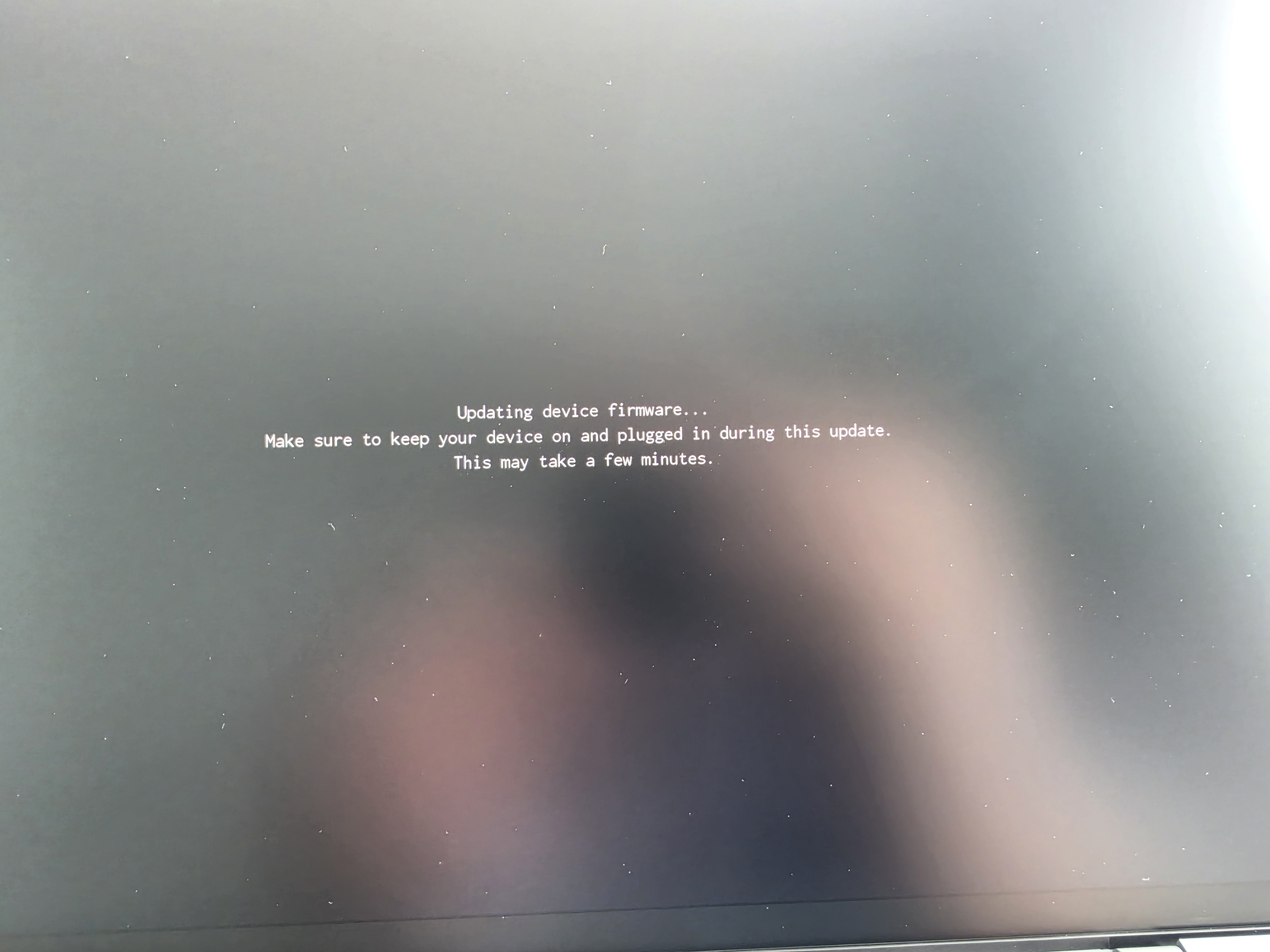
The first thing setup wanted was an update. I accepted it, and the normal update screen was followed by a small, pixelated firmware-update message, repeatedly flashing until it was ready to boot. The flashing, low-resolution text was a poor introduction to the machine.
Once set up and sorted, I noticed a few more Chrome extensions synced over after sign-in than I saw on the HP. One notable issue I had there was the ChatGPT extension trying to open a desktop application that isn't available on Googlebook, and it doesn't try to open the Android app instead. That extension isn't usable here as it stands. That's naturally a developer issue on OpenAIs side, though I'm surprised it wasn't considered as a potential user experience to attempt to assist with.
On the subject of ChatGPT, when trying to use the camera to authenticate, it just gave up. I got as far as a Pairing failed screen, where it said the camera was unavailable and suggested closing other apps using it before trying again.
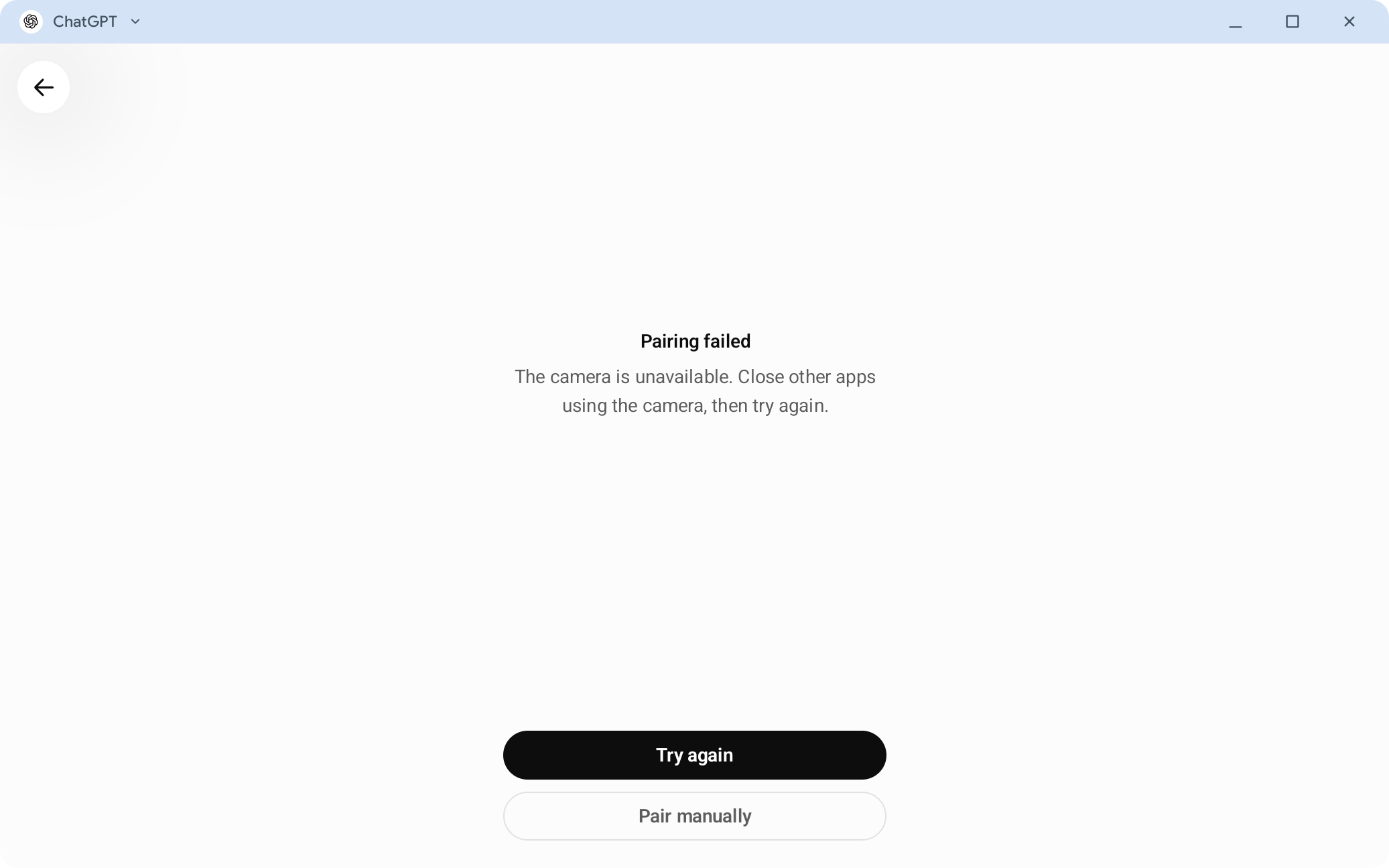
The camera wasn't being used elsewhere, so that was an odd experience.
I'm still unsure about the Intel choice. I'm concerned about the overhead of running Android applications that ship Arm-only native code, and would have preferred more choice of hardware. I also have historic experiences with Intel that just aren't that great in power management, performance, thermal control.. you name it.
Android supports x86 and x86-64 as well as Arm, and ART handles application bytecode for the device's processor. An Android application isn't necessarily an Arm binary. Where it includes native libraries, however, the architectures supplied by the developer determine whether translation is needed. My concern is with those Arm-only libraries and what translating them costs in performance and battery life.
Google told Android Authority that some complex applications and games need developer tuning to run well on Intel Googlebooks. Tom's Guide's review of the Intel Acer Googlebook 14 also reports Android applications and games misbehaving or crashing completely, although it doesn't name them or identify the cause. Neither report tells me which applications to watch out for on the ASUS. Google's follow-up on 7 October describes a 64-bit Arm-to-x86-64 binary translation layer, and claims 96.6% of the top 10,000-plus most-used applications are available in Play and run without issues on Intel models. Most of the exclusions, it says, are down to large-screen or hardware requirements across platforms, such as an application needing a gyroscope.
Since Google hasn't named the apps known to be troublesome (yet), we can't know what to avoid (or badger the developers about).
Zoom has given me another reason to be uncomfortable with the Intel choice. Opening its Android app brings up a warning that future updates will require an Arm device and this machine will no longer be supported. There's a Continue to use button, but I can't reasonably rely on it for work while it's telling me updates won't support the laptop longer term.
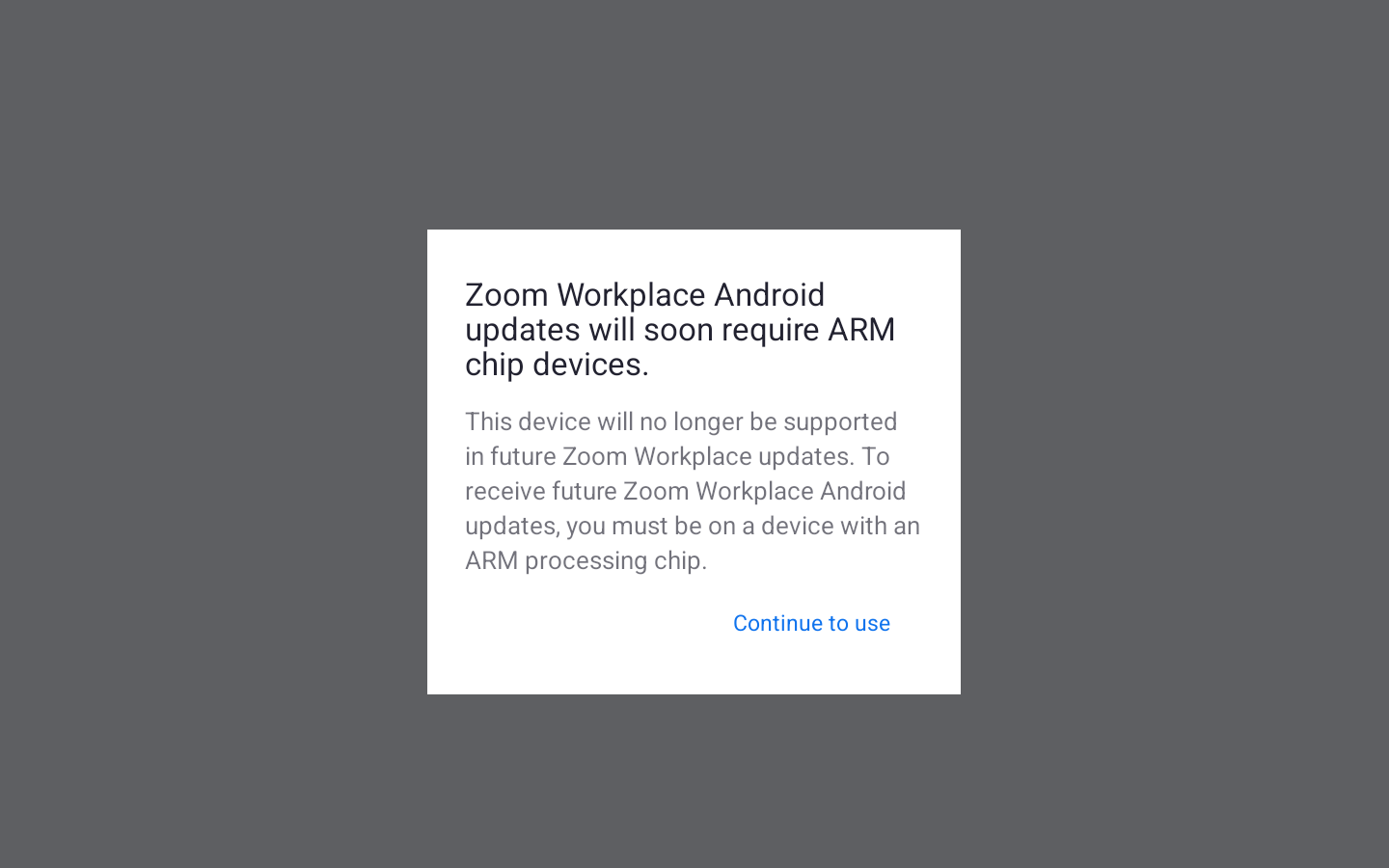
Even with work profile/enterprise support, an experience like this in the first week kills a product for me.
Update, 12 October: performance on the ASUS
#After a full day working on the ASUS, performance has been significantly worse than on the HP with even minimal work spinning up the fans to maintain thermal performance. I've been getting stuttering during ordinary use, including while typing, and for some reason taking screenshots makes it particularly unhappy. The HP had those occasional Chrome ANRs I mentioned above, but otherwise felt fast and comfortable to work on. I didn't feel the need to spend a day collecting bug reports to find out why it was struggling.
That is however what I've done on the ASUS, and Chrome and Terminal both show rendering delays, while even Settings managed to stop responding due to memory pressure running nothing more than what the HP was handling without issue.
The traces showed waits for graphics buffers, and substantial memory pressure around the Settings freeze. Driving the external 4K display also appears to add to the load, which isn't unexpected, but to the point of it being noticeable absolutely is.
I don't know what's responsible, or whether these stalls all share the same cause, but the only on-paper difference is Arm vs Intel so far, given I've been relying on integrated graphics in both cases.
What I didn't test, since the ASUS supports it, is routing to the 4k monitor over HDMI instead of USB C, and I'm not going to; my monitor hooks up via USB C on everything and there's no reason it shouldn't work fine here, too.
While I'd expected to be getting on with work by now, I've spent rather more of the first day troubleshooting than I'd have liked.
I'm afraid the ASUS will also be going back to whence it came. For a device costing over £1000, the experience is immensely sub-par.
That leaves only the Dell XPS to review next, but given delivery will take 20+ days, there won't be much to talk about until November.
If you're using a Googlebook too, give me a ping. I'd be interested to hear how you're finding your own applications, particularly if you've been using an Intel model for longer than I have.
That's all for now.. I'll aim to check back in after a month or so of use (or when Google adds work profile support. Whichever comes first!).
Articles
2026
- Upcoming work profile support for Googlebook first look
- A week with Googlebook
- Googlebook in enterprise? Here's my wishlist
- Googlebooks meet enterprise, eventually
- Zero-touch initiation comes to the app generators
- I built an app for my son's music lessons, then reported its API out of existence
- What the last decade of Android Enterprise DPC migration could have been
- Introducing DeltaWatch: web change detection
- Android Enterprise lands on Android XR
- How MIKA works: building an AI assistant for bayton.org
- Bayton.org goes AI-first: meet MIKA
- TCL Note A1 NXTPAPER hands-on
- What's new in the 2026 Android Security Paper?
- MDM is dead. Long live ACE?
- Introducing AMAPI Commander: converse with your Android estate
- MANAGED INFO is going licence-free
2025
- Google Play Protect is now the custom DPC gatekeeper, and everyone is a threat by default
- 12 deliveries of AE-mas (What shipped in Android Enterprise in 2025)
- The 12 AE requests of Christmas (2025 Edition)
- RCS Archival and you: clearing up the misconceptions
- Device Trust from Android Enterprise: What it is and how it works (hands-on)
- Android developer verification: what this means for consumers and enterprise
- AMAPI finally supports direct APK installation, this is how it works
- The Android Management API doesn't support pulling managed properties (config) from app tracks. Here's how to work around it
- Hands-on with CVE-2025-22442, a work profile sideloading vulnerability affecting most Android devices today
- AAB support for private apps in the managed Google Play iFrame is coming, take a first look here
- What's new (so far) for enterprise in Android 16
2024
- Android 15: What's new for enterprise?
- How Goto's acquisition of Miradore is eroding a once-promising MDM solution
- Google Play Protect no longer sends sideloaded applications for scanning on enterprise-managed devices
- Mobile Pros is moving to Discord
- Avoid another CrowdStrike takedown: Two approaches to replacing Windows
- Introducing MANAGED SETTINGS
- I'm joining NinjaOne
- Samsung announces Knox SDK restrictions for Android 15
- What's new (so far) for enterprise in Android 15
- Google quietly introduces new quotas for unvalidated AMAPI use
- What is Play Auto Install (PAI) in Android and how does it work?
- AMAPI publicly adds support for DPC migration
- How do Android devices become certified?
2023
- Mute @channel & @here notifications in Slack
- A guide to raising better support requests
- Ask Jason: How should we manage security and/or OS updates for our devices?
- Pixel 8 series launches with 7 years of software support
- Android's work profile behaviour has been reverted in 14 beta 5.3
- Fairphone raises the bar with commitment to Android updates
- Product files: The DoorDash T8
- Android's work profile gets a major upgrade in 14
- Google's inactive account policy may not impact Android Enterprise customers
- Product files: Alternative form factors and power solutions
- What's new in Android 14 for enterprise
- Introducing Micro Mobility
- Android Enterprise: A refresher
2022
- What I'd like to see from Android Enterprise in 2023
- Thoughts on Android 12's password complexity changes
- Google Play target API requirements & impact on enterprise applications
- Sunsetting Discuss comment platform
- Google publishes differences between Android and Android Go
- Android Go & EMM support
- Relaunching bayton.org
- AER dropped the 3/5 year update mandate with Android 11, where are we now?
- I made a bet with Google (and lost)
2020
- Product files: Building Android devices
- Google announce big changes to zero-touch
- VMware announces end of support for Device Admin
- Google launch the Android Enterprise Help Community
- Watch: An Android Enterprise discussion with Hypergate
- Listen again: BM podcast #144 - Jason Bayton & Russ Mohr talk Android!
- Google's Android Management API will soon support COPE
- Android Enterprise in 11: Google reduces visibility and control with COPE to bolster privacy.
- The decade that redefined Android in the enterprise
2019
- Why Intune doesn't support Android Enterprise COPE
- VMware WS1 UEM 1908 supports Android Enterprise enrolments on closed networks and AOSP devices
- The Bayton 2019 Android Enterprise experience survey
- Android Enterprise Partner Summit 2019 highlights
- The Huawei ban and Enterprise: what now?
- Dabbling with Android Enterprise in Q beta 3
- Why I moved from Google WiFi to Netgear Orbi
- I'm joining Social Mobile as Director of Android Innovation
- Android Enterprise in Q/10: features and clarity on DA deprecation
- MWC 2019: Mid-range devices excel, 5G everything, form-factors galore and Android Enterprise
- UEM tools managing Android-powered cars
- Joining the Android Enterprise Experts community
- February was an interesting month for OEMConfig
- Google launch Android Enterprise Recommended for Managed Service Providers
- Migrating from Windows 10 Mobile? Here's why you should consider Android
- AER expands: Android Enterprise Recommended for EMMs
- What I'd like to see from Android Enterprise in 2019
2018
- My top Android apps in 2018
- Year in review: 2018
- MobileIron Cloud R58 supports Android Enterprise fully managed devices with work profiles
- Hands on with the Huawei Mate 20 Pro
- Workspace ONE UEM 1810 introduces support for Android Enterprise fully managed devices with work profiles
- G Suite no longer prevents Android data leakage by default
- Live: Huawei Mate series launch
- How to sideload the Digital Wellbeing beta on Pie
- How to manually update the Nokia 7 Plus to Android Pie
- Hands on with the BQ Aquaris X2 Pro
- Hands on with Sony OEMConfig
- The state of Android Enterprise in 2018
- BYOD & Privacy: Don’t settle for legacy Android management in 2018
- Connecting two Synologies via SSH using public and private key authentication
- How to update Rsync on Mac OS Mojave and High Sierra
- Intune gains support for Android Enterprise COSU deployments
- Android Enterprise Recommended: HMD Global launch the Nokia 3.1 and Nokia 5.1
- Android Enterprise Partner Summit 2018 highlights
- Live: MobileIron LIVE! 2018
- Android Enterprise first: AirWatch 9.4 lands with a new name and focus
- Live: Android Enterprise Partner Summit 2018
- Samsung, Oreo and an inconsistent Android Enterprise UX
- MobileIron launch Android Enterprise work profiles on fully managed devices
- Android P demonstrates Google's focus on the enterprise
- An introduction to managed Google Play
- MWC 2018: Android One, Oreo Go, Android Enterprise Recommended & Android Enterprise
- Enterprise ready: Google launch Android Enterprise Recommended
2017
- Year in review: 2017
- Google is deprecating device admin in favour of Android Enterprise
- Hands on with the Sony Xperia XZ1 Compact
- Moto C Plus giveaway
- The state of Android Enterprise in 2017
- Samsung launched a Note 8 for enterprise
- MobileIron officially supports Android Enterprise QR code provisioning
- Android zero-touch enrolment has landed
- MobileIron unofficially supports QR provisioning for Android Enterprise work-managed devices, this is how I found it
- Hands on with the Nokia 3
- Experimenting with clustering and data replication in Nextcloud with MariaDB Galera and SyncThing
- Introducing documentation on bayton.org
- Goodbye Alexa, Hey Google: Hands on with the Google Home
- Restricting access to Exchange ActiveSync
- What is Mobile Device Management?
- 8 tips for a successful EMM deployment
- Long-term update: the fitlet-RM, a fanless industrial mini PC by Compulab
- First look: the FreedomPop V7
- Vault7 and the CIA: This is why we need EMM
- What is Android Enterprise (Android for Work) and why is it used?
- Introducing night mode on bayton.org
- What is iOS Supervision and why is it used?
- Hands on with the Galaxy TabPro S
- Introducing Nextcloud demo servers
- Part 4 - Project Obsidian: Obsidian is dead, long live Obsidian
2016
- My top Android apps 2016
- Hands on with the Linx 12V64
- Wandera review 2016: 2 years on
- Deploying MobileIron 9.1+ on KVM
- Hands on with the Nextcloud Box
- How a promoted tweet landed me on Finnish national news
- Using RWG Mobile for simple, cross-device centralised voicemail
- Part 3 – Project Obsidian: A change, data migration day 1 and build day 2
- Hands on: fitlet-RM, a fanless industrial mini PC by Compulab
- Part 2 - Project Obsidian: Build day 1
- Part 1 - Project Obsidian: Objectives & parts list
- Part 0 - Project Obsidian: Low power NAS & container server
- 5 Android apps improving my Chromebook experience
- First look: Android apps on ChromeOS
- Competition: Win 3 months of free VPS/Container hosting - Closed!
- ElasticHosts review
- ElasticHosts: Cloud Storage vs Folders, what's the difference?
- Adding bash completion to LXD
- Android N: First look & hands-on
- Springs.io - Container hosting at container prices
- Apple vs the FBI: This is why we need MDM
- Miradore Online MDM: Expanding management with subscriptions
- Lenovo Yoga 300 (11IBY) hard drive upgrade
- I bought a Lenovo Yoga 300, this is why I'm sending it back
- Restricting access to Exchange ActiveSync
- Switching to HTTPS on WordPress
2015
2014
- Is CYOD the answer to the BYOD headache?
- BYOD Management: Yes, we can wipe your phone
- A fortnight with Android Wear: LG G Watch review
- First look: Miradore Online free MDM
- Hands on: A weekend with Google Glass
- A month with Wandera Mobile Gateway
- Final thoughts: Dell Venue Pro 11 (Atom)
- Thoughts on BYOD
- Will 2014 bring better battery life?
- My year in review: Bayton.org
- The best purchase I've ever made? A Moto G for my father
2013
2012
- My Top Android Apps 12/12
- The Nexus 7 saga: Resolved
- Recycling Caps Lock into something useful - Ubuntu (12.04)
- The Nexus 7 saga continues
- From Wows to Woes: Why I won't be recommending a Nexus7 any time soon.
- Nexus7: What you need to know
- Why I disabled dlvr.it links on Facebook
- HTC Sense: Changing the lockscreen icons from within ADW
2011
- Push your Google+ posts to Twitter and Facebook
- Using multiple accounts with Google.
- The "Wn-R48" (Windows on the Cr-48)
- Want a Google+ invite?
- Publishing to external sources from Google+
- Dell Streak review. The Phone/Tablet Hybrid
- BlueInput: The Bluetooth HID driver Google forgot to include
- Pushing Buzz to Twitter with dlvr.it
- Managing your social outreach with dlvr.it
- When Awe met Some. The Cr-48 and Gnome3.
- Living with Google's Cr-48 and the cloud.
- Downtime 23-25/04/2011
- Are you practising "safe surfing"?
- The Virtualbox bug: "Cannot access the kernel driver" in Windows
- Putting tech into perspective
2010
- Have a Google Buzz Christmas
- Root a G1 running Android 1.6 without recovery!
- Windows 7 display issues on old Dell desktops
- Google added the Apps flexibility we've been waiting for!
- Part I: My 3 step program for moving to Google Apps
- Downloading torrents
- Completing the Buzz experience for Google Maps Mobile
- Quicktip: Trial Google Apps
- Quicktip: Save internet images fast
- Turn your desktop 3D!
- Part III - Device not compatible - Skype on 3
- Swype not compatible? ShapeWriter!
- Don't wait, get Swype now!
- HideIP VPN. Finally!
- Google enables Wave for Apps domains
- Aspire One touch screen
- Streamline XP into Ubuntu
- Edit a PDF with Zamzar
- Google offering Gmail addresses in the UK
- Google Wave: Revolutionising blogs!
- Hexxeh's Google Chrome OS builds
- Update: Buzz on Windows Mobile
- Alternatives to Internet Explorer
- Wordress 3.0 is coming!
- Skype for WM alternatives
- Browsing on a (data) budget? Opera!
- Buzz on unsupported mobiles
- Buzz on your desktop
- What's all the Buzz?
- Part II: Device not compatible - Skype on 3
- Part I - Device not compatible - Skype on 3
- Dreamscene on Windows 7
- Free Skype with 3? There's a catch..