Contents
Articles
2026
- Upcoming work profile support for Googlebook first look
- A week with Googlebook
- Googlebook in enterprise? Here's my wishlist
- Googlebooks meet enterprise, eventually
- Zero-touch initiation comes to the app generators
- I built an app for my son's music lessons, then reported its API out of existence
- What the last decade of Android Enterprise DPC migration could have been
- Introducing DeltaWatch: web change detection
- Android Enterprise lands on Android XR
- How MIKA works: building an AI assistant for bayton.org
- Bayton.org goes AI-first: meet MIKA
- TCL Note A1 NXTPAPER hands-on
- What's new in the 2026 Android Security Paper?
- MDM is dead. Long live ACE?
- Introducing AMAPI Commander: converse with your Android estate
- MANAGED INFO is going licence-free
2025
- Google Play Protect is now the custom DPC gatekeeper, and everyone is a threat by default
- 12 deliveries of AE-mas (What shipped in Android Enterprise in 2025)
- The 12 AE requests of Christmas (2025 Edition)
- RCS Archival and you: clearing up the misconceptions
- Device Trust from Android Enterprise: What it is and how it works (hands-on)
- Android developer verification: what this means for consumers and enterprise
- AMAPI finally supports direct APK installation, this is how it works
- The Android Management API doesn't support pulling managed properties (config) from app tracks. Here's how to work around it
- Hands-on with CVE-2025-22442, a work profile sideloading vulnerability affecting most Android devices today
- AAB support for private apps in the managed Google Play iFrame is coming, take a first look here
- What's new (so far) for enterprise in Android 16
2024
- Android 15: What's new for enterprise?
- How Goto's acquisition of Miradore is eroding a once-promising MDM solution
- Google Play Protect no longer sends sideloaded applications for scanning on enterprise-managed devices
- Mobile Pros is moving to Discord
- Avoid another CrowdStrike takedown: Two approaches to replacing Windows
- Introducing MANAGED SETTINGS
- I'm joining NinjaOne
- Samsung announces Knox SDK restrictions for Android 15
- What's new (so far) for enterprise in Android 15
- Google quietly introduces new quotas for unvalidated AMAPI use
- What is Play Auto Install (PAI) in Android and how does it work?
- AMAPI publicly adds support for DPC migration
- How do Android devices become certified?
2023
- Mute @channel & @here notifications in Slack
- A guide to raising better support requests
- Ask Jason: How should we manage security and/or OS updates for our devices?
- Pixel 8 series launches with 7 years of software support
- Android's work profile behaviour has been reverted in 14 beta 5.3
- Fairphone raises the bar with commitment to Android updates
- Product files: The DoorDash T8
- Android's work profile gets a major upgrade in 14
- Google's inactive account policy may not impact Android Enterprise customers
- Product files: Alternative form factors and power solutions
- What's new in Android 14 for enterprise
- Introducing Micro Mobility
- Android Enterprise: A refresher
2022
- What I'd like to see from Android Enterprise in 2023
- Thoughts on Android 12's password complexity changes
- Google Play target API requirements & impact on enterprise applications
- Sunsetting Discuss comment platform
- Google publishes differences between Android and Android Go
- Android Go & EMM support
- Relaunching bayton.org
- AER dropped the 3/5 year update mandate with Android 11, where are we now?
- I made a bet with Google (and lost)
2020
- Product files: Building Android devices
- Google announce big changes to zero-touch
- VMware announces end of support for Device Admin
- Google launch the Android Enterprise Help Community
- Watch: An Android Enterprise discussion with Hypergate
- Listen again: BM podcast #144 - Jason Bayton & Russ Mohr talk Android!
- Google's Android Management API will soon support COPE
- Android Enterprise in 11: Google reduces visibility and control with COPE to bolster privacy.
- The decade that redefined Android in the enterprise
2019
- Why Intune doesn't support Android Enterprise COPE
- VMware WS1 UEM 1908 supports Android Enterprise enrolments on closed networks and AOSP devices
- The Bayton 2019 Android Enterprise experience survey
- Android Enterprise Partner Summit 2019 highlights
- The Huawei ban and Enterprise: what now?
- Dabbling with Android Enterprise in Q beta 3
- Why I moved from Google WiFi to Netgear Orbi
- I'm joining Social Mobile as Director of Android Innovation
- Android Enterprise in Q/10: features and clarity on DA deprecation
- MWC 2019: Mid-range devices excel, 5G everything, form-factors galore and Android Enterprise
- UEM tools managing Android-powered cars
- Joining the Android Enterprise Experts community
- February was an interesting month for OEMConfig
- Google launch Android Enterprise Recommended for Managed Service Providers
- Migrating from Windows 10 Mobile? Here's why you should consider Android
- AER expands: Android Enterprise Recommended for EMMs
- What I'd like to see from Android Enterprise in 2019
2018
- My top Android apps in 2018
- Year in review: 2018
- MobileIron Cloud R58 supports Android Enterprise fully managed devices with work profiles
- Hands on with the Huawei Mate 20 Pro
- Workspace ONE UEM 1810 introduces support for Android Enterprise fully managed devices with work profiles
- G Suite no longer prevents Android data leakage by default
- Live: Huawei Mate series launch
- How to sideload the Digital Wellbeing beta on Pie
- How to manually update the Nokia 7 Plus to Android Pie
- Hands on with the BQ Aquaris X2 Pro
- Hands on with Sony OEMConfig
- The state of Android Enterprise in 2018
- BYOD & Privacy: Don’t settle for legacy Android management in 2018
- Connecting two Synologies via SSH using public and private key authentication
- How to update Rsync on Mac OS Mojave and High Sierra
- Intune gains support for Android Enterprise COSU deployments
- Android Enterprise Recommended: HMD Global launch the Nokia 3.1 and Nokia 5.1
- Android Enterprise Partner Summit 2018 highlights
- Live: MobileIron LIVE! 2018
- Android Enterprise first: AirWatch 9.4 lands with a new name and focus
- Live: Android Enterprise Partner Summit 2018
- Samsung, Oreo and an inconsistent Android Enterprise UX
- MobileIron launch Android Enterprise work profiles on fully managed devices
- Android P demonstrates Google's focus on the enterprise
- An introduction to managed Google Play
- MWC 2018: Android One, Oreo Go, Android Enterprise Recommended & Android Enterprise
- Enterprise ready: Google launch Android Enterprise Recommended
2017
- Year in review: 2017
- Google is deprecating device admin in favour of Android Enterprise
- Hands on with the Sony Xperia XZ1 Compact
- Moto C Plus giveaway
- The state of Android Enterprise in 2017
- Samsung launched a Note 8 for enterprise
- MobileIron officially supports Android Enterprise QR code provisioning
- Android zero-touch enrolment has landed
- MobileIron unofficially supports QR provisioning for Android Enterprise work-managed devices, this is how I found it
- Hands on with the Nokia 3
- Experimenting with clustering and data replication in Nextcloud with MariaDB Galera and SyncThing
- Introducing documentation on bayton.org
- Goodbye Alexa, Hey Google: Hands on with the Google Home
- Restricting access to Exchange ActiveSync
- What is Mobile Device Management?
- 8 tips for a successful EMM deployment
- Long-term update: the fitlet-RM, a fanless industrial mini PC by Compulab
- First look: the FreedomPop V7
- Vault7 and the CIA: This is why we need EMM
- What is Android Enterprise (Android for Work) and why is it used?
- Introducing night mode on bayton.org
- What is iOS Supervision and why is it used?
- Hands on with the Galaxy TabPro S
- Introducing Nextcloud demo servers
- Part 4 - Project Obsidian: Obsidian is dead, long live Obsidian
2016
- My top Android apps 2016
- Hands on with the Linx 12V64
- Wandera review 2016: 2 years on
- Deploying MobileIron 9.1+ on KVM
- Hands on with the Nextcloud Box
- How a promoted tweet landed me on Finnish national news
- Using RWG Mobile for simple, cross-device centralised voicemail
- Part 3 – Project Obsidian: A change, data migration day 1 and build day 2
- Hands on: fitlet-RM, a fanless industrial mini PC by Compulab
- Part 2 - Project Obsidian: Build day 1
- Part 1 - Project Obsidian: Objectives & parts list
- Part 0 - Project Obsidian: Low power NAS & container server
- 5 Android apps improving my Chromebook experience
- First look: Android apps on ChromeOS
- Competition: Win 3 months of free VPS/Container hosting - Closed!
- ElasticHosts review
- ElasticHosts: Cloud Storage vs Folders, what's the difference?
- Adding bash completion to LXD
- Android N: First look & hands-on
- Springs.io - Container hosting at container prices
- Apple vs the FBI: This is why we need MDM
- Miradore Online MDM: Expanding management with subscriptions
- Lenovo Yoga 300 (11IBY) hard drive upgrade
- I bought a Lenovo Yoga 300, this is why I'm sending it back
- Restricting access to Exchange ActiveSync
- Switching to HTTPS on WordPress
2015
2014
- Is CYOD the answer to the BYOD headache?
- BYOD Management: Yes, we can wipe your phone
- A fortnight with Android Wear: LG G Watch review
- First look: Miradore Online free MDM
- Hands on: A weekend with Google Glass
- A month with Wandera Mobile Gateway
- Final thoughts: Dell Venue Pro 11 (Atom)
- Thoughts on BYOD
- Will 2014 bring better battery life?
- My year in review: Bayton.org
- The best purchase I've ever made? A Moto G for my father
2013
2012
- My Top Android Apps 12/12
- The Nexus 7 saga: Resolved
- Recycling Caps Lock into something useful - Ubuntu (12.04)
- The Nexus 7 saga continues
- From Wows to Woes: Why I won't be recommending a Nexus7 any time soon.
- Nexus7: What you need to know
- Why I disabled dlvr.it links on Facebook
- HTC Sense: Changing the lockscreen icons from within ADW
2011
- Push your Google+ posts to Twitter and Facebook
- Using multiple accounts with Google.
- The "Wn-R48" (Windows on the Cr-48)
- Want a Google+ invite?
- Publishing to external sources from Google+
- Dell Streak review. The Phone/Tablet Hybrid
- BlueInput: The Bluetooth HID driver Google forgot to include
- Pushing Buzz to Twitter with dlvr.it
- Managing your social outreach with dlvr.it
- When Awe met Some. The Cr-48 and Gnome3.
- Living with Google's Cr-48 and the cloud.
- Downtime 23-25/04/2011
- Are you practising "safe surfing"?
- The Virtualbox bug: "Cannot access the kernel driver" in Windows
- Putting tech into perspective
2010
- Have a Google Buzz Christmas
- Root a G1 running Android 1.6 without recovery!
- Windows 7 display issues on old Dell desktops
- Google added the Apps flexibility we've been waiting for!
- Part I: My 3 step program for moving to Google Apps
- Downloading torrents
- Completing the Buzz experience for Google Maps Mobile
- Quicktip: Trial Google Apps
- Quicktip: Save internet images fast
- Turn your desktop 3D!
- Part III - Device not compatible - Skype on 3
- Swype not compatible? ShapeWriter!
- Don't wait, get Swype now!
- HideIP VPN. Finally!
- Google enables Wave for Apps domains
- Aspire One touch screen
- Streamline XP into Ubuntu
- Edit a PDF with Zamzar
- Google offering Gmail addresses in the UK
- Google Wave: Revolutionising blogs!
- Hexxeh's Google Chrome OS builds
- Update: Buzz on Windows Mobile
- Alternatives to Internet Explorer
- Wordress 3.0 is coming!
- Skype for WM alternatives
- Browsing on a (data) budget? Opera!
- Buzz on unsupported mobiles
- Buzz on your desktop
- What's all the Buzz?
- Part II: Device not compatible - Skype on 3
- Part I - Device not compatible - Skype on 3
- Dreamscene on Windows 7
- Free Skype with 3? There's a catch..
Change log
Upcoming work profile support for Googlebook first look
Contents
In my week with the Googlebook I had a go at enrolling a work profile (technically the 2nd time after trying the demo units at the enterprise summit, but I digress..), and while debugging the persistent failures upon initiating enrolment, the logs kept shouting about device management feature flags being declared unsupported. My hope was that was a flag to disable it intentionally, rather than support being genuinely impossible before H2 2027.
And today I have something of an answer..
Getting GooglebookOS into a VM
#I made the choice to try this dabbling in a VM. As tempting as ripping open a new Dell XPS Googlebook would be, the RMA process probably wouldn't cover returns because I software-bricked it. Besides, I've got a mac mini just hankering for something to do.
With that established, it was on to the research and prep. Google publishes recovery images for each current model, much as it does for Pixels. Given Google have been clear about owning the Googlebook update process this is expected, and works in my favour because scouring OEM support sites for recovery images can be a huge pain.
The one I went for was mica, the Dell XPS Googlebook's recovery, although HP's would have likely been fine as well given all that mattered was it was an ARM build so it'd play nicely with my Mac.
I left the Dell XPS within viewing distance of the Mac for this, to give it a heads-up on what may be coming its way..
With the Google-hosted recovery image, the next task was to figure out how to get it to boot with QEMU.
All credit for that goes to skylartaylor's gbos-vm. It runs the recovery image in a GPU-accelerated QEMU VM on Apple Silicon. It rebuilds the vendor partition for the virtual device, borrows a software keystore and boot HAL from a Cuttlefish donor, boots the stock system partition more or less as shipped, and turns off verified boot so boot isn't blocked by Android's verified boot system.
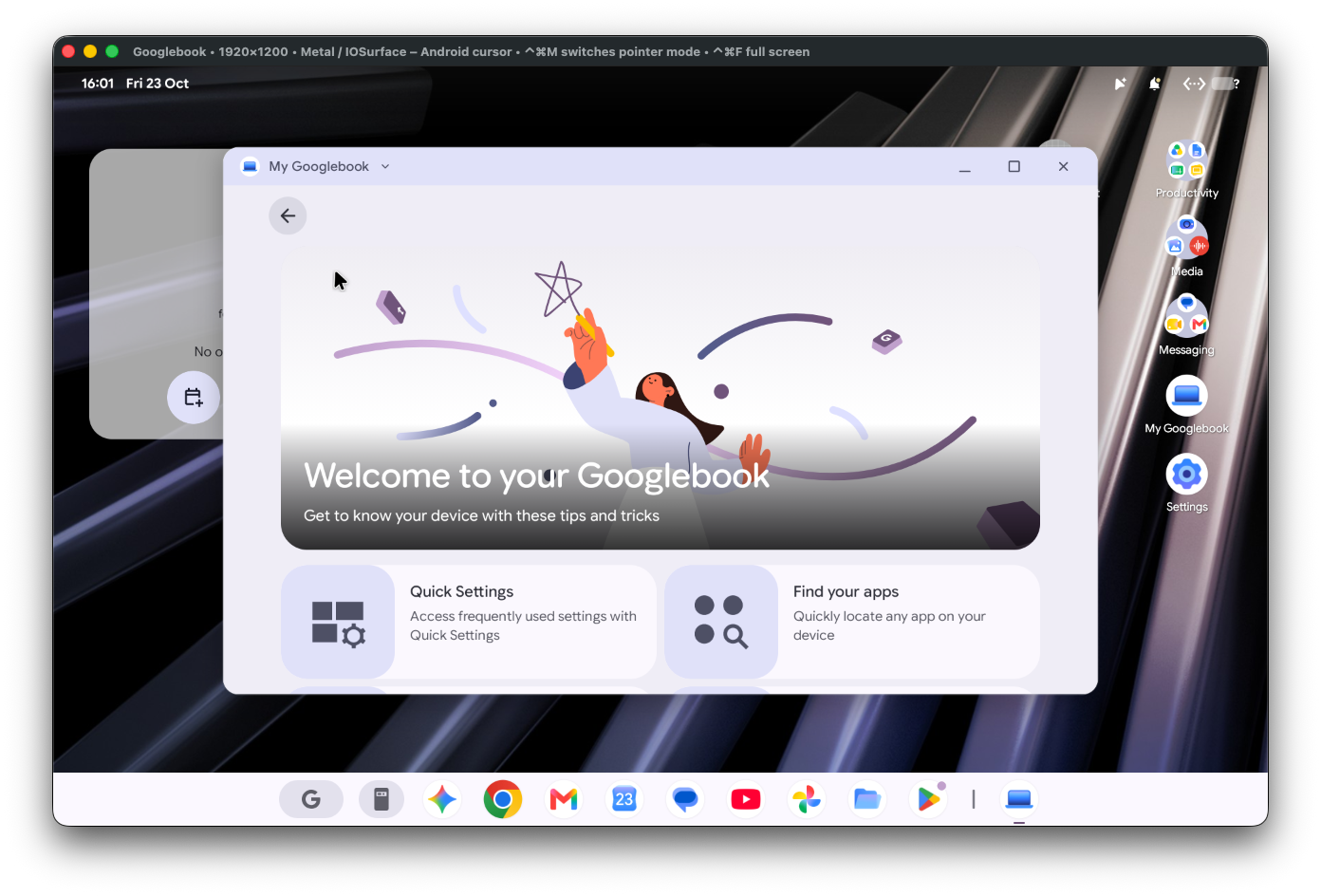
With that in place, within a few minutes I was sat at a working Googlebook desktop. The VM booted sweet as a nut!
Why the work profile wouldn't enrol
#Google have been immensely clear about enterprise management features being omitted for the next year, so trying to enrol was really not expected to work. What I found more interesting was why enrolment failed and how management had been removed from what is otherwise a standard android build on a new form factor.
During attempts, I was seeing entries in the bug report along the lines of:
DevicePolicyManager: Cannot check provisioning for action android.app.action.PROVISION_MANAGED_PROFILE because device does not have the android.software.device_admin feature.
With further digging, pm list features doesn't list android.software.device_admin or android.software.managed_users, so anything that wants to set an owner refuses because the device doesn't have the device admin feature.
But it was more than just a missing declaration, Google disables management in more than one place:
- The system declares both features unavailable in a permissions file, and the framework is compiled to report them missing regardless of what that file says.
- Even with the features present, Device Policy's own device-admin gate was folded to a hard
falseat build time, which short-circuits essentially every management operation - setting an admin, a profile owner, a device owner, the provisioning, all of it.
It was the 2nd gotcha above that caught me out, leading to more sleuthing through the build after I was sure I had it sorted.
What this sleuthing also discovered was much of the management components I look for in a build supporting Android Enterprise were absolutely present. They may not have been fully functional - and spoiler, they're not - but knowing the components existed gave me all I needed to see to move on to trying to enable them!
Enabling management
#The requirement was three changes, and a recompile back into the system image:
- Patch the framework so it reports the two features as present,
- Patch Device Policy's gate so it stops reading
falseby default, - and flip the permissions file to declare the features available.
None of it is overly complex given it's undoing three deliberate off switches normally on in standard Android builds (those I'm familiar with having built Android for hardware myself in the past). The tricky bit was getting the modified files back into a read-only system partition inside a logical-partition container without breaking everything around them, which took rather more scripting than the patches themselves. Thankfully my team of AI powered assistants know more about compiling than I do, so what would have taken me days of research was done in minutes with a nice how-to created after so I know for next time.
Going for gold
#With the flags on and verified through ADB, I ran a bog-standard work profile enrolment on an already set-up device through AMAPI.
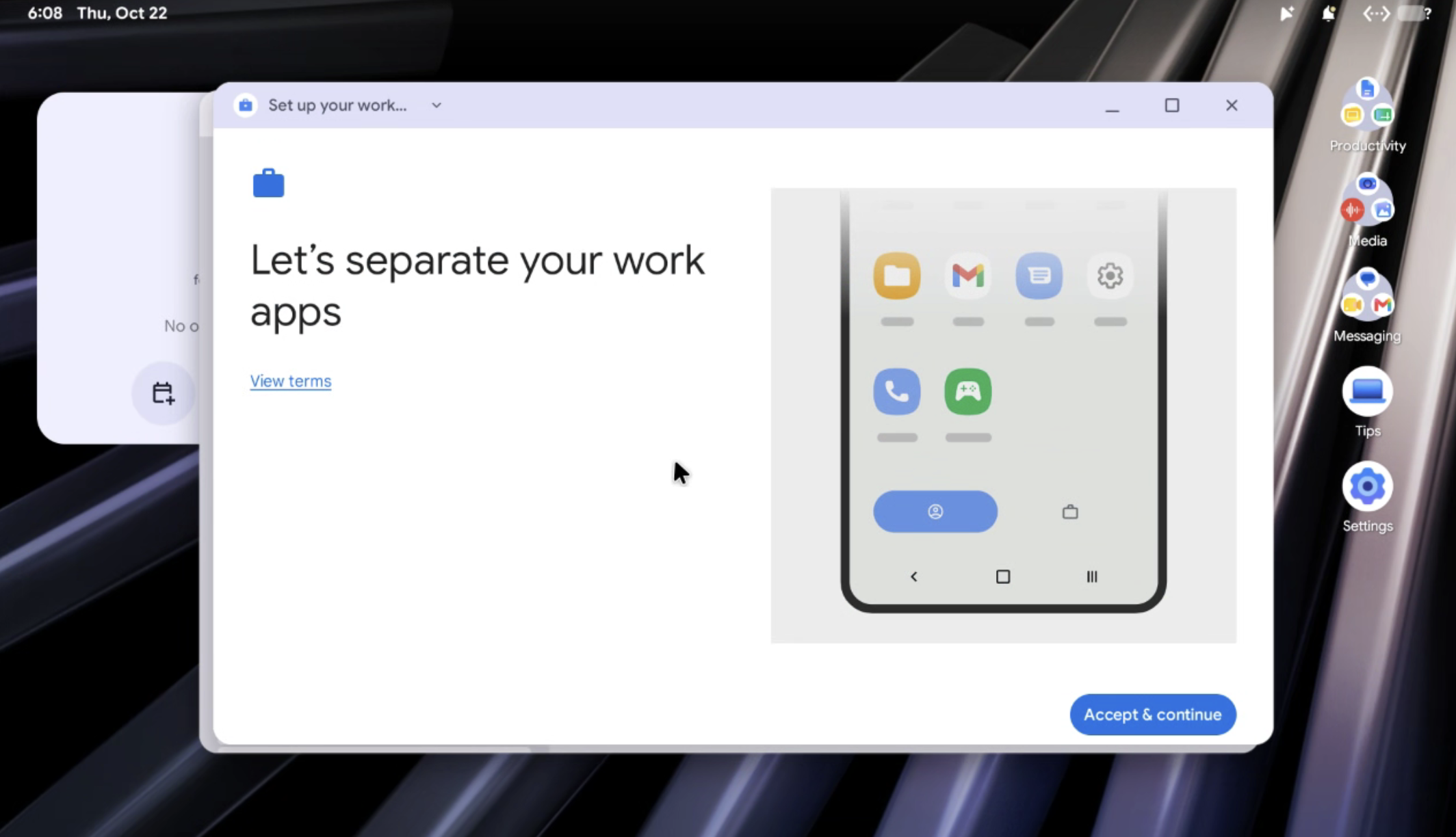
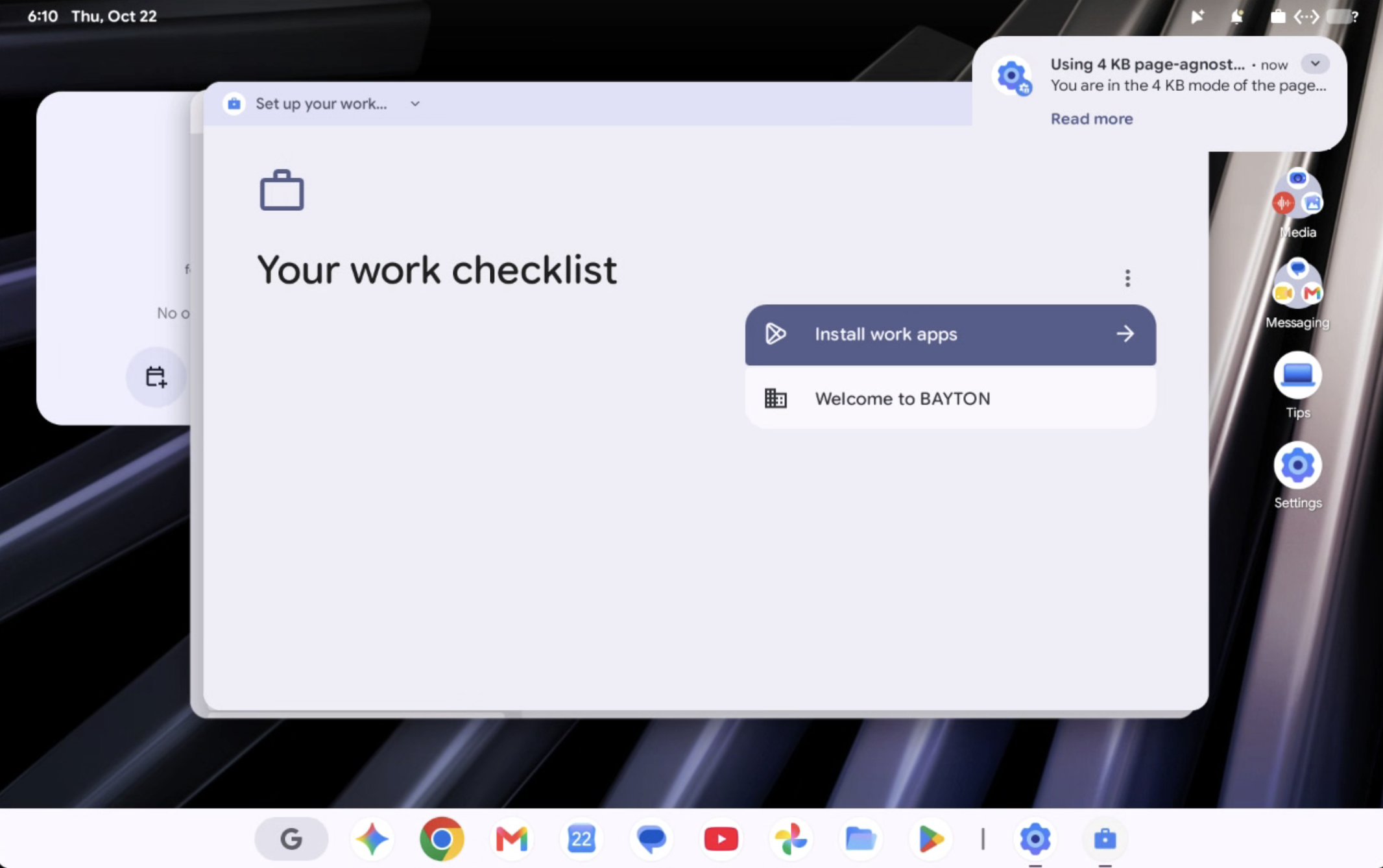
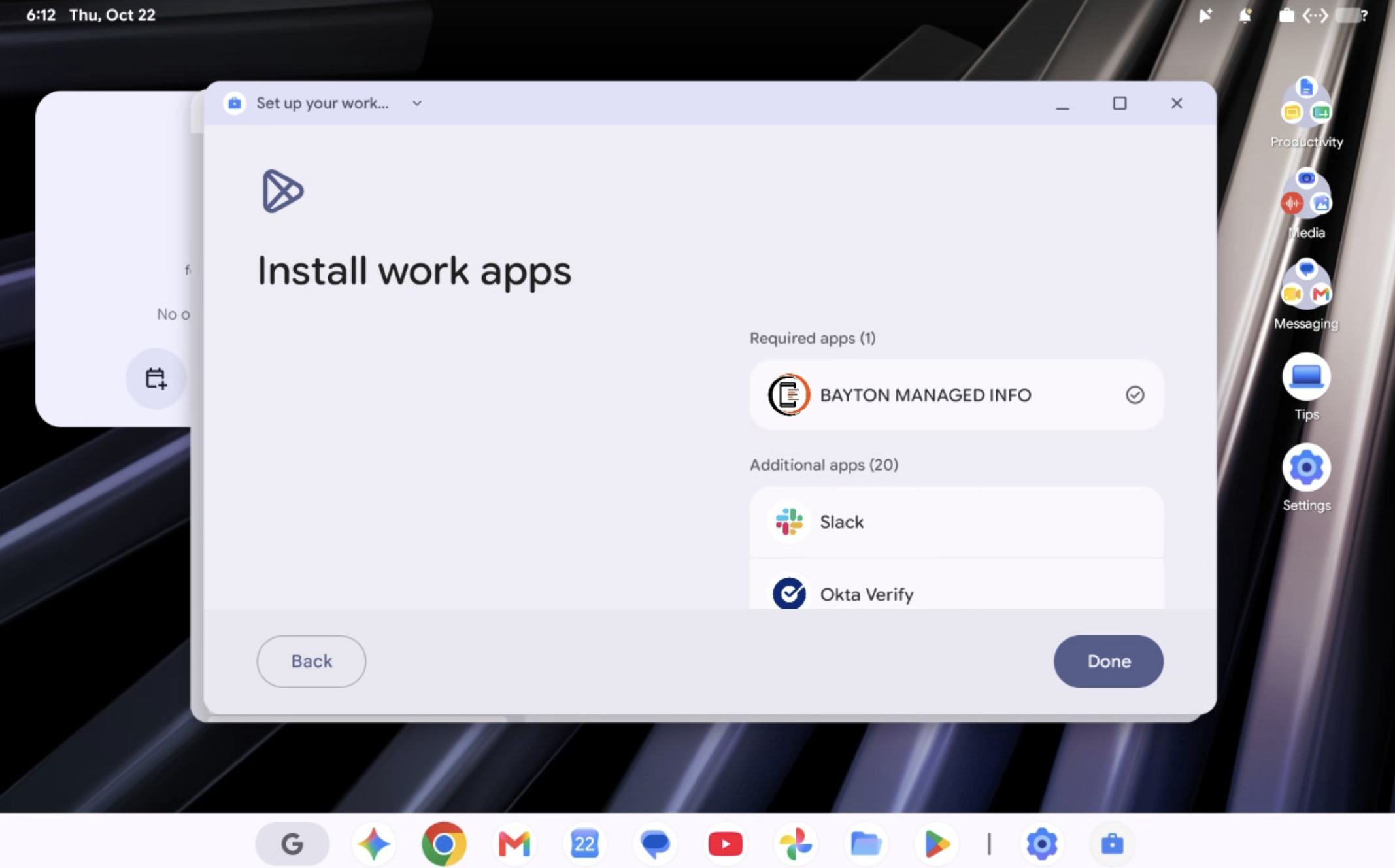
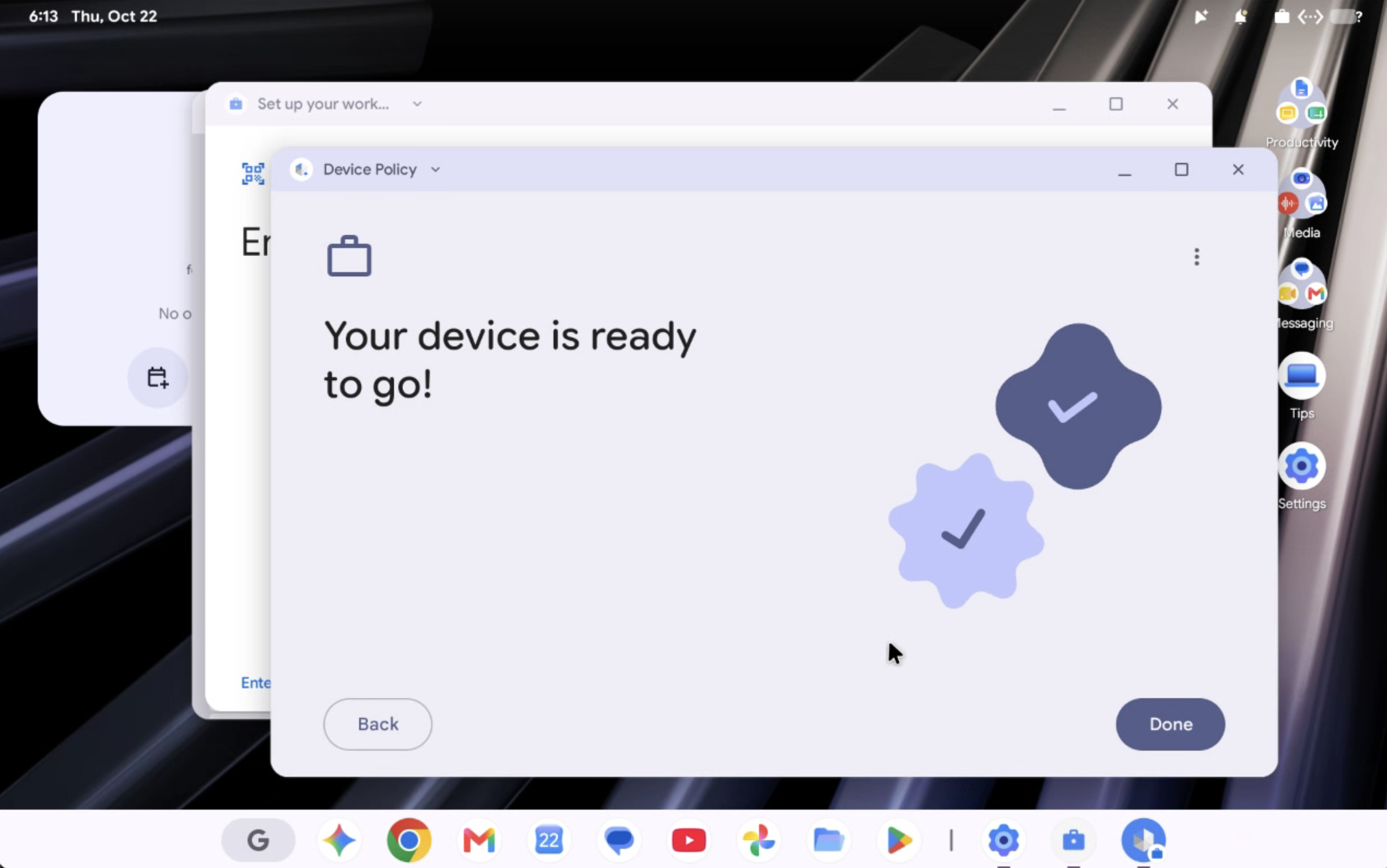
Given the VM doesn't expose a camera I ended up pasting the enrolment token itself rather than scanning a QR. Not long after, I saw it succeeded, with ADP showing profile owner of a work profile:
Profile Owner (User 11): com.google.android.apps.work.clouddpc/...CloudDeviceAdminReceiver
UserInfo{11:Work profile:1030} running   (parent User 10)
EnforcingAdmin { ...clouddpc..., mAuthorities=[enterprise], mUserId=11 }
And there we have it. A work profile, sat under the primary user (User 10, in this case, because Googlebook uses headless users similar to Android Automotive!), with Android Device Policy registered as its profile owner. Applications soon came down from managed Google Play, and the previously hidden/non-functional work profile references dotted around the UI now opened to offer access to settings and configuration.
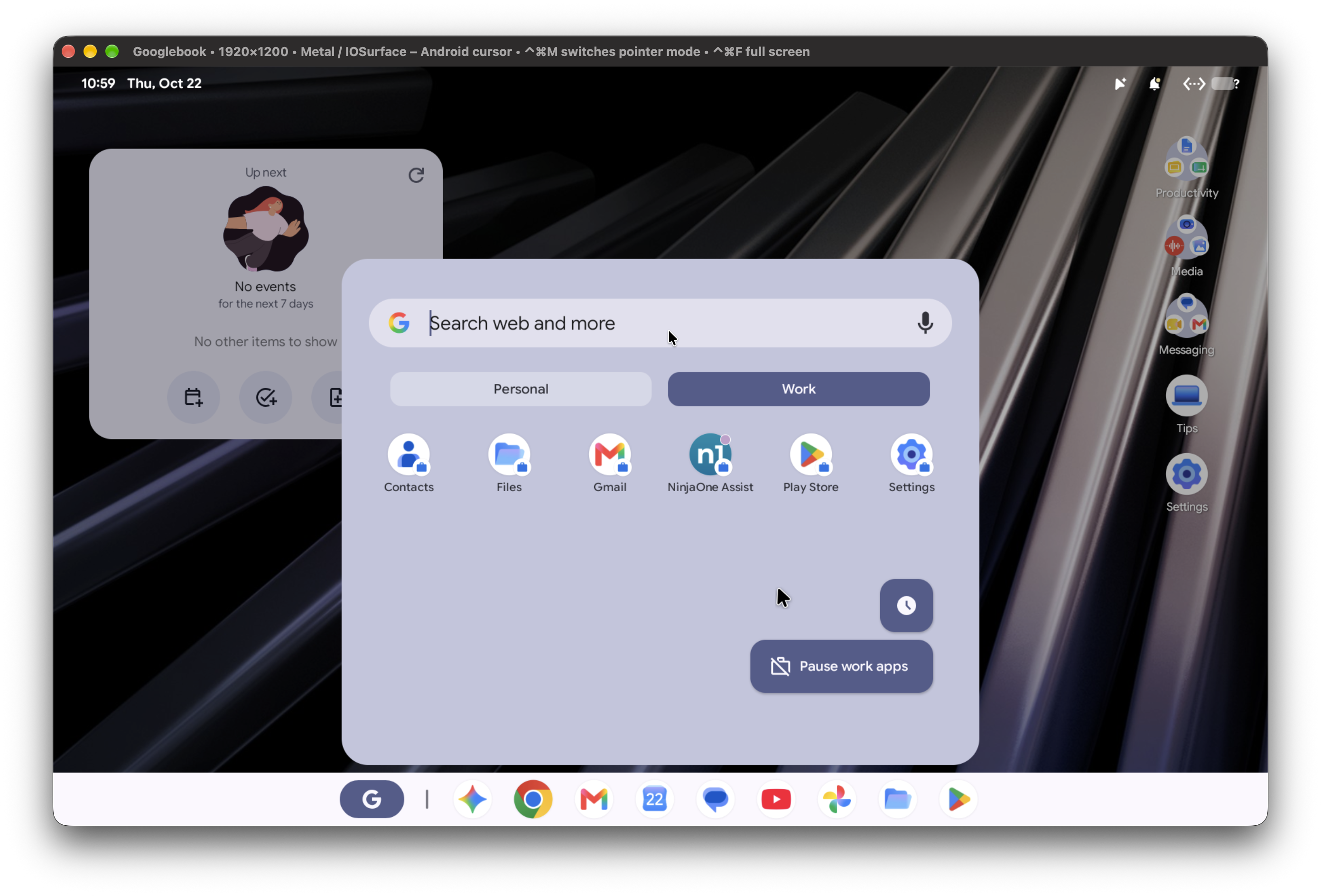
That's a managed work profile on a Googlebook, enrolled through the same process I'd point to for any other Android device.
:)
The caveats
#- Given the system has been modified and verified boot turned off, I wouldn't expect banking apps and other apps requiring device integrity to work. - Recompiling an already compiled build is also far less ideal than being able to build from source for stability and reliability.
- I didn't extensively test policy enforcement, and I'm not going to.
- As a proof of concept it does the job, and I'm happy with that. It isn't anything more.
What about fully managed enrolment?
#Yeah, no, that's not ready..
I did see some interesting screens though:

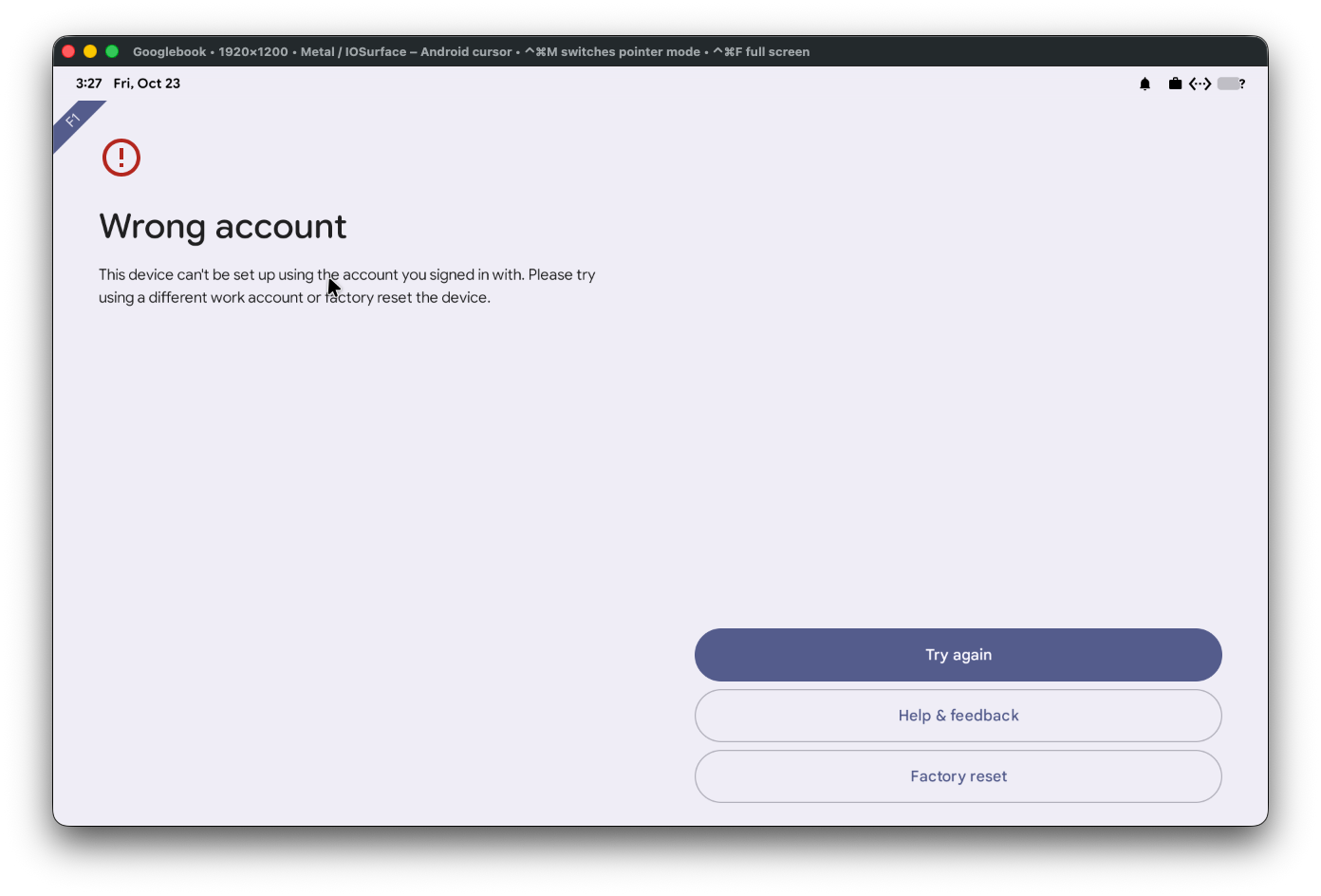
The Googlebook flow presently looks like it will offer a similar Chromebook-esque work/personal setup flow directly from the welcome screen. When tapping this it presently goes directly into work profile setup and blocks completing enrolment, which is presumably not right.. either way it fails on adding account.
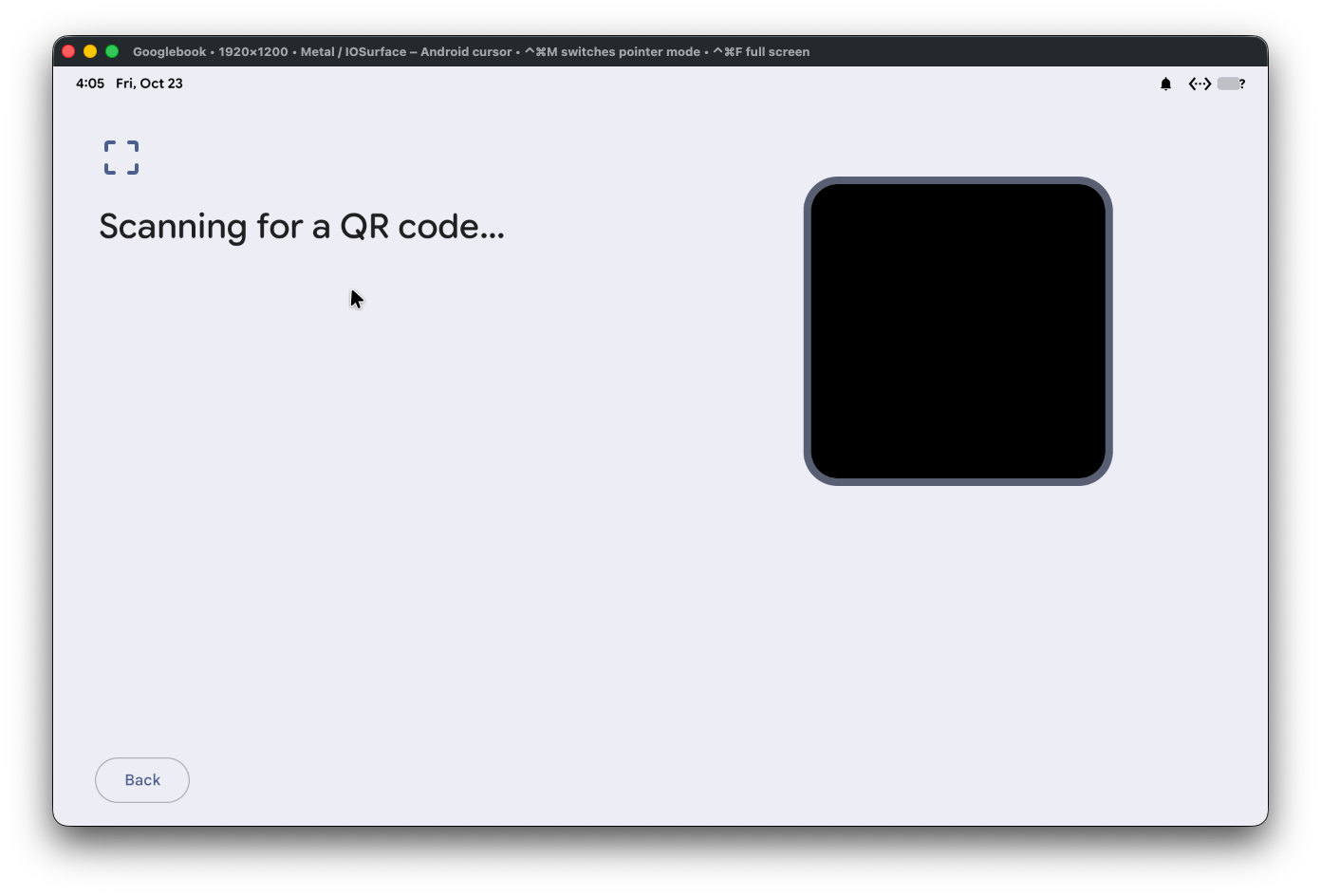
The 6-tap QR code provisioning flow is present, but without a camera in the VM it didn't let me progress.
I also tried the old trusty afw#setup which eventually also died:
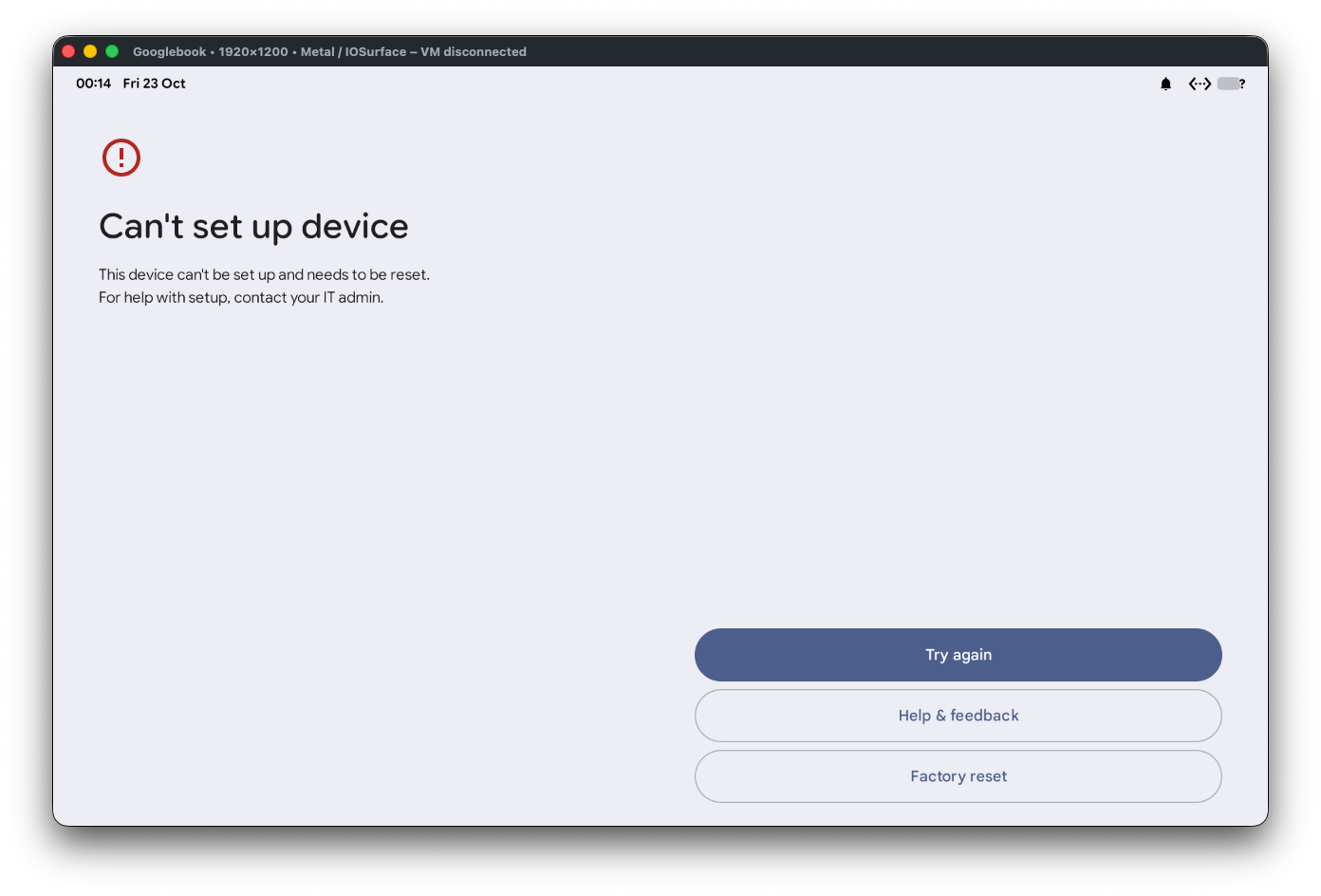
In all cases when provisioning for company-owned flows does eventually fail, the reset button crashes the GooglebookOS. So maybe someone should check on that, too..
I could test custom DPC, but given the provisioning flow is broken, it seems unnecessary today.
We can probably leave this bit disabled for a little longer.
So where do we stand?
#Back in the wishlist I argued a work profile is the one thing I want most from Googlebook in enterprise. There's no specific date for work profiles yet, yet for a consumer launch it's understandable the work profile would also be the most in-demand of the enterprise use cases for Googlebook, as has been echoed across the r/Googlebook subreddit amongst other places (it's not just me asking for it!)
Having now watched a Googlebook enrol a work profile through Android Device Policy, I'm fairly confident it's much closer than previously let on. The management stack is in the OS, it enrols, and although I'm sure there's still much to do, hopefully it's not enough to keep it delayed until late next year.
I've got a work-profile tracker going with guidance on submitting feedback if you'd like to nudge Google along. If you've been poking at the same images, or want to chat about this in general, get in touch.
Articles
2026
- Upcoming work profile support for Googlebook first look
- A week with Googlebook
- Googlebook in enterprise? Here's my wishlist
- Googlebooks meet enterprise, eventually
- Zero-touch initiation comes to the app generators
- I built an app for my son's music lessons, then reported its API out of existence
- What the last decade of Android Enterprise DPC migration could have been
- Introducing DeltaWatch: web change detection
- Android Enterprise lands on Android XR
- How MIKA works: building an AI assistant for bayton.org
- Bayton.org goes AI-first: meet MIKA
- TCL Note A1 NXTPAPER hands-on
- What's new in the 2026 Android Security Paper?
- MDM is dead. Long live ACE?
- Introducing AMAPI Commander: converse with your Android estate
- MANAGED INFO is going licence-free
2025
- Google Play Protect is now the custom DPC gatekeeper, and everyone is a threat by default
- 12 deliveries of AE-mas (What shipped in Android Enterprise in 2025)
- The 12 AE requests of Christmas (2025 Edition)
- RCS Archival and you: clearing up the misconceptions
- Device Trust from Android Enterprise: What it is and how it works (hands-on)
- Android developer verification: what this means for consumers and enterprise
- AMAPI finally supports direct APK installation, this is how it works
- The Android Management API doesn't support pulling managed properties (config) from app tracks. Here's how to work around it
- Hands-on with CVE-2025-22442, a work profile sideloading vulnerability affecting most Android devices today
- AAB support for private apps in the managed Google Play iFrame is coming, take a first look here
- What's new (so far) for enterprise in Android 16
2024
- Android 15: What's new for enterprise?
- How Goto's acquisition of Miradore is eroding a once-promising MDM solution
- Google Play Protect no longer sends sideloaded applications for scanning on enterprise-managed devices
- Mobile Pros is moving to Discord
- Avoid another CrowdStrike takedown: Two approaches to replacing Windows
- Introducing MANAGED SETTINGS
- I'm joining NinjaOne
- Samsung announces Knox SDK restrictions for Android 15
- What's new (so far) for enterprise in Android 15
- Google quietly introduces new quotas for unvalidated AMAPI use
- What is Play Auto Install (PAI) in Android and how does it work?
- AMAPI publicly adds support for DPC migration
- How do Android devices become certified?
2023
- Mute @channel & @here notifications in Slack
- A guide to raising better support requests
- Ask Jason: How should we manage security and/or OS updates for our devices?
- Pixel 8 series launches with 7 years of software support
- Android's work profile behaviour has been reverted in 14 beta 5.3
- Fairphone raises the bar with commitment to Android updates
- Product files: The DoorDash T8
- Android's work profile gets a major upgrade in 14
- Google's inactive account policy may not impact Android Enterprise customers
- Product files: Alternative form factors and power solutions
- What's new in Android 14 for enterprise
- Introducing Micro Mobility
- Android Enterprise: A refresher
2022
- What I'd like to see from Android Enterprise in 2023
- Thoughts on Android 12's password complexity changes
- Google Play target API requirements & impact on enterprise applications
- Sunsetting Discuss comment platform
- Google publishes differences between Android and Android Go
- Android Go & EMM support
- Relaunching bayton.org
- AER dropped the 3/5 year update mandate with Android 11, where are we now?
- I made a bet with Google (and lost)
2020
- Product files: Building Android devices
- Google announce big changes to zero-touch
- VMware announces end of support for Device Admin
- Google launch the Android Enterprise Help Community
- Watch: An Android Enterprise discussion with Hypergate
- Listen again: BM podcast #144 - Jason Bayton & Russ Mohr talk Android!
- Google's Android Management API will soon support COPE
- Android Enterprise in 11: Google reduces visibility and control with COPE to bolster privacy.
- The decade that redefined Android in the enterprise
2019
- Why Intune doesn't support Android Enterprise COPE
- VMware WS1 UEM 1908 supports Android Enterprise enrolments on closed networks and AOSP devices
- The Bayton 2019 Android Enterprise experience survey
- Android Enterprise Partner Summit 2019 highlights
- The Huawei ban and Enterprise: what now?
- Dabbling with Android Enterprise in Q beta 3
- Why I moved from Google WiFi to Netgear Orbi
- I'm joining Social Mobile as Director of Android Innovation
- Android Enterprise in Q/10: features and clarity on DA deprecation
- MWC 2019: Mid-range devices excel, 5G everything, form-factors galore and Android Enterprise
- UEM tools managing Android-powered cars
- Joining the Android Enterprise Experts community
- February was an interesting month for OEMConfig
- Google launch Android Enterprise Recommended for Managed Service Providers
- Migrating from Windows 10 Mobile? Here's why you should consider Android
- AER expands: Android Enterprise Recommended for EMMs
- What I'd like to see from Android Enterprise in 2019
2018
- My top Android apps in 2018
- Year in review: 2018
- MobileIron Cloud R58 supports Android Enterprise fully managed devices with work profiles
- Hands on with the Huawei Mate 20 Pro
- Workspace ONE UEM 1810 introduces support for Android Enterprise fully managed devices with work profiles
- G Suite no longer prevents Android data leakage by default
- Live: Huawei Mate series launch
- How to sideload the Digital Wellbeing beta on Pie
- How to manually update the Nokia 7 Plus to Android Pie
- Hands on with the BQ Aquaris X2 Pro
- Hands on with Sony OEMConfig
- The state of Android Enterprise in 2018
- BYOD & Privacy: Don’t settle for legacy Android management in 2018
- Connecting two Synologies via SSH using public and private key authentication
- How to update Rsync on Mac OS Mojave and High Sierra
- Intune gains support for Android Enterprise COSU deployments
- Android Enterprise Recommended: HMD Global launch the Nokia 3.1 and Nokia 5.1
- Android Enterprise Partner Summit 2018 highlights
- Live: MobileIron LIVE! 2018
- Android Enterprise first: AirWatch 9.4 lands with a new name and focus
- Live: Android Enterprise Partner Summit 2018
- Samsung, Oreo and an inconsistent Android Enterprise UX
- MobileIron launch Android Enterprise work profiles on fully managed devices
- Android P demonstrates Google's focus on the enterprise
- An introduction to managed Google Play
- MWC 2018: Android One, Oreo Go, Android Enterprise Recommended & Android Enterprise
- Enterprise ready: Google launch Android Enterprise Recommended
2017
- Year in review: 2017
- Google is deprecating device admin in favour of Android Enterprise
- Hands on with the Sony Xperia XZ1 Compact
- Moto C Plus giveaway
- The state of Android Enterprise in 2017
- Samsung launched a Note 8 for enterprise
- MobileIron officially supports Android Enterprise QR code provisioning
- Android zero-touch enrolment has landed
- MobileIron unofficially supports QR provisioning for Android Enterprise work-managed devices, this is how I found it
- Hands on with the Nokia 3
- Experimenting with clustering and data replication in Nextcloud with MariaDB Galera and SyncThing
- Introducing documentation on bayton.org
- Goodbye Alexa, Hey Google: Hands on with the Google Home
- Restricting access to Exchange ActiveSync
- What is Mobile Device Management?
- 8 tips for a successful EMM deployment
- Long-term update: the fitlet-RM, a fanless industrial mini PC by Compulab
- First look: the FreedomPop V7
- Vault7 and the CIA: This is why we need EMM
- What is Android Enterprise (Android for Work) and why is it used?
- Introducing night mode on bayton.org
- What is iOS Supervision and why is it used?
- Hands on with the Galaxy TabPro S
- Introducing Nextcloud demo servers
- Part 4 - Project Obsidian: Obsidian is dead, long live Obsidian
2016
- My top Android apps 2016
- Hands on with the Linx 12V64
- Wandera review 2016: 2 years on
- Deploying MobileIron 9.1+ on KVM
- Hands on with the Nextcloud Box
- How a promoted tweet landed me on Finnish national news
- Using RWG Mobile for simple, cross-device centralised voicemail
- Part 3 – Project Obsidian: A change, data migration day 1 and build day 2
- Hands on: fitlet-RM, a fanless industrial mini PC by Compulab
- Part 2 - Project Obsidian: Build day 1
- Part 1 - Project Obsidian: Objectives & parts list
- Part 0 - Project Obsidian: Low power NAS & container server
- 5 Android apps improving my Chromebook experience
- First look: Android apps on ChromeOS
- Competition: Win 3 months of free VPS/Container hosting - Closed!
- ElasticHosts review
- ElasticHosts: Cloud Storage vs Folders, what's the difference?
- Adding bash completion to LXD
- Android N: First look & hands-on
- Springs.io - Container hosting at container prices
- Apple vs the FBI: This is why we need MDM
- Miradore Online MDM: Expanding management with subscriptions
- Lenovo Yoga 300 (11IBY) hard drive upgrade
- I bought a Lenovo Yoga 300, this is why I'm sending it back
- Restricting access to Exchange ActiveSync
- Switching to HTTPS on WordPress
2015
2014
- Is CYOD the answer to the BYOD headache?
- BYOD Management: Yes, we can wipe your phone
- A fortnight with Android Wear: LG G Watch review
- First look: Miradore Online free MDM
- Hands on: A weekend with Google Glass
- A month with Wandera Mobile Gateway
- Final thoughts: Dell Venue Pro 11 (Atom)
- Thoughts on BYOD
- Will 2014 bring better battery life?
- My year in review: Bayton.org
- The best purchase I've ever made? A Moto G for my father
2013
2012
- My Top Android Apps 12/12
- The Nexus 7 saga: Resolved
- Recycling Caps Lock into something useful - Ubuntu (12.04)
- The Nexus 7 saga continues
- From Wows to Woes: Why I won't be recommending a Nexus7 any time soon.
- Nexus7: What you need to know
- Why I disabled dlvr.it links on Facebook
- HTC Sense: Changing the lockscreen icons from within ADW
2011
- Push your Google+ posts to Twitter and Facebook
- Using multiple accounts with Google.
- The "Wn-R48" (Windows on the Cr-48)
- Want a Google+ invite?
- Publishing to external sources from Google+
- Dell Streak review. The Phone/Tablet Hybrid
- BlueInput: The Bluetooth HID driver Google forgot to include
- Pushing Buzz to Twitter with dlvr.it
- Managing your social outreach with dlvr.it
- When Awe met Some. The Cr-48 and Gnome3.
- Living with Google's Cr-48 and the cloud.
- Downtime 23-25/04/2011
- Are you practising "safe surfing"?
- The Virtualbox bug: "Cannot access the kernel driver" in Windows
- Putting tech into perspective
2010
- Have a Google Buzz Christmas
- Root a G1 running Android 1.6 without recovery!
- Windows 7 display issues on old Dell desktops
- Google added the Apps flexibility we've been waiting for!
- Part I: My 3 step program for moving to Google Apps
- Downloading torrents
- Completing the Buzz experience for Google Maps Mobile
- Quicktip: Trial Google Apps
- Quicktip: Save internet images fast
- Turn your desktop 3D!
- Part III - Device not compatible - Skype on 3
- Swype not compatible? ShapeWriter!
- Don't wait, get Swype now!
- HideIP VPN. Finally!
- Google enables Wave for Apps domains
- Aspire One touch screen
- Streamline XP into Ubuntu
- Edit a PDF with Zamzar
- Google offering Gmail addresses in the UK
- Google Wave: Revolutionising blogs!
- Hexxeh's Google Chrome OS builds
- Update: Buzz on Windows Mobile
- Alternatives to Internet Explorer
- Wordress 3.0 is coming!
- Skype for WM alternatives
- Browsing on a (data) budget? Opera!
- Buzz on unsupported mobiles
- Buzz on your desktop
- What's all the Buzz?
- Part II: Device not compatible - Skype on 3
- Part I - Device not compatible - Skype on 3
- Dreamscene on Windows 7
- Free Skype with 3? There's a catch..